


A+ PBQs Are Catching Students Off Guard: How to Prepare for the 220-1201 and 220-1202 Exams
CompTIA A+ is often one of the first certifications people pursue when starting an IT career. It is widely recognized, beginner-friendly compared to more advanced certifications, and directly connected to help desk, technical support, desktop support, and entry-level IT roles.
But many students are discovering something important as they prepare for the current A+ exams: knowing the definitions is not always enough.
The CompTIA A+ 220-1201 and 220-1202 exams can include performance-based questions, often called PBQs. These questions can feel very different from standard multiple-choice questions because they ask students to apply knowledge in a practical scenario. Instead of simply choosing the correct answer from a list, students may need to troubleshoot, configure, organize, match, identify, or solve a technical problem in a simulated environment.
That is why PBQs can catch students off guard. A student may watch videos, take notes, memorize terms, and score well on multiple-choice practice exams, but still feel uncomfortable when faced with a question that asks them to actually apply what they learned.
This does not mean the exam is unfair. It means the exam is testing what entry-level IT work often requires: practical thinking.
For students preparing for A+, understanding PBQs early can make a major difference.
What Are Performance-Based Questions on the A+ Exam?
Performance-based questions are exam questions designed to test applied skills. In simple terms, they ask whether a student can use what they know, not just remember what they studied.
A standard multiple-choice question may ask which tool, port, command, setting, or device is correct. A PBQ may ask the student to apply that knowledge in a scenario. The exam may present a troubleshooting situation, a drag-and-drop activity, a configuration task, a matching exercise, or a simulated support problem.
That is why PBQs can feel more intimidating. They require students to slow down, read carefully, and think through the problem. The answer is not always obvious right away, and students may need to connect several concepts together.
For example, a student may need to understand hardware troubleshooting, networking basics, Windows tools, security settings, mobile devices, printers, malware response, or operational procedures. PBQs are not just about knowing one term. They often require students to understand how several pieces fit together.
This is why hands-on preparation matters.
Why A+ Students Feel Unprepared for PBQs
Many students prepare for A+ using videos, flashcards, notes, and practice exams. These resources can be helpful, but they are not always enough by themselves.
The issue is that many study methods are passive. Watching a video can help students understand a topic, but it does not always prove that they can apply it. Flashcards can help with memorization, but they do not always build troubleshooting judgment. Multiple-choice practice exams can show whether students recognize correct answers, but PBQs may require a different level of thinking.
This is where some students get surprised.
They may know what a command does, but not when to use it. They may know what a printer component is, but not how to troubleshoot a printer issue. They may know what malware is, but not the correct order of response steps. They may know what a network device does, but not how to interpret a practical connectivity problem.
A+ PBQs can expose the gap between recognition and application.
That gap is not a failure. It is a sign that the student needs to add more hands-on practice to their study plan.
The Current A+ Exams: 220-1201 and 220-1202
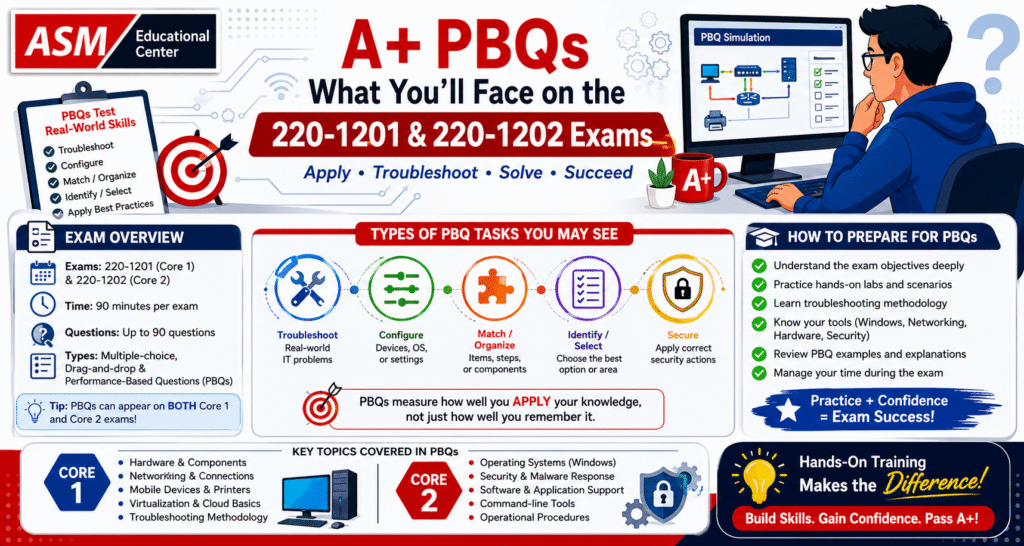
The current CompTIA A+ certification requires students to pass two exams: Core 1 and Core 2.
Core 1 is exam 220-1201. Core 2 is exam 220-1202. Students must pass both exams from the same exam version to earn the certification.
Core 1 focuses more on areas such as mobile devices, networking, hardware, virtualization and cloud computing, and hardware and network troubleshooting. Core 2 focuses more on operating systems, security, software troubleshooting, and operational procedures.
This matters because PBQs can appear across both exams. A student should not assume that PBQs only belong to one side of A+. Both Core 1 and Core 2 can test practical skills.
The best preparation plan should account for both.
What A+ Core 1 PBQs May Test
A+ Core 1 PBQs may require students to think through hardware, networking, devices, and troubleshooting scenarios.
A student preparing for Core 1 should be comfortable with hardware components, cables, connectors, mobile device features, basic networking concepts, printers, storage, cloud and virtualization basics, and troubleshooting methodology.
The key is not only knowing what each item is. Students should understand how those concepts appear in real support situations.
For example, if a user cannot connect to the network, the issue could involve Wi-Fi settings, IP configuration, cabling, a switch port, DNS, DHCP, or a simple physical connection problem. A multiple-choice question may ask about one of those terms. A PBQ may require the student to identify what belongs where or decide what should be checked first.
That is why troubleshooting methodology is so important. A+ students should practice reading the scenario, identifying the symptoms, narrowing down likely causes, and choosing the most practical next step.
Core 1 is not just about parts and devices. It is about understanding how those parts and devices support real users.
What A+ Core 2 PBQs May Test
A+ Core 2 PBQs may feel different because Core 2 focuses more on software, operating systems, security, and procedures.
Students preparing for Core 2 should be comfortable with Windows tools, operating system installation and configuration, command-line utilities, malware response, security settings, user support, documentation, change management, and basic operational procedures.
Core 2 PBQs may require students to think like a support technician. What should be checked first? What setting needs to change? What is the safest response to a malware issue? What tool should be used for a particular operating system problem? What procedure should be followed when handling a user issue?
This is where memorization alone can become weak. If a student only memorizes tool names but does not understand what the tools do, the PBQ can feel confusing.
For Core 2, students should spend time understanding the purpose behind the tools and procedures. They should know not only what something is called, but why it matters in a support environment.
Why Practice Exams Alone May Not Be Enough
Practice exams are useful, but they should not be the only way students prepare.
A practice exam can help students identify weak areas, build test-taking stamina, and get used to exam wording. However, many practice exams are mostly multiple-choice. That can create a false sense of readiness if the student does not also practice applied scenarios.
A student may score well on practice questions because they recognize familiar wording. But in a PBQ, the exam may present the same concept in a different format. Instead of asking, “What does this command do?” the exam may ask the student to use the right concept in a situation.
This is why students should study in multiple ways.
They should review the official exam objectives. They should use practice questions. They should work through labs. They should practice troubleshooting steps. They should get comfortable with hardware, settings, commands, networking concepts, and security basics. They should also learn how to slow down during a PBQ instead of panicking.
A+ preparation should build both knowledge and confidence.
How to Approach PBQs on Exam Day
PBQs can feel stressful because they often appear near the beginning of the exam. Some students see a PBQ right away and feel their confidence drop.
The best approach is to stay calm and manage time carefully.
First, read the instructions slowly. PBQs often contain details that tell you exactly what the task is asking. Do not rush through the prompt.
Second, identify what concept is being tested. Is this a hardware issue? A network setup? A printer problem? A security response? A Windows tool question? A support procedure?
Third, complete the parts you know first. If the PBQ has several pieces, do not get stuck on one confusing section. Solve what you can and come back if needed.
Fourth, use the exam’s flagging feature if necessary. Some students prefer to skip PBQs at first, answer multiple-choice questions, and return to PBQs later. Other students prefer to handle PBQs immediately. The right method depends on the student, but time management is important either way.
Fifth, do not overthink every detail. PBQs test practical reasoning. Focus on the scenario, the objective, and the most direct solution.
The goal is not to be perfect. The goal is to stay organized and think clearly.
Why Hands-On Training Makes A+ PBQs Less Intimidating
Hands-on training helps because it teaches students how concepts work in practice.
When students physically work through hardware, operating system settings, network configurations, troubleshooting examples, and support scenarios, the exam becomes less abstract. A student who has practiced troubleshooting a connectivity issue is more likely to understand what a network PBQ is asking. A student who has worked with Windows tools is more likely to recognize which tool fits a Core 2 scenario. A student who has practiced security response steps is less likely to panic when a question asks about malware or access control.
Hands-on practice builds technical confidence.
This is especially important for beginners. Many A+ students are new to IT. They may understand the study material in theory but still feel unsure when asked to apply it. Guided training can help bridge that gap.
In a live class, students can ask questions, see demonstrations, make mistakes safely, and get explanations when something does not make sense. That support can be difficult to replace with self-study alone.
How ASM Educational Center Helps A+ Students Prepare
At ASM Educational Center, A+ training is designed to help students build the foundation needed for entry-level IT support and certification preparation.
The goal is not only to help students memorize exam facts. A strong A+ course should help students understand the skills behind the exam, including hardware, networking, troubleshooting, operating systems, security basics, and practical support scenarios.
For students who feel overwhelmed by PBQs, instructor-led training can make the exam feel more manageable. Instead of guessing through topics alone, students can learn in a structured environment, ask questions, and connect exam objectives to real IT situations.
This matters because A+ is not only a certification. It is a foundation for help desk, technical support, desktop support, and future IT training. The better students understand the hands-on side, the more prepared they can be for both the exam and the workplace.
A+ PBQs Are Challenging, But They Are Also Valuable
It is easy to see PBQs as a frustrating part of the exam, but they serve an important purpose.
IT work is practical. A help desk technician does not only define a problem. They troubleshoot it. A support technician does not only recognize a cable type. They may need to connect, replace, or verify it. A technician does not only know what malware is. They may need to respond correctly when a user’s device shows signs of infection.
PBQs push students closer to the type of thinking used in real entry-level IT work.
That is why students should not avoid them. They should prepare for them.
A student who becomes comfortable with PBQs is not only improving exam readiness. They are building the mindset needed for real support work.
Final Thoughts
CompTIA A+ 220-1201 and 220-1202 are not only memory tests. They can include performance-based questions that ask students to apply what they know in practical scenarios.
That is why some students feel caught off guard. They may study hard, watch videos, and take practice exams, but still feel unprepared if they have not practiced hands-on troubleshooting and scenario-based thinking.
The solution is not to panic. The solution is to prepare the right way.
Students should study the exam objectives, review key concepts, practice multiple-choice questions, work through hands-on labs, and build confidence with the kinds of practical thinking the exam expects.
A+ PBQs may feel intimidating at first, but they are manageable with the right preparation. For beginners who want to build a serious foundation in IT, learning how to apply knowledge is just as important as learning the terms.
That is what makes A+ valuable.
FAQ
PBQs are performance-based questions that test whether students can apply technical knowledge in a practical scenario.
Yes, CompTIA says A+ exams can include multiple-choice, drag-and-drop, and performance-based questions.
Yes, Core 2 can also include performance-based questions, along with multiple-choice and drag-and-drop formats.
Many students rely heavily on videos and multiple-choice practice exams, but PBQs require applied troubleshooting and scenario-based thinking.
Students should practice hands-on labs, review troubleshooting steps, understand Windows tools, work with hardware and networking concepts, and avoid relying only on memorization.
It depends on the student’s background. Core 1 focuses more on hardware, networking, mobile devices, and troubleshooting, while Core 2 focuses more on operating systems, security, software troubleshooting, and operational procedures. CompTIA requires both exams from the same version for certification.
If you would like to explore this topic further, you can read more of our cloud and certification blogs or visit www.asmed.com for additional resources. If you are currently unemployed and live in the Washington, D.C. area, you may qualify for grant-funded IT training. Eligibility details are available at www.asmed.com/wd.
Cloud careers are built step by step. With the right foundation and steady growth, AWS certifications remain a practical and reliable place to begin.
