


Why Early IT Education Matters: Helping Kids and Teens Build Tech Skills Before College
Children are growing up surrounded by technology. They use tablets, phones, games, apps, search engines, streaming platforms, school portals, and now AI tools at younger ages than ever before. But there is a major difference between using technology and understanding how technology works.
That difference matters.
A child can swipe through an app without knowing anything about logic, sequencing, automation, design, safety, networks, or problem-solving. A teenager can use the internet every day without understanding how devices connect, how data moves, why cybersecurity matters, or what cloud computing actually does behind the scenes. This is why early IT education has become more important. It gives students a chance to move from passive technology use to active technology understanding.
Early IT education is not about forcing a six-year-old to choose a career. It is not about pressuring every student to become a programmer, cybersecurity analyst, cloud engineer, or network administrator. The better goal is exposure. Students benefit when they are introduced to technology in a structured, age-appropriate, hands-on environment where they can ask questions, build projects, make mistakes, solve problems, and discover what interests them.
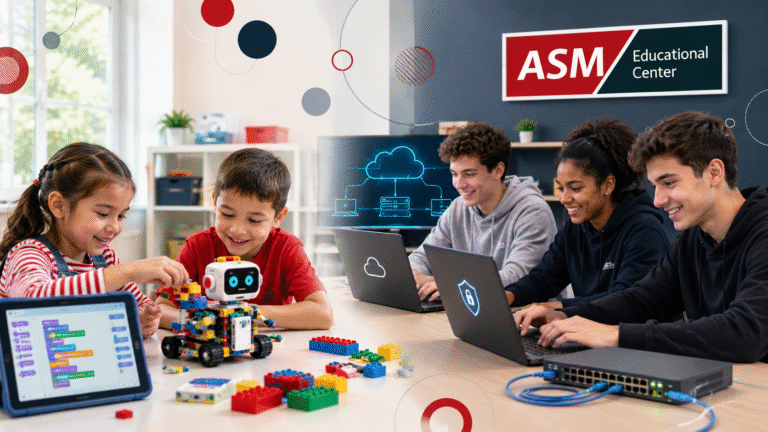
For younger children, that may look like creating a simple animation in Scratch, building a LEGO robot, learning how a sensor works, or using simple logic to make something move. For teenagers, it may look like building a small network, learning how cybersecurity threats happen, exploring AWS cloud services, or understanding the career pathways connected to IT.
The earlier students are exposed to these ideas, the more comfortable they can become with technology as something they can understand, shape, and build with.
Students Need More Than Screen Time
Many parents already know their children are comfortable with devices. But comfort with screens is not the same as digital literacy.
A student may know how to play a game, but not how games are designed. They may know how to open a website, but not how the internet connects devices together. They may know how to use Wi-Fi, but not what a router does. They may know how to download an app, but not how permissions, accounts, passwords, and privacy affect their safety online.
That is where structured IT education becomes useful.
Good technology education gives students a foundation. It helps them understand that computers follow instructions, networks connect systems, cybersecurity protects people and data, and cloud platforms support many of the tools they use every day. It also teaches a deeper lesson: technology is not magic. It is built by people, maintained by people, secured by people, and improved by people.
That message can be powerful for students. When they realize technology is something they can understand, they often become more confident. They stop seeing computers as confusing machines and start seeing them as tools they can learn to control.
Why Starting Early Can Help Students Build Confidence
One of the strongest reasons to introduce IT early is confidence. Many students assume technology is too hard before they ever try it. They hear words like coding, networking, cybersecurity, cloud computing, artificial intelligence, or robotics and think those subjects are only for advanced students.
But when technology is introduced the right way, that fear can start to disappear.
Young students do not need to begin with complex programming languages. They can begin with visual tools like Scratch, where coding blocks help them understand sequencing, movement, sound, timing, and interaction. Instead of staring at lines of code, they can create a character, animate a story, design a simple game, and see the result immediately. That kind of learning is concrete. It connects logic with creativity.
Robotics can make the same lesson physical. When a student builds a LEGO robot and programs it to move, stop, turn, or react to a sensor, the lesson becomes visible. They can see that instructions produce actions. They can test what works, fix what does not, and try again. That process teaches problem-solving in a way that feels natural.
For teenagers, confidence grows through practical exposure. A high school student may not know whether they are interested in IT until they actually touch the material. A one-week camp that introduces networking, cybersecurity, cloud computing, and basic career pathways can help students see the field more clearly. They may discover that they enjoy troubleshooting. They may find cybersecurity interesting. They may realize cloud computing makes more sense than they expected. They may also discover that IT is not for them, and that is still useful information.
The point is not to force a decision. The point is to give students enough exposure to make better decisions later.
The Future Is Digital, Even for Students Who Do Not Become IT Professionals
One common misunderstanding is that technology education only matters for students who want technology careers. That is no longer true.
Students who become nurses, business owners, teachers, designers, engineers, marketers, mechanics, accountants, military service members, or government employees will still work with technology. Many jobs now require digital tools, online systems, databases, cloud platforms, cybersecurity awareness, or basic technical troubleshooting. Even when students do not choose IT as a career, technology literacy can still help them.
Computer and IT occupations are also projected to remain a strong part of the U.S. labor market. The U.S. Bureau of Labor Statistics projects computer and information technology occupations to grow much faster than the average for all occupations from 2024 to 2034. BLS also reported a median annual wage of $105,990 for computer and IT occupations in May 2024, far above the median annual wage for all occupations. That does not mean every student should chase a salary number, but it does show that technology skills are connected to a major part of the modern workforce.
There is also a broader education gap. National computer science access has improved, but participation is still limited. Code.org’s 2025 State of AI and Computer Science Education work continues to track computer science and AI education access across the country, and education reporting on the 2024–25 school year found that 60% of U.S. public high schools offered foundational computer science while only 6.1% of eligible students were enrolled. That means many students still move through school without meaningful computer science exposure.
This is one reason summer technology programs can matter. They can give students an additional opportunity to explore IT outside the regular school schedule. For some students, a summer camp may be their first structured experience with coding, robotics, networking, cybersecurity, or cloud computing.
For Ages 6–7: Learning Logic Through Scratch and LEGO Robotics
For younger students, the best technology education should feel creative, hands-on, and age-appropriate. A six- or seven-year-old does not need a lecture on advanced programming. They need activities that help them connect basic logic with something they can see, move, build, and explain.
That is why Scratch and LEGO robotics are useful starting points.
Scratch helps young students learn coding concepts visually. They can move characters, add sounds, create animations, build simple stories, design mini-games, and experiment with cause and effect. Through these activities, students begin to understand sequencing, timing, instructions, events, and simple logic.
A Scratch project may look simple to an adult, but for a young learner it can teach important thinking patterns. When a student creates an animated story, they have to think about order. What happens first? What happens next? When should a character move? When should a sound play? When should the background change? Those are early forms of computational thinking.
LEGO robotics adds another layer. Students are not only looking at a screen. They are building something physical and then programming it to respond. Motors, sensors, movement, loops, and conditions become easier to understand when students can see the result in front of them.
This kind of learning also teaches patience. Projects do not always work on the first try. A robot may not move the way the student expected. A game may not keep score correctly. A button may not respond. Instead of seeing mistakes as failure, students learn that testing and fixing are part of the process.
That mindset is valuable far beyond technology. It teaches students to try, observe, adjust, and try again.
For Ages 15–18: Turning Curiosity Into Career Awareness
Teenagers need a different kind of introduction. By ages 15–18, students are closer to decisions about college, certifications, military pathways, internships, part-time work, or career training. They may have heard about cybersecurity, cloud computing, networking, AI, and IT jobs, but they may not know what those fields actually involve.A teen IT camp can help bridge that gap.
Networking gives students a foundation for understanding how devices communicate. Concepts like LANs, WANs, IP addressing, DNS, switches, routers, and wireless networks help students understand the systems they use every day. This matters because networking is one of the foundations of IT. Before a student can understand cybersecurity or cloud architecture deeply, they benefit from understanding how systems connect.
Cybersecurity introduces students to the importance of protecting people, devices, accounts, and data. Topics like malware, phishing, ransomware, wireless security, and basic security practices help teens understand real-world risks. This is especially important because teenagers are already online. They use email, social media, school platforms, gaming accounts, mobile apps, and cloud storage. Cybersecurity education helps them become safer users and more informed future professionals.
Cloud computing gives students a look at where modern IT is headed. Services like Amazon AWS are used by businesses, schools, organizations, and developers around the world. When students are introduced to cloud concepts like storage, permissions, web servers, and identity management, they begin to understand that modern technology is not limited to one computer in one room. It often runs across distributed systems, cloud services, and managed platforms.
A strong teen IT camp should not just talk about these concepts. It should let students practice them. Building a simple LAN, assigning IP addresses, securing a wireless network, creating an S3 bucket, exploring IAM permissions, and presenting a final project can help students connect theory with action.
That kind of exposure can make future certification paths less intimidating. A student who later studies CompTIA A+, Network+, Security+, or AWS may already have a mental framework for what those topics mean.
Why Hands-On Learning Makes the Difference
Technology is difficult to learn through passive listening alone. Students need to do something with the information.
Hands-on labs help students turn abstract ideas into real understanding. A younger child may understand loops better after programming a LEGO build to repeat an action. A teenager may understand networking better after assigning IP addresses and seeing devices communicate. A student may understand cloud storage better after creating a bucket and uploading a file. A cybersecurity lesson becomes more meaningful when students can connect threats to real accounts, networks, passwords, and wireless systems.
Hands-on learning also encourages teamwork and communication. When students build projects together, they have to explain their ideas, divide tasks, solve problems, and present their work. These are not only technical skills. They are professional skills.
This is especially important in IT because real technology work is rarely done alone. IT professionals explain problems, document solutions, troubleshoot with others, support users, secure systems, and communicate risk. Even at the beginner level, students benefit from learning that technology is not only about computers. It is also about thinking clearly and communicating well.
Early IT Education Should Be Encouraging, Not Overwhelming
Parents may wonder when the “right age” is to begin. The better question is not, “When should my child become serious about IT?” The better question is, “When can my child be introduced to technology in a healthy and age-appropriate way?”
For young children, that means playful exploration. They should be allowed to create, build, experiment, and present without pressure. A Scratch animation, a simple game, or a LEGO robot may seem small, but those projects can build confidence and curiosity.
For teenagers, the focus can become more practical. They can begin exploring real IT areas, including networking, cybersecurity, cloud computing, troubleshooting, and career pathways. They do not need to master everything in one week. They need enough exposure to understand what each area feels like and whether they want to continue.
This kind of early introduction can help students avoid feeling lost later. A student who has already seen basic networking may feel less overwhelmed when taking a certification course. A student who has already heard about phishing and wireless security may take cybersecurity more seriously. A student who has already explored AWS may better understand why cloud skills matter.
The goal is not perfection. The goal is readiness.
How ASM’s Summer IT Camps Help Students Start
ASM Educational Center offers summer technology camps designed to introduce students to IT in a structured and hands-on way.
For ages 6–7, ASM’s Scratch/LEGO camp introduces young learners to coding and robotics through Scratch programming and LEGO Spike Essentials. Students explore animations, storytelling, simple games, LEGO builds, sensors, motors, loops, conditions, and final project presentations. The goal is to help young learners build creativity, logic, confidence, and early problem-solving skills through activities that match their age and learning style.
For ages 15–18, ASM’s Teen IT Camp introduces high school students to networking, cybersecurity, and AWS cloud. Students explore topics such as computer networks, the OSI model, IP addressing, DNS, LANs, WANs, switching, routing, wireless security, cyber threats, AWS services, S3, IAM, and basic cloud projects. The week ends with a final project that brings the major concepts together.
Both camps are designed around the same larger idea: students learn best when they can build, test, ask questions, and apply what they are learning.
For parents, this provides a practical way to give children and teens early exposure to technology without overwhelming them. For students, it creates a chance to discover that IT is not only something adults do in offices. It is something they can begin to understand now.
Final Thoughts: Start With Exposure, Not Pressure
Technology will continue to shape education, careers, communication, business, security, and daily life. Students do not need to have their entire future planned early, but they do benefit from learning how technology works.
Early IT education gives students more than technical vocabulary. It helps them build confidence, curiosity, patience, problem-solving skills, and digital awareness. For young children, that may begin with Scratch and LEGO robotics. For teens, it may begin with networking, cybersecurity, and cloud computing.
The best reason to start early is not to rush students into a career. It is to give them room to explore before major decisions arrive. A student who understands technology earlier has more time to ask questions, develop confidence, and discover whether IT is something they want to pursue.
In a world where technology is everywhere, early exposure can make a real difference. Students should not only grow up using technology. They should have the chance to understand it, build with it, and see what they are capable of creating.
Early IT education introduces students to basic technology concepts such as coding, robotics, networking, cybersecurity, cloud computing, and digital problem-solving. The goal is not to make students experts right away. The goal is to help them understand how technology works in an age-appropriate way.
No. At ages 6–7, students can begin with visual, hands-on tools like Scratch and LEGO robotics. They do not need advanced programming. They can learn simple ideas such as sequencing, movement, cause and effect, patterns, loops, and basic problem-solving through creative projects.
Younger students can learn basic coding logic, storytelling, animation, simple game design, robotics, sensors, motors, loops, conditions, and presentation skills. These activities help students practice creativity, patience, and problem-solving.
Teenagers are close to major decisions about college, certifications, career training, or future jobs. Learning networking, cybersecurity, and cloud computing gives them a practical introduction to major IT fields before they commit to a specific path.
A summer IT camp is not the same as a full certification course, but it can help students build early familiarity with important concepts. Teens who later study CompTIA A+, Network+, Security+, or AWS may feel more comfortable because they have already been introduced to basic IT ideas.
No advanced experience is needed. The camps are built as introductions. The younger camp focuses on creative coding and robotics, while the teen camp introduces students to networking, cybersecurity, AWS cloud, and basic hands-on labs.
IT is easier to understand when students can build, test, troubleshoot, and present projects. Hands-on learning helps students connect ideas to real actions, whether they are programming a LEGO robot, building a simple network, securing wireless access, or exploring AWS cloud tools.
If you would like to explore this topic further, you can read more of our cloud and certification blogs or visit www.asmed.com for additional resources. If you are currently unemployed and live in the Washington, D.C. area, you may qualify for grant-funded IT training. Eligibility details are available at www.asmed.com/wd.
Cloud careers are built step by step. With the right foundation and steady growth, AWS certifications remain a practical and reliable place to begin.
