Posted by & filed under CompTIA Security+.

“`html

Top Cyber Security Courses to Pursue After 12th in 2025

Are you fascinated by the world of technology, hacking, and online safety? With the increasing prevalence of cyber threats, the demand for skilled cyber security professionals has never been higher. If you’ve just completed your 12th grade and are wondering what to do next, pursuing a cyber security course after 12th can open up an exciting and rewarding career path. In this blog post, we will explore the top cyber security courses you can pursue after 12th in 2025, their eligibility criteria, career prospects, and more!

Why Choose Cyber Security After 12th?

The digital landscape is evolving rapidly, leading to a surge in data breaches, identity thefts, and online hacks. Organizations worldwide are investing heavily in cyber security, creating a massive demand for professionals who can safeguard sensitive data. Pursuing cyber security after 12th empowers students with cutting-edge skills, high earning potential, and immense job satisfaction.

  • Job Security: Cyber security experts are always in high demand across industries.
  • High Salary Packages: Skilled professionals often command lucrative salaries.
  • Continuous Learning: The field offers constant opportunities to upgrade your knowledge.
  • Global Opportunities: Work with top organizations around the world.

Eligibility to Pursue Cyber Security Courses After 12th

Most cyber security courses require you to complete 10+2 from a recognized board with a background in science or computer applications. Some diploma and certification programs are open to students from any stream. Here are the typical requirements:

  • Completion of the 12th grade in any stream (Science/Commerce/Arts, depending on the course)
  • Basic knowledge of computers or IT (beneficial but not always mandatory)
  • Some institutes may require minimum marks in 12th exams

Top Cyber Security Courses After 12th in 2025

Whether you’re looking for a professional degree or a short-term certification, there’s a variety of courses suited for aspirants straight out of high school. Below, we have categorized the options into degree programs, diploma courses, and online certifications.

1. Bachelor’s Degrees in Cyber Security

Pursuing a bachelor’s degree is a solid foundation for a career in cyber security, providing a mix of core IT concepts and specialized topics.

  • B.Tech/B.E. in Cyber Security
    • Duration: 4 years
    • Includes subjects like ethical hacking, cryptography, network security, and digital forensics.
  • B.Sc. in Cyber Security
    • Duration: 3 years
    • Emphasizes theory and application, often combined with computer science curricula.
  • BCA (Bachelor of Computer Applications) with Cyber Security Specialization
    • Duration: 3 years
    • Ideal for students interested in both IT and security disciplines.

2. Diploma and Advanced Diploma Courses

These shorter, focused courses are perfect for quick upskilling and gaining entry-level jobs.

  • Diploma in Cyber Security
    • Duration: 1-2 years
    • Learn about system security, risk management, and investigation tactics.
  • Advanced Diploma in Network Security & Ethical Hacking
    • Duration: 1 year
    • Specializes in advanced hacking techniques and defense strategies.

3. Online & Certification Courses

With the rise of e-learning, several reputable platforms offer industry-recognized certifications, many of which require no prior degree.

  • Certified Ethical Hacker (CEH)
    • Globally respected, ideal for aspiring penetration testers and ethical hackers.
  • CompTIA Security+
    • Broad certification covering foundational cyber security practices.
  • Cisco Certified CyberOps Associate
    • Focuses on operations, monitoring, and detection roles.
  • Google Cybersecurity Professional Certificate
    • Beginner-friendly, project-based learning, and recognized by top employers.

Skills You’ll Gain From Cyber Security Courses

  • Network and Information Security
  • Ethical Hacking and Penetration Testing
  • Risk Assessment and Vulnerability Management
  • Cyber Laws and Digital Forensics
  • Incident Handling and Response
  • Cryptography and Data Protection Techniques

Career Opportunities After Cyber Security Courses

Upon completing cyber security courses after 12th, you will be ready to join the workforce in a variety of dynamic roles. Some popular career opportunities include:

  • Cyber Security Analyst
  • Ethical Hacker/Penetration Tester
  • Information Security Specialist
  • Security Consultant
  • Network Security Engineer
  • Digital Forensics Expert

Major recruiters include tech giants, government agencies, banks, consulting firms, and startups. With cyber security skills, you can also freelance or work remotely for global clients.

Top Institutes & Online Platforms for Cyber Security Courses

  • Indian Institute of Technology (IITs)
  • National Institutes of Technology (NITs)
  • Symbiosis Institute of Computer Studies & Research
  • Amity University
  • Online Platforms: Simplilearn, Coursera, Udemy, edX, FutureLearn

Tips to Succeed in Cyber Security After 12th

  • Pursue internships and hands-on projects for practical exposure.
  • Stay updated with the latest trends and threats in cyber security.
  • Participate in CTFs (Capture the Flag competitions) and hacking challenges.
  • Consider additional certificates to boost employability.
  • Develop problem-solving and analytical skills.

Conclusion: Build a Secure Digital Future

As technology becomes more ingrained in our lives, the need for cyber security will continue to soar. Pursuing a cyber security course after 12th in 2025 is a wise choice for anyone passionate about technology, puzzles, and digital protection. Whether you choose a comprehensive degree, a specialized diploma, or a globally recognized certification, the possibilities are endless.

Start your journey today and equip yourself with the skills that will not just future-proof your career, but also help you contribute towards building a safer digital world for everyone.

“`

Posted by & filed under Amazon AWS.

“`html

Boost AWS Well-Architected Reviews Using Generative AI Solutions

In today’s rapidly evolving cloud landscape, ensuring your workloads are secure, reliable, and efficient is critical for business success. The AWS Well-Architected Framework offers invaluable guidance, but conducting a thorough review can be time-consuming. Thanks to recent innovations, Generative AI is transforming how organizations approach the AWS Well-Architected Review process—automating manual tasks, surfacing insights, and empowering teams to make better decisions, faster. In this post, we’ll explore how integrating generative AI into your Well-Architected Reviews can supercharge your cloud architecture optimization efforts.

What is the AWS Well-Architected Framework?

The AWS Well-Architected Framework is a set of best practices and guidelines designed to help architects build secure, high-performing, resilient, and efficient cloud infrastructure. It covers six pillars:

  • Operational Excellence
  • Security
  • Reliability
  • Performance Efficiency
  • Cost Optimization
  • Sustainability

Performing a Well-Architected Review helps organizations systematically identify weaknesses, remediate risks, and unlock opportunities for improvement across these pillars.

Challenges with Traditional Well-Architected Reviews

While the Well-Architected Framework is powerful, the review process poses several challenges:

  • Manual and Labor-Intensive: Reviews require significant time and domain expertise to gather data, interview stakeholders, and document findings.
  • Inconsistent Outputs: The quality and thoroughness of reviews depend on the reviewers’ experience, leading to variability.
  • Scalability: Large organizations with multiple workloads struggle to execute reviews frequently and uniformly.
  • Continuous Improvement: Implementing and tracking remediation actions can be ad hoc or easily overlooked.

How Generative AI Transforms Well-Architected Reviews

Generative AI solutions, like large language models (LLMs), are revolutionizing the Well-Architected Review process by automating key tasks and augmenting human expertise.

Key Benefits of Generative AI for Well-Architected Reviews

  • Automated Data Analysis: Rapidly analyze configuration files, logs, and architectural diagrams to identify deviations from best practices effortlessly.
  • Contextual Recommendations: Generate actionable remediation suggestions tailored to your specific workload, environment, and risk profile.
  • Consistency and Quality: Ensure every review is thorough and based on the latest AWS guidelines, reducing human error.
  • Time Savings: Eliminate repetitive manual work, enabling teams to focus on strategic initiatives and continuous improvement.
  • Scalability: Conduct reviews across dozens or hundreds of workloads simultaneously, regardless of team size.

Integrating Generative AI into Your Well-Architected Review Process

How can your organization start using generative AI to supercharge its Well-Architected Reviews? AWS is investing in solutions and offering tools to accelerate this transformation.

Introducing AWS Well-Architected Tool with Generative AI Capabilities

The AWS Well-Architected Tool (AWS WA Tool) now features generative AI-powered functionality. This integration provides:

  • Automated Question Answering: The tool can interpret documentation, configurations, and even Slack conversations to auto-suggest answers to review questions.
  • Prioritized Remediation Guidance: Generative AI summarizes findings and offers step-by-step remediation advice tailored to your unique environment.
  • Enhanced Collaboration: AI-generated summaries help technical and non-technical stakeholders quickly align on key risks and next steps.

Streamline Assessment and Remediation Workflows

By automating data asssessment and leveraging AI to generate action plans, organizations experience:

  • Faster Assessments: AI parses complex AWS environments in minutes, significantly reducing manual effort.
  • Continuous Improvement: AI can monitor ongoing remediation status, prompting teams with periodic reminders and updates.
  • Knowledge Sharing: AI-driven insights create a knowledge base for onboarding new team members and standardizing review practices across teams.
Best Practices for Deploying Generative AI in Well-Architected Reviews

While generative AI offers substantial benefits, maximizing its value requires thoughtful planning.

  • Start with High-Value Workloads: Pilot generative AI reviews on mission-critical or complex workloads to demonstrate value quickly.
  • Human-AI Collaboration: Use generative AI for data collection and initial analysis, but always combine outputs with expert human judgment.
  • Iterate and Improve: Continuously refine AI prompts and feedback loops to improve the accuracy and relevance of recommendations.
  • Stay Up-to-Date: Ensure your reviews incorporate the latest Well-Architected best practices as AWS evolves its framework.

Real-World Impact: Case Studies

Organizations leveraging generative AI for Well-Architected Reviews report transformational results:

  • Speed: One financial services firm reduced review cycles from weeks to hours, identifying critical vulnerabilities early and cutting remediation timelines in half.
  • Consistency: A multi-cloud enterprise standardized its reviews across hundreds of workloads, eliminating knowledge silos and variability in outputs.
  • Productivity: Cloud DevOps teams freed up to focus on innovation instead of repetitive documentation, resulting in improved morale and faster project delivery.

Future Trends: Beyond Well-Architected Reviews

The integration of generative AI into cloud governance doesn’t stop at Well-Architected Reviews. Look for these emerging capabilities:

  • Proactive Optimization: AI predicts architectural problems before they arise, suggesting optimizations in real-time.
  • Full Lifecycle Support: From design through operations, generative AI will provide prescriptive guidance throughout the cloud journey.
  • Natural Language Interfaces: Ask questions about your environment in plain English and receive detailed, actionable answers instantly.

Getting Started: Resources and Next Steps

  • Explore the AWS Well-Architected Tool and start a review with generative AI assistance.
  • Read the official AWS blog post on accelerating reviews with AI.
  • Train your teams in both the Well-Architected Framework and emerging cloud AI solutions.
  • Partner with AWS or certified Well-Architected partners to scale your optimization efforts.

Conclusion

As cloud adoption accelerates and architectures grow in complexity, leveraging generative AI is no longer a luxury—it’s a necessity for staying secure, efficient, and competitive. By integrating generative AI into your AWS Well-Architected Reviews, you can achieve faster insights, consistent best practices, and a sustainable culture of cloud excellence. Start your journey today and unlock the next era of cloud architecture optimization.

“`

Posted by & filed under Amazon AWS.

“`html

Amazon S3 Tables Revolutionize Storage for Analytics Workloads

Introduction: A New Era for Data Analytics Storage

The landscape of big data analytics is evolving rapidly as organizations collect ever-larger volumes of information. The ability to efficiently store, manage, and analyze this data has become central to business success. In June 2024, Amazon Web Services (AWS) announced a groundbreaking solution: Amazon S3 Tables. This new managed storage feature is designed specifically to optimize analytics workloads, providing agility, scalability, and cost-efficiency for organizations of every size.

Previously, customers have used Amazon S3 with open table formats like Apache Iceberg, Hudi, and Delta Lake to construct data lakes. However, maintaining and operating open table formats at scale involves complexity—schema evolution, partition management, transaction consistency, and more. Amazon S3 Tables aim to eliminate these challenges, delivering a simple, robust, and high-performance storage layer purpose-built for analytic data.

What Are Amazon S3 Tables?

Amazon S3 Tables is a new managed service that stores data in Apache Iceberg table format directly on Amazon S3, offering a seamless integration for modern analytics engines including Amazon Athena, Amazon EMR, and AWS Glue. Key objectives center around:

  • Simplifying data management
  • Boosting analytics performance
  • Reducing storage and operational costs

Key features include compatibility with open data formats, automatic table optimization, and eliminating the need for complex, user-managed catalog infrastructure.

Key Features of Amazon S3 Tables

1. Storage Optimized for Analytics

AWS has engineered S3 Tables to deliver high-throughput, low-latency access to large-scale analytic datasets. The service stores data in a columnar, compressed format (Apache Iceberg), which is efficient for analytics queries.

  • Columnar Storage: Optimized for scanning massive datasets, reducing storage and I/O footprint.
  • Partition Pruning: Intelligently skips irrelevant data to accelerate query results.
  • Automatic Compaction: Merges small files and optimizes storage layouts for performance.

2. No-Code Table Management

With S3 Tables, AWS takes care of all the heavy lifting. Users no longer have to manually manage partitions, file compaction, schema evolution, or table optimization. The service handles:

  • Transaction consistency
  • Metadata management
  • Automatic schema evolution support
  • Integrated security and access controls

3. Open Table Format with Apache Iceberg

Open formats ensure your data remains accessible and interoperable. Amazon S3 Tables natively stores table metadata and data files in the open Apache Iceberg format, allowing customers to leverage evolving analytics and ML ecosystems, both on AWS and beyond.

  • Vendor-neutral data architecture
  • Easy integration with open-source and 3rd-party analytics engines

4. Seamless Integration with AWS Analytics Services

S3 Tables readily connect to popular AWS analytics services:

  • Amazon Athena: Run SQL analytics over S3 Tables with no infrastructure to manage.
  • Amazon EMR & Glue: Process and transform big data seamlessly.
  • Amazon Redshift (future support): Plan for unified warehousing and lakehouse analytics.

5. Cost-Efficient, Scalable Storage

Pay only for what you need: S3 Tables are built on Amazon S3’s industry-leading storage durability and price-to-performance ratio. Users benefit from S3’s scalable cost model, while S3 Tables’ file optimization further reduces long-term expenses such as small file proliferation.

How Amazon S3 Tables Work

Amazon S3 Tables are designed for ease of use. Here’s a step-by-step overview of how they operate:

  • Creation: Use AWS Management Console, CLI, or SDK to create an S3 Table.
  • Ingestion: Write data into the table using familiar SQL or data engineering tools. S3 Tables manage ingestion, metadata tracking, and file layouts automatically.
  • Optimization: AWS continuously optimizes tables for query efficiency, performing compactions, partitioning, and metadata updates as needed.
  • Management: Monitor, query, and manage tables via AWS Analytics services or partner tools supporting Apache Iceberg.

Benefits of Amazon S3 Tables for Analytics Teams

Amazon S3 Tables unlock several critical advantages for data-driven organizations:

  • Reduced Data Engineering Overhead: No more managing table catalogs, partitions, or schema updates.
  • Faster, Consistent Query Performance: Automatic table optimization delivers predictable, high-speed queries.
  • Open Data Lakehouse Future-Proofing: Store data in an open format ready for evolving analytics and AI/ML workloads.
  • Cost Savings: Storage and maintenance costs go down due to S3’s scale and intelligent file management.
  • Simplified Security: Leverage S3’s battle-tested data security, compliance, and access controls.

Ideal Use Cases for Amazon S3 Tables

Organizations can utilize S3 Tables in a range of scenarios:

  • Data Lakes & Lakehouses: Centralize enterprise data for analytics, ML, and business intelligence.
  • Real-Time and Batch Analytics: Handle high-velocity streaming data alongside massive historical datasets.
  • Multi-Engine Analytics: Allow data scientists, analysts, and engineers to access the same tables from multiple AWS and 3rd-party tools.
  • Regulated Industries: Store sensitive data with strong compliance, audit, and security controls inherent to Amazon S3.

Getting Started with Amazon S3 Tables

It’s simple to launch your analytics modernization journey:

  • Sign in to the AWS Management Console and navigate to Amazon S3.
  • Create an S3 Table using point-and-click wizard or AWS CLI/SDK.
  • Ingest Data from various sources (ETL jobs, streaming, or direct SQL).
  • Query with Athena, EMR, or Glue in minutes, without custom table management infrastructure.

For more advanced use cases, Amazon’s documentation provides guidance on permissions, schema evolution, and integration with partner tools and open-source frameworks.

Conclusion: Simplifying the Future of Analytics Storage

Amazon S3 Tables represent a pivotal step forward in how organizations store and utilize big data for analytics. By removing the operational and performance barriers of open table formats, S3 Tables provide a truly managed, modern, and cost-effective analytics storage layer—empowering businesses to focus more on insight, less on infrastructure.

Ready to experience the future of analytics storage? Start experimenting with Amazon S3 Tables today and unlock seamless, scalable analytics on your enterprise data lake.

“`

Posted by & filed under Amazon AWS.

Comprehensive RAG Solution Architecture Guide for AWS Implementations

With the rapid acceleration of generative AI, the Retrieval-Augmented Generation (RAG) architecture is quickly becoming a best practice for organizations seeking powerful, accurate, and contextually relevant outcomes from their AI applications. For enterprises building or modernizing solutions on Amazon Web Services (AWS), designing a well-rounded technical architecture for RAG is imperative. In this in-depth article, we explore how you can leverage AWS’s robust cloud capabilities to implement a scalable, secure, and efficient RAG solution tailored for your needs.

What is Retrieval-Augmented Generation (RAG)?

Retrieval-Augmented Generation is an AI pattern where a language model is “augmented” by an external data retrieval mechanism. Instead of generating answers solely based on its training data, a RAG system:

  • Extracts relevant information from large datasets, both structured and unstructured.
  • Feeds this information into a generative model (like GPT, or Amazon Bedrock models) to produce accurate, up-to-date, and grounded responses.

By merging information retrieval with advanced language models, RAG bridges the gap between static knowledge and dynamic, domain-specific content, making it exceptionally powerful for customer service, knowledge discovery, and enterprise search applications.

Benefits of Building RAG Solutions on AWS

  • Scalability: Seamlessly scale with managed services and serverless architectures.
  • Security and Compliance: Utilize advanced IAM controls, encryption, and audit capabilities.
  • Rich Data Integration: Natively connect with AWS’s suite of databases, data lakes, and AI services.
  • Operational Efficiency: Take advantage of automation, monitoring, and high availability.
  • Access to Foundation Models: Integrate quickly with cutting-edge models via Amazon Bedrock, SageMaker, and more.

Core Components of a RAG Architecture on AWS

A robust RAG pipeline contains several essential layers. Let’s explore each core architectural component and the AWS services suited for the job:

1. Data Ingestion & Processing

  • Amazon S3: Safely store vast amounts of structured and unstructured data.
  • AWS Glue / Amazon Kinesis: Automate extract, transform, load (ETL) processes for stream and batch data.
  • Amazon Textract, Comprehend, or Transcribe: Process documents, images, and audio into machine-readable text.

2. Data Indexing & Vectorization

  • Amazon OpenSearch Service: Powerful indexing and fast full-text search at scale.
  • Amazon OpenSearch with KNN Plugin or Amazon Aurora PostgreSQL pgvector: Store, search, and retrieve vector embeddings for semantic similarity searches.
  • Amazon SageMaker / Amazon Bedrock: Generate and manage vector embeddings using large language models.

3. Query & Retrieval Engine

  • Amazon OpenSearch / Aurora PostgreSQL: Retrieve top-k relevant documents based on user queries.
  • AWS Lambda / ECS / EKS: Serverless or containerized microservices to handle business logic, query orchestration, and response assembly.

4. Generative Model Integration

  • Amazon Bedrock: Direct API access to leading foundation models such as Anthropic Claude, Cohere, Stability AI, and Amazon Titan, with built-in integration for retrieval steps.
  • Amazon SageMaker: Fine-tune custom language models and deploy them at scale for enterprise-specific needs.

5. Output Post-processing & Delivery

  • AWS Lambda / Step Functions: Orchestrate additional logic such as formatting, summarization, or alerts.
  • Amazon API Gateway: Secure and scale API access for web, mobile, or internal client consumption.
  • Amazon CloudWatch / X-Ray: Monitor performance; trace requests for operational insight.

Best Practices for a Secure and Reliable RAG Implementation

  • Adopt IAM Least Privilege: Restrict roles and access policies tightly across the data, model, and inference layers.
  • Encrypt at Rest and In-Transit: Leverage AWS KMS, S3 encryption, and HTTPS throughout your stack.
  • Automate Monitoring: Use CloudWatch Alarms, X-Ray, and GuardDuty for observability and threat detection.
  • Manage Cost: Leverage Spot Instances, serverless where possible, and resource tagging for cost control and visibility.

Sample Reference Architecture for an AWS RAG Solution

Consider this simplified workflow for an enterprise RAG implementation:

  1. Content Ingestion: Raw business documents are uploaded to Amazon S3. Automated triggers process them through Textract or Comprehend for extraction and normalization.
  2. Embedding Generation: SageMaker or Bedrock foundation models generate vector embeddings for documents, which are stored in Amazon OpenSearch Service or Aurora pgvector.
  3. User Query: A user submits a question via a web/mobile app interfacing with API Gateway and Lambda.
  4. Relevant Content Retrieval: The query is vectorized, and OpenSearch or Aurora retrieves the most semantically similar documents.
  5. Contextual Response Generation: The retrieved passages are sent to an LLM (via Bedrock or SageMaker), and a grounded answer is synthesized.
  6. Post-processing & Delivery: The final answer is formatted, audited, optionally summarized, and delivered back to the client.

Advanced Considerations & Enhancements

  • Real-time Updates: Use Kinesis or DynamoDB Streams to reflect new/updated data instantly in your retrieval indexes.
  • Personalization: Incorporate user metadata to tailor retrieval results and LLM generation in context-aware experiences.
  • Feedback Loops: Store and analyze user feedback to retrain embeddings or improve ranking performance.
  • Multi-Modal Retrieval: Combine text, image, and audio search by leveraging Amazon Rekognition, Transcribe, and cross-modal embedding approaches.
  • Data Lineage & Governance: Use AWS Glue Data Catalog, Lake Formation, and robust logging to maintain compliance and traceability.

Conclusion: Unleash the Power of RAG on AWS

Retrieval-Augmented Generation empowers enterprises with next-generation capabilities to extract, synthesize, and deliver highly relevant information. AWS provides a mature, secure, and flexible toolkit for building RAG architectures that meet the most demanding production requirements. By following the architectural patterns and best practices outlined here, organizations can accelerate innovation, delight users, and future-proof their AI investments on AWS.

Ready to take your RAG implementation to the next level? Explore AWS documentation, experiment with Amazon Bedrock and OpenSearch, and architect for success in the generative AI era.

Posted by & filed under Amazon AWS.

“`html

Boost Cloud Success by Engaging an AWS Solutions Architect Today

In the ever-evolving world of cloud computing, organizations face the dual challenge of innovation and optimization. AWS provides an incredible suite of services, but leveraging these tools for transformational impact requires experience and expertise. That’s where collaborating with an AWS Solutions Architect can make all the difference. In this comprehensive guide, we’ll explore why engaging an AWS Solutions Architect is a critical step for your cloud strategy, the value they deliver, and how to get started on your journey toward scalable, secure, and cost-effective cloud solutions.

Why Are AWS Solutions Architects Essential for Cloud Success?

Cloud adoption is not just about migrating workloads or scaling storage; it’s about architecting a resilient, secure, and future-proof IT infrastructure. AWS Solutions Architects are seasoned professionals who bridge the gap between innovation and implementation, ensuring your workloads run optimally and securely on AWS. Here are some core reasons why they are indispensable:

  • Strategic Vision – Solutions Architects understand AWS’s vast capabilities and align them with your business objectives.
  • Deep Technical Expertise – They design architectures for optimal performance, reliability, and scalability, considering everything from compute and networking to storage and security.
  • Cost Optimization – By proposing right-sized solutions and leveraging AWS’s pricing models, they drive increased ROI.
  • Security and Compliance – Solutions Architects bring best practices to fortify your environment against threats and ensure compliance with industry standards.
  • Accelerated Innovation – Tap into their emerging technology insights, from AI/ML to serverless and containers, to rapidly build and test new ideas.

How AWS Solutions Architects Deliver Value

1. Customized Solution Design

No two businesses are the same. AWS Solutions Architects engage with you to understand your goals, constraints, and existing architecture, and then design solutions tailored to your needs.

  • Architecture reviews and workshops to understand your challenges
  • Prototyping and proof of concepts to validate ideas early
  • Guidance on choosing the right services to match performance and budget requirements

2. Best Practices and Cloud Maturity Guidance

AWS Solutions Architects ensure your cloud journey aligns with the AWS Well-Architected Framework. This standardized approach addresses five crucial pillars:

  • Operational Excellence
  • Security
  • Reliability
  • Performance Efficiency
  • Cost Optimization

By leaning on these best practices, your cloud architecture becomes more robust and agile.

3. Hands-On Collaboration

One of the most valuable benefits of working with an AWS Solutions Architect is their collaborative approach.

  • Whiteboarding sessions to brainstorm and map out solutions in real-time
  • Interactive workshops that upskill your internal team and foster knowledge transfer
  • Direct access to AWS technical resources and guidance throughout your project lifecycle

4. Problem Solving and Risk Mitigation

Whether you’re migrating existing workloads or deploying new applications, challenges can arise. AWS Solutions Architects help you anticipate problem areas and develop mitigation plans, leading to smoother deployments and less downtime.

5. Accelerating Innovation

With first-hand exposure to the latest AWS services and features, Solutions Architects empower your teams to innovate faster:

  • Building DevOps pipelines for agile delivery
  • Integrating AI/ML and analytics capabilities
  • Facilitating serverless architecture adoption for reduced overhead

When Should You Engage an AWS Solutions Architect?

It’s never too early to get an expert involved. Here are common scenarios where Solutions Architects add immense value:

  • Starting a cloud migration and need guidance on strategy and execution
  • Optimizing an existing AWS environment for cost or performance
  • Designing for compliance (HIPAA, GDPR, etc.)
  • Launching new applications or services in the cloud
  • Scaling workloads due to business growth
  • Modernizing legacy applications

How to Engage with an AWS Solutions Architect

Getting started is easier than you think. Here’s how most organizations begin:

  • Reach out to your AWS account team, or request contact through AWS Support
  • Participate in AWS events (such as AWS Summits and Immersion Days) for hands-on workshops with Solutions Architects
  • Engage AWS Partners with certified architects for project-specific support

For more details on collaboration, visit the official AWS Blog: Engaging a Solutions Architect

What to Expect When Working with an AWS Solutions Architect

  • Initial Discovery Meetings: Define objectives, challenges, and key outcomes.
  • Architecture Design Sessions: Dive into technical planning, service selection, and integration points.
  • Implementation Guidance: Receive best practice input during deployment stages.
  • Ongoing Support and Optimization: Solutions Architects often remain engaged to optimize, troubleshoot, and advise as your needs evolve.

Maximizing the Value: Best Practices for Organizations

To unlock the full potential of your engagement:

  • Encourage team members to participate in workshops and sessions
  • Share clear goals and business drivers with your Solutions Architect
  • Be open to new approaches and innovation fostered by AWS experts
  • Document outcomes and recommendations for long-term reference

The Competitive Edge: Real Business Benefits

Companies that partner with AWS Solutions Architects enjoy tangible advantages:

  • Achieve faster cloud migrations with reduced risk
  • Lower total cost of ownership (TCO) through right-sized, optimized solutions
  • Increase adoption of modern technologies to spur innovation
  • Meet compliance and security objectives with confidence
  • Empower internal teams with new skills and best practices

Conclusion: Secure Your Cloud Success Today

Cloud transformation is a continuous journey, not a one-time event. Engaging an AWS Solutions Architect gives your business the guidance, technical expertise, and strategic vision needed to navigate complexity, avoid costly pitfalls, and seize new opportunities. Whether you’re just starting out or looking to optimize and innovate, AWS Solutions Architects can take your cloud journey to the next level.

Ready to accelerate your cloud success? Engage with an AWS Solutions Architect today and discover what’s possible for your organization.

“`

Posted by & filed under CompTIA A+.

A+ certification develops PC hardware and software troubleshooting skills. Professionals in the information technology industry may find A+ certification to be an advantage when searching for jobs. Technicians that have the certification tend to earn 5 to 15 percent more than those that don’t. Some employers require A+ certification for entry-level technical support positions. IT professionals that obtain the certification pursue many career paths, such as technical support specialist and IT support administrator.

If you’ve ever attempted to set up a new piece of technology in your home or office, you know how frustrating it can be to find the correct information and get that device up and running. This is especially true if the device in question is fairly uncommon. For example, how many non-tech-savvy people do you know who would have no idea what a router is, let alone how to install one? Unless you’re lucky enough to have someone in your life who knows about dealing with these things on a regular basis, figuring it out from scratch can be difficult. That’s why we’ve put together this handy guide on how to install & configure a router.

Installing a Wireless Router

A wireless router is a device that lets you connect multiple devices to your internet connection—this is known as “switching” or “routing” traffic. A router uses a number of different protocols to do this, and some of the most common are Ethernet, Wi-Fi, and Bluetooth. Using a router allows you to expand the range of your internet connection and share that connection with multiple devices, such as computers and printers. Almost all home routers are wireless, so you’re likely to have a wireless router in your house. Installing a wireless router is easy—all you need follow the guide below.

Connect to power

The first thing you’ll want to do is connect your router to power. Before you do that, though, you need to make sure you’re using the correct power adapter. Check the back of your router and make sure the voltage and amperage listed there matches what’s listed on your power adapter. If they don’t match, you’ll need to use a power adapter that isn’t the same brand as what came with the router. Plug your power adapter into a wall socket, then connect the other end to your router. Make sure it’s plugged in securely and isn’t wiggling around in its socket.

Connect to your internet source

Next, you’ll need to connect your router to your internet source. The method for doing this will be different depending on your router, but it’s generally pretty straightforward. Look for a “WAN” or “internet” port on the back or side of your router. This port is where you’ll plug in the Ethernet cable that you connected to your modem. If you have a DSL or fiber-optic connection, you may need to plug that cable into a different port. Consult your router’s instruction manual for details. Once you’ve plugged in the cable, your router will be connected to the internet.

Configuring a Wireless Router

Now you’ll need to configure your router. This will depend on what model of router you have, but it’s usually pretty easy to do. Many routers will automatically start a set-up wizard when you plug them in and they’re connected to the internet. You can also access your router’s set-up page on your computer or by logging into the router’s web interface in your browser. If you have a Linksys router, for example, you can access its setup page by entering “192.168.1.1” into your browser’s address bar. You may need to enter your router’s password, too.

Tips for Installing and Configuring a Router

If you’re trying to set up a brand-new router, make sure you’re using the latest firmware for that device. You can usually find this information on the manufacturer’s website or in the router’s instruction manual. Don’t use the default name and password for your router’s web interface! These are almost always public knowledge and can be accessed by anyone. Instead, choose a new name and password that only you know. You can also set up a VPN with your router, which will help protect your data while you’re online. It’s also a good idea to change your router’s SSID (the name of its Wi-Fi network) to something unique. Otherwise, your neighbors will probably be able to access your internet connection.

Sources:  script

Are you getting ready to take your A+ exam? Did our tips help? Be sure to comment in on ways we can improve our guide process as well as share your own success stories! We are grateful to help you succeed with the A+ and hope to see you as a certified A+ member soon!

Posted by & filed under CompTIA A+, MICROSOFT MTA SECURITY, Sec+.

Identify the Common Connector Types

A+ certification develops PC hardware and software troubleshooting skills. Professionals in the information technology industry may find A+ certification to be an advantage when searching for jobs. Technicians that have the certification tend to earn 5 to 15 percent more than those that don’t. Some employers require A+ certification for entry-level technical support positions. IT professionals that obtain the certification pursue many career paths, such as technical support specialist and IT support administrator.

You’ve seen them before. You’re probably even one of their biggest users. You see those little rectangular boxes (sometimes called “connectors”) everywhere, from your computer to a printer, your smart phone to a USB charger, and even your car to a battery. But what are they? How do they work? And what are the differences between the different types of connectors? Let’s take a look at the different connector types, their uses, and the pros and cons of each.

Types of Connector

The most basic connector type is the male and female edge connectors that you’ve seen on everything from paper documents to your smart phone. These connectors have a small pin that aligns with a corresponding pin on the other connector or device. An example of a female edge connector is on your old school paper documents. A male edge connector is what you’ll find on everything else: your smart phone, laptop, monitor, keyboard, battery, and the list goes on. Wired connectors are the most common types of connectors. They’re simple, but they’re also the most limited. With wired connectors, the signal that travels between two devices is directly transmitted through the wire itself. That means there are two points of failure: the wire itself, and the connectors. Connectors can fail because of wear and tear, or because they break or become loose. If a wire breaks or a connector becomes loose, then the signal is lost, and the connection between the two devices is lost.

USB Connector

The USB connector is the most common connector type. It’s used for two things in computer networking: USB hubs and USB cables. If you have more than one USB device on your desk, a USB hub can help you connect them all without having to use several different cables. Because the USB connector is so common, nearly every device you own uses one. The only downside to the USB connector is that it’s also the only connector type that was designed to be detached. You can use a USB cable to charge your device while it’s in use, but once it’s done charging, it has to be detached in order to unplug it.

RJ-11 Connector

RJ-11 connectors are used on phone lines and fax lines. It’s basically the same as a standard phone jack, but it’s often used in older phone wiring. A phone jack has two wires inside, one for the ground and one for the signal. RJ-11 connectors have only one wire inside, which gets connected to both the ground and the signal inside a device. This means that if you want to connect two devices to the same phone line, you’ll need to use a splitter that splits the single RJ-11 wire in half so both devices can be connected to the line.

RJ-45 Ethernet Connector

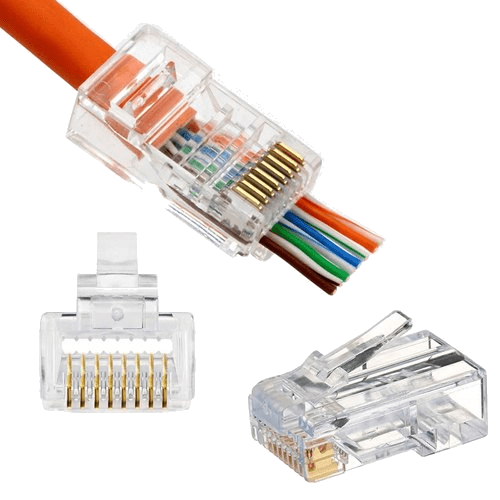
Ethernet is a popular networking standard that’s used for local area networking — like your home or small office. Ethernet uses a special Ethernet connector that’s often referred to as a “ RJ-45 ” or “ RJ-45 Ethernet connector ”. This connector is pretty different from other connectors, but it has some benefits. The RJ-45 connector is always facing the wall, which means that it can’t be plugged in backwards. It also means that if your cable is plugged into the wall, the cable itself is blocked from being plugged in backwards. The other thing to note about Ethernet is that it doesn’t just transmit data; it also creates a physical connection between devices that allows them to communicate with each other. This means that you can use your Ethernet connection for more than just networking: you can also use it for things like powerline networking, where two devices are able to communicate with each other even if they’re not in the same room.

HDMI Conector

HDMI is a type of connector that’s become popular for connecting digital displays like your monitor, TV, or projector to your computer. It’s the type of connector that you’ll find on a lot of newer devices, like your smart phone, your monitor, and even your car’s display. HDMI is a digital connection that sends a video and audio signal, but it also lets you use some features of your device. If you connect an HDMI cable, then your device will realize that there’s a display attached and will usually open up some features, like being able to use your phone as a GPS. This is a great advantage, but it also means that your HDMI connection is always sending information. That’s great when you’re using your device, but it can also be a problem. If you want to use a device without leaving a trace on your device, you’ll want to use an analog connection instead of HDMI.

Optical Fiber Connector

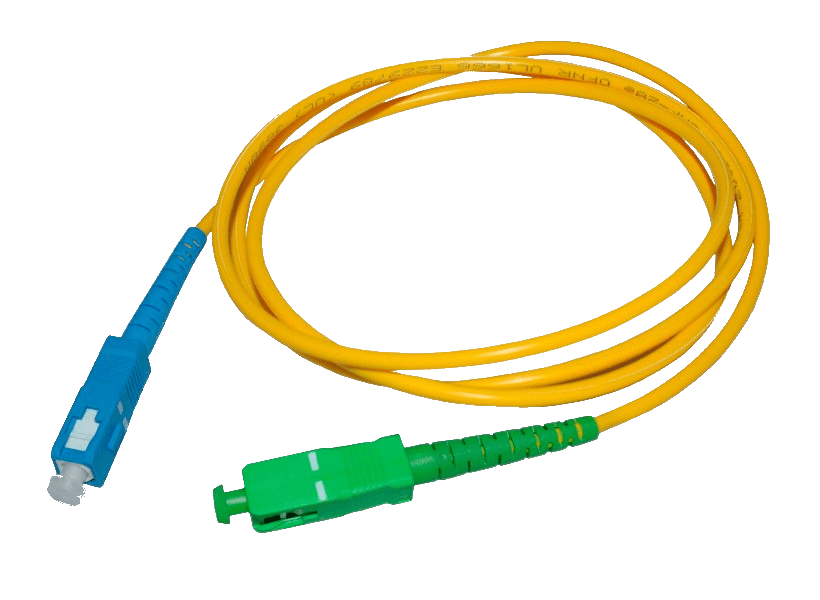
Optical fiber is a type of highly durable cable that can transmit data extremely quickly. It’s often used in computer networking and has a special connector that looks like a fiber optic cable, with a “SC” or “ST” on either end. The SC or ST represents the type of connector at the end of the cable, and the most common types of optical fiber connectors are SC or ST. If you have a device that has an optical fiber connection, it’s a great way to transfer large amounts of data. You can connect computer cables to transfer data, but the real advantage of optical fiber is that you can connect one device to another without using a network between the two devices. This means that you can use your high speed computer networking connection for things like transferring large files or streaming music, instead of using the network for everything like most people do.

DisplayPort Connector

If you’re using a computer with a Thunderbolt port, you’re using a DisplayPort connector. This connector is often used for connecting monitors to a computer. It’s fast, it’s capable of transferring lots of data, and it’s also very easy to use. The only downside to DisplayPort connectors is that they’re pretty uncommon and they’re also expensive to buy. If you want to connect multiple computers to a single monitor, a DisplayPort adapter cable is a great way to do it.

Thunderbolt Connector

The most recent connector type is Thunderbolt. Thunderbolt is a faster, more efficient USB connector that uses a thinner connector that’s more easily compatible with devices. The only downside to Thunderbolt is that it’s pretty expensive: you have to buy a lot of Thunderbolt-compatible devices in order to make use of it. Thunderbolt is a great upgrade, especially for computer users, but it’s not a universal connector type.

Micro USB and USB-C Connector

If you’ve ever used a smartphone or tablet, you’ve probably encountered a micro USB or USB-C connector. These are the most common connectors used to charge your device, so they’re common on devices that you use to charge other devices. It’s a small rectangular connector that’s often used with a computer cable.

Summary

The connector types are the most common, but don’t be fooled: they each have their advantages and disadvantages.

Sources:  script

Are you getting ready to take your A+ exam? Did our tips help? Be sure to comment in on ways we can improve our guide process as well as share your own success stories! We are grateful to help you succeed with the A+ and hope to see you as a certified A+ member soon!

Posted by & filed under CompTIA Security+, MICROSOFT MTA SECURITY, Sec+.

The Importance of Secure Coding Techniques: Why You Need to Know It!

Are you looking to break into the exciting field of cybersecurity? Join our 5-day CompTIA Security+ Bootcamp Training and build your cybersecurity knowledge and skills. 

Coding is a big deal. It is the process of taking digital information and making it usable by machines. Programmers and developers are the people who code. They take digital information, and make it usable by computers. The aim is to create software applications and websites.

Programmers and developers use software, websites and applications to help people do things. They can be used for personal interests, or for business, education or government purposes. It is very important to know how to code securely. Safeguarding your source code is critical for keeping your projects secure and releasing software updates as soon as possible.

What is Secure Coding?

Secure coding is essential in any software development cycle. This can include all stages of software development from planning and requirements gathering, to writing code and testing.

Secure coding is the practice of writing code that is firewall, virus, and malware (or attack) resistant. It is essential to writing code that can withstand cyber attacks. All software developers should be aware of the importance of securing their applications.

Why is Secure Coding Important?

Developing secure software applications is important because it ensures that the information that you are transmitting to the application is not altered in any way. Making sure that your source code cannot be tampered with is critical to maintaining the integrity of your software.

If a hacker were to gain access to your application and tamper with the code, it could potentially cause the application to crash, and not work properly. This could potentially cause serious damage to your business or personal interests.

Methods of Safeguarding Code

There are many ways to safeguard code. Here are some of the most common methods to secure code:

– Normalization – This is the process of taking non-normal data (in this example, an unnormalized variable) and making it normal. This is done by creating a variable that is a combination of all characters in the alphabet, with none of those characters repeated. In a database, for example, a variable that has an extra ‘a’ character would have to be replaced by a ‘b’.

– Encryption – This is the process of taking non-encrypted data and making it encrypted. This is done by replacing every character in the data with a code. An example of this would be replacing all letters with numbers.

– Stored Procedures – This is the practice of storing business logic, rules, algorithms and data within a database. These procedures can be run at any time by the database, rather than being triggered when a user tries to access the logic.

– Refactoring – This is the process of changing the logic within a software project by rewriting the existing code, rather than rewriting it from scratch. This is usually done to fix errors in the logic, or to make the code more efficient.

– Obfuscation – is the process of making code more difficult to understand. This is typically done by replacing certain words and phrases in the code with numbers. For example, replacing “function returns” with “returns function.”

Another common practice is replacing all letters with numbers. For example, replacing “the capital of Ohio” with “1,” or replacing “the word ‘apple’ with “a,” and so on.

Conclusion

Secure coding practices can help safeguard your applications, while enabling your team to better collaborate and deliver high quality, secure software. It is important to note that while coding and developing software applications is important, it is only one part of the development process. Therefore, it’s equally important to secure your development process, including the tools that your team uses to develop and code.

Developing and securing software applications is a complex process that requires knowledge and experience. It’s also a process that can be very time consuming and frustrating. This guide will help you develop secure software applications from start to finish, but you’ll need to put in the time and energy to make it happen.

Developing secure software applications is not easy. It requires knowledge, experience and time. If you want to develop secure software applications, you will need to put in the time and effort.

Sources:  NIST, script

Are you looking to break into the exciting field of cybersecurity? Join our 5-day CompTIA Security+ Bootcamp Training and build your cybersecurity knowledge and skills. 

Or

Become a certified ethical hacker! Our 5-day CEH Bootcamp is unlike other strictly theoretical training, you will be immersed in interactive sessions with hands-on labs after each topic. You can explore your newly gained knowledge right away in your classroom by pentesting, hacking and securing your own systems. Learn more 
Posted by & filed under CompTIA Security+, MICROSOFT MTA SECURITY, Sec+.

The Pros and Cons of Performing a Pentest on Production Environment vs Non-Production Environment

Cybersecurity is a top priority for any organization. With more and more data breaches occurring, it’s crucial to implement security measures to protect your company from cyberattacks. A pentest is a valuable tool that can help you get ahead of the curve before your company falls victim to a data breach. However, what you may not know is that there are two different types of pentests: those performed on a non-production environment and those performed on production environment. While both have their benefits and drawbacks, which one should you use? Read on to find out.
What is a pentest and why is it important?

A pentest is a type of assessment that evaluates the security of your company’s systems. Pentests are often performed to ensure that your company has taken proper precautions against cyberattacks and to identify vulnerabilities in your system.

In today’s world, hackers are getting more sophisticated and it is increasingly difficult for companies to keep up with them. That’s why it’s more important now than ever for organizations to take steps to protect themselves from hackers. A pentest can help you do just that.

But not all pentests are the same: there are two types – those done on a production environment and those done on a non-production environment. The difference between these two types of pentests will impact which one you choose as they have their pros and cons.

The difference between a non-production environment and production environment pentest

The best way to understand the difference between a non-production environment and production environment pentest is by breaking down what each entails.

A non-production environment pentest is conducted on an environment that does not contain any real data. This type of pentest can be performed on-site or remotely where you’re accessing an organization’s servers through the internet. A production environment pentest, on the other hand, is conducted on the live site which may contain sensitive data during normal operation. Because of this, a production environment pentest requires careful planning and consideration before it can begin.

Benefits of performing the Pentest on non-production environment

The primary benefit of performing a pentest on a non-production environment is that you’ll know ahead of time which weaknesses your business has. You’ll be able to take steps to make sure those weaknesses are addressed, so when the pentest does occur on production, your organization will be secure.

Performing the pentest on a non-production environment also provides you with an opportunity to test what needs to happen if there’s an attack on production. You can simulate this type of attack and find out what resources you would need in order to mitigate the damages that may occur.

Benefits of performing the Pentest on production environment

The most obvious benefit of performing the pentest on production environment is that you know for sure that it will be accurate. A pentest performed on a non-production environment won’t reflect the actual vulnerabilities and risks to your company’s infrastructure, but one performed on production environment will.

Additionally, tests performed on production environments can identify all of the violations and severity of those violations in real time. This lets you fix any security breaches that are present, before they have a chance to cause any damage.

Benefits of performing the Pentest on production environment

One of the drawbacks of performing a pentest on a non-production environment is that you don’t know how your system will react to the attack. In other words, it’s not exactly like a real-life situation where data may be lost. As such, you’re in danger of spending unnecessary time and money running tests because you’re unsure of how your system will react.

Another drawback is that some companies have sensitive information that they don’t want to share with just anyone. Having this pentest done on an environment other than production can lead to errors in reporting, which then leads to false positives – or vulnerabilities that don’t exist on the production environment.

Benefits of performing the Pentest on production environment

In a production environment, the pentest can interfere with your organization’s day-to-day operations. This means that you may have to take time away from your day-to-day operations to address any vulnerabilities found. Another drawback is that if a vulnerability is found, your company will have to fix the issue before it can be remediated. If you perform a pentest on a non-production environment, there may not be as many issues as in a production environment because the system is being used for testing purposes only.

Benefits of performing the Pentest on production environment

If you are considering running a pentest on your production environment, we would recommend you do so.

If you are considering running a pentest on your non-production environment, we would recommend you do so.

Sources:  CMU, NIST, Standford

Are you looking to break into the exciting field of cybersecurity? Join our 5-day CompTIA Security+ Bootcamp Training and build your cybersecurity knowledge and skills. 

Or

Become a certified ethical hacker! Our 5-day CEH Bootcamp is unlike other strictly theoretical training, you will be immersed in interactive sessions with hands-on labs after each topic. You can explore your newly gained knowledge right away in your classroom by pentesting, hacking and securing your own systems. Learn more 

Posted by & filed under Webinar.

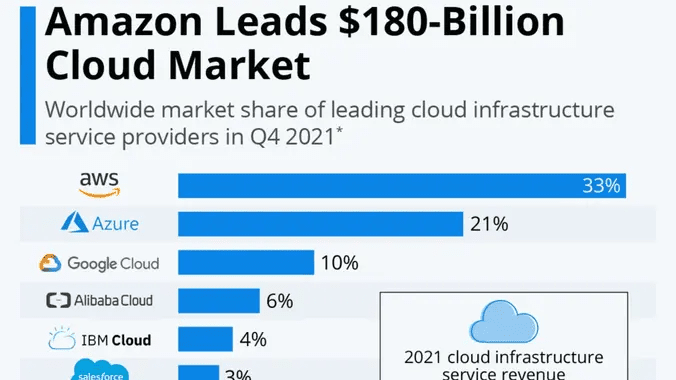
Amazon Leads $180-Billion Cloud Market

Details

Interested to earn “$150K+/Year”? If yes, please join our meeting and share with others.

Are you Unemployed/Underemployed/Impacted by Pandemic? Not to worry. We are here to help.

ASM Educational Center (ASM) “family-owned” & operated business (30+ years) is approved under Federal Training Funds (WIOA) & other funding programs.

We will review “eligibility” requirements for WIOA & Other FREE Funding Programs.

You can get started with a “Career in Cloud” even if you don’t have any IT Background.

Links to Review:

Date:

Tuesday, February 15, 2022
5:00 PM to 6:30 PM EST

Agenda:

Introduction/Networking 5:30pm – 5:45 pm
WIOA/FREE Training Funding Program Overview 5:45pm – 6:00pm
Amazon AWS Salary/Job Openings 6:00pm – 6:45 pm
Q/A 6:45pm – 7:00 pm

Need more info?
info@asmed.com | 301-984-7400 | Chat

Register Here

Posted by & filed under CompTIA A+.

Network shares 2

Given a scenario configure MS windows network on a client/desktop

Network sharing is a feature that allows resources such as files, documents, folders, media, etc., to be shared over a network. These resources are made accessible to other users/computers over a network. In this post, we will describe how you can manage administrative shares in Windows 10.

Network sharing is also known as Shared resources. It enables access to information by more than one person through more than one device at the same or at different times. By connecting a device to a network, other users/devices in the network can share and exchange information through this network.

Managing Administrative Shares

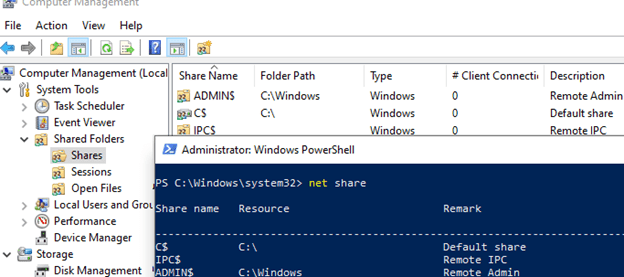
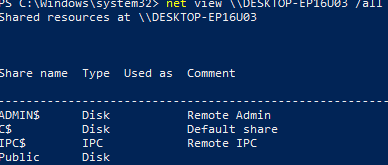
Administrative Shares are used in Windows to remotely access and manage a computer. If you open the computer management console (compmgmt.msc), expand the System Tools -> Shared Folders -> Share section, or run the net share command, you will see a list of admin shared folders (these folders are hidden in the network neighborhood and access to them is restricted).

What are Administrative Hidden Shares on Windows?

By default, Windows creates the following admin shares:

    Admin$ — Remote admin (this is the %SystemRoot% directory)

    IPC$ — Remote IPC (used in named pipes)

    C$ — Default Drive Share

If there are other partitions on the computer that are assigned a drive letter, they are also automatically published as admin shares (D$, E$, etc.). If you are using a shared printer, then there should be a Print$, or FAX$ share if you are using a fax server.

Note that the names of administrative shares end with a $. This mark causes LanmanServer to hide these SMB resources when accessed over the network (specific files and folders in the shared network folder can be hidden using Access-Based Enumeration). If you try to view a list of shared network folders available on the computer in File Explorer (\\computername), you won’t see them in the list of available SMB shares.

Most third-party file managers for Windows have the options to automatically display available admin resources on remote computers when browsing the network.

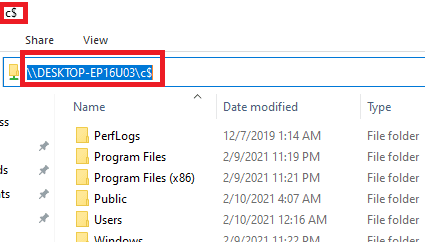
In order to view the contents of an admin share from File Explorer, you must specify its full name. For example, \\computername\c$. This command will open the contents of the local drive C and allow you to access the file system of the system drive of the remote computer.

Only members of the local computer Administrators group (and the Backup Operators group) can get access to administrative shares, provided that you have SMB enabled, turned on file and printer sharing and access via TCP port 445 is not blocked by Windows Defender Firewall rules .

Sources:  TheWindowsClub


Are you getting ready to take your A+ exam? Did our tips help? Be sure to comment in on ways we can improve our guide process as well as share your own success stories! We are grateful to help you succeed with the A+ and hope to see you as a certified A+ member soon!


Posted by & filed under CompTIA A+.

Network shares

Given a scenario configure MS windows network on a client/desktop

Network sharing is a feature that allows resources such as files, documents, folders, media, etc., to be shared over a network. These resources are made accessible to other users/computers over a network. In this post, we will describe how you can enable a user account to create network shares in Windows 10.

Network sharing is also known as Shared resources. It enables access to information by more than one person through more than one device at the same or at different times. By connecting a device to a network, other users/devices in the network can share and exchange information through this network.

Create Network shares in Windows 10

For administrators who want to enable a user account to create Shares in Windows 10, do the following:

–  Add the user account to the Power Users administrative group. By default, the Power Users’ administrative group has permission to create shares.

–    Enable the File and Printer Sharing group in the firewall. When the first user share is created (not counting default shares), the File and Printer Sharing group in the firewall is enabled automatically.

If the first user share is created by using a user account that does not have permission to enable that group, the action will fail. In which case, you can grant the account permission to the user to allow the user to enable firewall settings. To do this, add the user account to the Network Configuration Operators group.

In Windows 10, when a user account in Power Users administrative group logs on, two separate access tokens are created for the user:

•   A Standard Users administrative group access token.

•   A Power Users administrative group access token.

By default, Standard Users and Power Users administrative group both access resources and run applications in the security context of the Standard Users administrative group. To use the Power User administrative group access token, run the application as administrator.

However, you can configure the Local Security Policy snap-in (Secpol.msc) or Local Group Policy Editor (gpedit.msc) to allow a power user who opens a Command Prompt window as an administrator to create a share by running the command below:

net share sharename=drive:path

That’s it!

Sources:  TheWindowsClub


Are you getting ready to take your A+ exam? Did our tips help? Be sure to comment in on ways we can improve our guide process as well as share your own success stories! We are grateful to help you succeed with the A+ and hope to see you as a certified A+ member soon!


Posted by & filed under CompTIA Security+.

Distributed denial-of-service

What is a distributed denial of service attack (DDoS)?

Security+ Objectives

A denial-of-service (DoS) attack occurs when legitimate users are unable to access information systems, devices, or other network resources due to the actions of a malicious cyber threat actor. Services affected may include email, websites, online accounts (e.g., banking), or other services that rely on the affected computer or network. A denial-of-service condition is accomplished by flooding the targeted host or network with traffic until the target cannot respond or simply crashes, preventing access for legitimate users. DoS attacks can cost an organization both time and money while their resources and services are inaccessible.

Network

Different types of DDoS attacks target varying components of a network connection. In order to understand how different DDoS attacks work, it is necessary to know how a network connection is made.

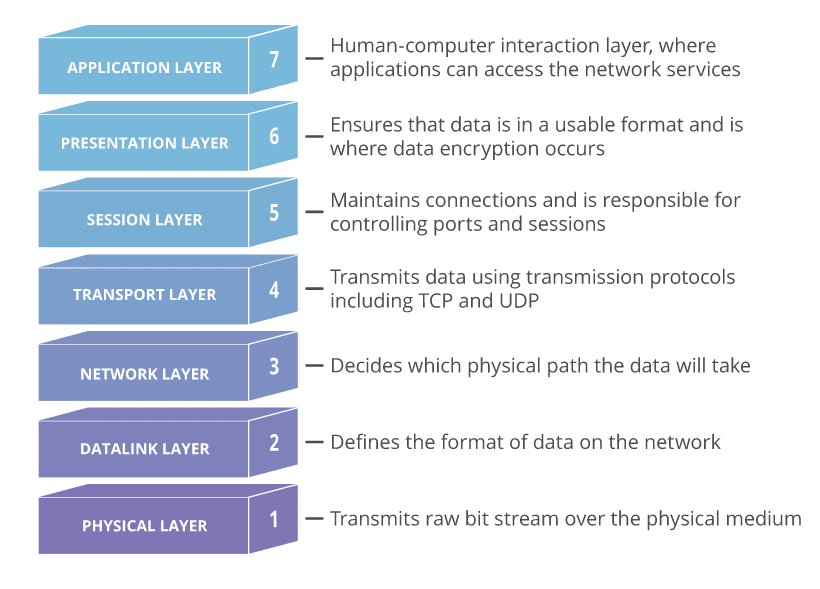
A network connection on the Internet is composed of many different components or “layers”. Like building a house from the ground up, each layer in the model has a different purpose.

The OSI Model, shown below, is a conceptual framework used to describe network connectivity in 7 distinct layers.

While nearly all DDoS attacks involve overwhelming a target device or network with traffic, attacks can be divided into three categories. An attacker may use one or more different attack vectors, or cycle attack vectors in response to counter measures taken by the target.

Application Layer

The goal of the attack:

Sometimes referred to as a layer 7 DDoS attack (in reference to the 7th layer of the OSI model), the goal of these attacks is to exhaust the target’s resources to create a denial-of-service.

The attacks target the layer where web pages are generated on the server and delivered in response to HTTP requests. A single HTTP request is computationally cheap to execute on the client side, but it can be expensive for the target server to respond to, as the server often loads multiple files and runs database queries in order to create a web page.

Layer 7 attacks are difficult to defend against, since it can be hard to differentiate malicious traffic from legitimate traffic.

Application Layer Attack Examples

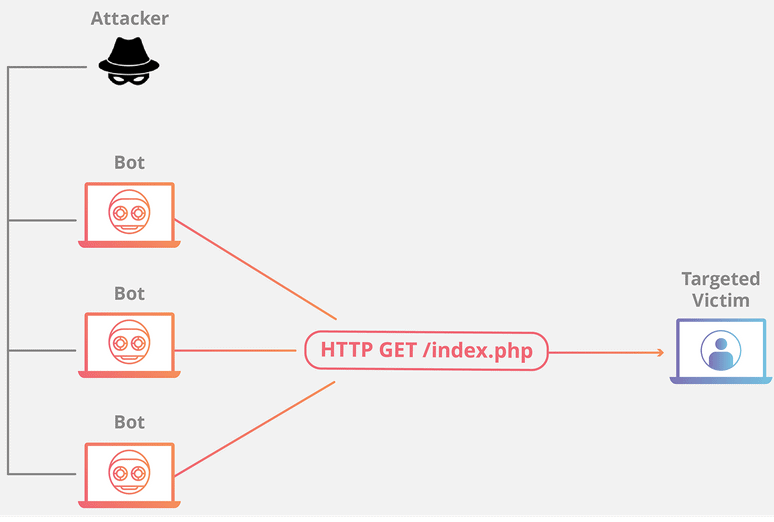
HTTP Flood

This attack is similar to pressing refresh in a web browser over and over on many different computers at once – large numbers of HTTP requests flood the server, resulting in denial-of-service.

This type of attack ranges from simple to complex.

Simpler implementations may access one URL with the same range of attacking IP addresses, referrers and user agents. Complex versions may use a large number of attacking IP addresses, and target random urls using random referrers and user agents.

Protocol Attacks

The goal of the attack:

Protocol attacks, also known as a state-exhaustion attacks, cause a service disruption by over-consuming server resources and/or the resources of network equipment like firewalls and load balancers.

Protocol attacks utilize weaknesses in layer 3 and layer 4 of the protocol stack to render the target inaccessible.

Volumetric Attacks

The goal of the attack:

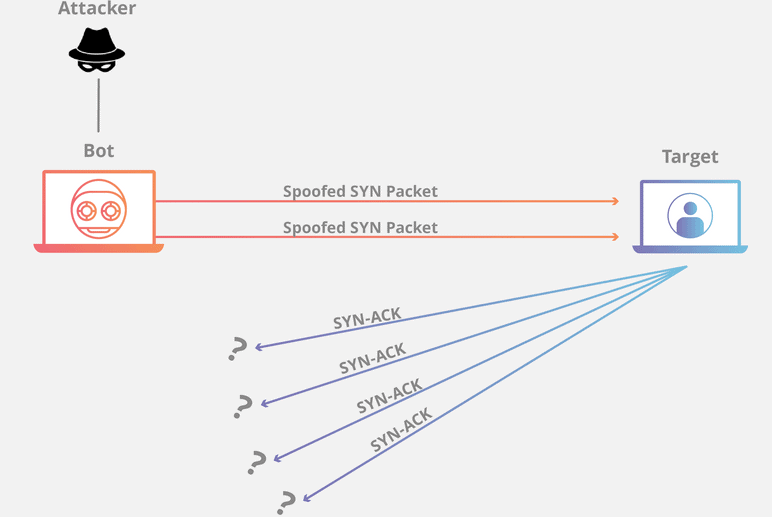
This category of attacks attempts to create congestion by consuming all available bandwidth between the target and the larger Internet. Large amounts of data are sent to a target by using a form of amplification or another means of creating massive traffic, such as requests from a botnet.

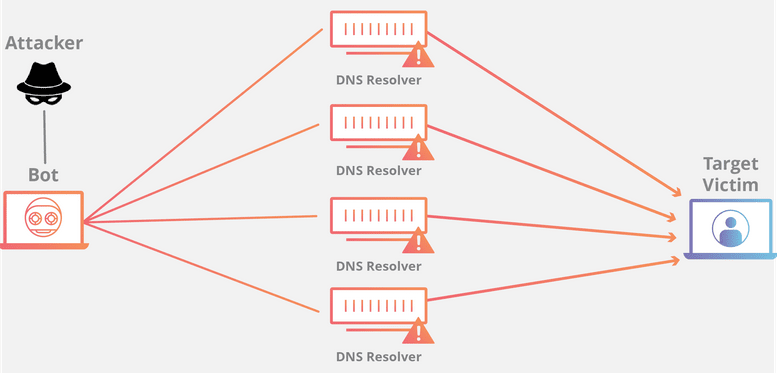
– DNS Amplification

A DNS amplification is like if someone were to call a restaurant and say “I’ll have one of everything, please call me back and repeat my whole order,” where the callback number actually belongs to the victim. With very little effort, a long response is generated and sent to the victim.

By making a request to an open DNS server with a spoofed IP address (the IP address of the victim), the target IP address then receives a response from the server.

How to Defend Against DDoS Attacks

– Mitigation

Mitigation refers to the methods and techniques put in place in order to reduce the negative effects on a server or service targeted by a DDoS attack. Mitigation consists of filtering traffic, so that only legitimate traffic reaches the server.

– Attack Detection

The first step of any mitigation strategy is understanding when you are the target of a DoS attack. Analyzing incoming traffic and determining whether or not it’s legitimate is the first step in keeping your service available and responsive. Scalable cloud service providers are great (and may even “absorb” a DoS attack transparently) which is fantastic until you receive an enormous bill for bandwidth or resource overuse. Making sure your cloud provider makes scaling decisions based only on legitimate traffic is the best way to ensure your company is not spending unnecessary elasticity dollars due to an attack. Early detection of an attack dramatically increases the efficacy of any mitigation strategy.

– Blackhole Routing

One solution available to virtually all network admins is to create a blackhole route and funnel traffic into that route. In its simplest form, when blackhole filtering is implemented without specific restriction

criteria, both legitimate and malicious network traffic is routed to a null route, or blackhole, and dropped from the network.

If an Internet property is experiencing a DDoS attack, the property’s Internet service provider (ISP) may send all the site’s traffic into a blackhole as a defense. This is not an ideal solution, as it effectively gives the attacker their desired goal: it makes the network inaccessible.

– Rate Limiting

Rate limiting is the practice of limiting the amount of traffic available to a specific Network Interface Controller (NIC). It can be done at the hardware or software level to mitigate the chances of falling victim to a DoS attack. At the hardware level, switches and routers usually have some degree of rate-limiting capabilities. At the software level, it’s essential to have a limit on the number of concurrent calls available to a specific customer. Giving users strictly defined limits on concurrent requests or total requests over a given duration (50 requests per minute) can be an excellent way to reject traffic and maintain service stability. The rate limit is usually tied to the customer’s plan or payment level. For example, customers on a free plan may only get 1,000 API calls, whereas customers at the premium level may get 10,000 API calls. Once the user reaches their rate limit, the service returns an HTTP status code indicating “too many requests” (status code 429).


While rate limiting is useful, depending on it alone is not enough. Using a router’s rate limiting features means that requests will still reach the router. Even the best routers can be overwhelmed and DoSed. At the software level, requests still need to reach your service even if a rate-limit has been reached to serve up a 429 status code. This means that your service could still be overwhelmed by requests, even if your service is only returning an error status code.

– Web Application Firewall

A Web Application Firewall (WAF) is a tool that can assist in mitigating a layer 7 DDoS attack. By putting a WAF between the Internet and an origin server, the WAF may act as a reverse proxy, protecting the targeted server from certain types of malicious traffic.

By filtering requests based on a series of rules used to identify DDoS tools, layer 7 attacks can be impeded. One key value of an effective WAF is the ability to quickly implement custom rules in response to an attack.

Upstream Filtering and DDS

One of the best mitigation strategies is to filter requests upstream, long before it reaches the target network. Done effectively, your API never even sees this traffic, so any rate limiting policies are not triggered. There are many providers of “Mitigation Centers” that will filter the incoming network traffic. For example Amazon Shield (opens new window) and Cloudflare (opens new window) both offer products that allow for protection against DoS and DDoS attacks by checking incoming packet IPs against known attackers and BotNets and attempt to only forward legitimate traffic. Various API gateways have the same capabilities but can also filter based on the requested endpoint, allowed HTTP verbs, or even a combination of verbs and endpoints.

These companies typically offer support should your service be currently under attack in an attempt to minimize damages. It then becomes the responsibility of the provider to keep abreast of new DDoS attack vectors and strategies, leaving you to focus on building your service.

Sources:  Cloudflare, CISA, Norton, Akamai

Are you looking to break into the exciting field of cybersecurity? Join our 5-day CompTIA Security+ Bootcamp Training and build your cybersecurity knowledge and skills. 

Or

Become a certified ethical hacker! Our 5-day CEH Bootcamp is unlike other strictly theoretical training, you will be immersed in interactive sessions with hands-on labs after each topic. You can explore your newly gained knowledge right away in your classroom by pentesting, hacking and securing your own systems. Learn more 

Posted by & filed under Webinar.

Setting Up LinkedIn So That Recruiters Can Find You


We will team up with Career Confidence to explain the basics of LinkedIn from setting up your profile to how recruiters use LinkedIn to find candidates. 94% of recruiters are highly active on LinkedIn. Therefore you must be active on LinkedIn in order to be found.

We have had job seekers land quality jobs as a direct result of applying what is taught in this webinar.

There are some recruiters who will go to other candidates if your LinkedIn profile is not filled out.

Links to Review:
FREE Training!
ASM Courses

Agenda:
Introduction/Informal Greeting 6:00pm – 6:15 pm
Setting Up LinkedIn 6:15pm-7:15pm
WIOA/Free Training Fund Program Overview 7:15pm – 7:30 pm
Q/A 7:30-7:45 pm

Date/Time:
Monday, January 17, 2022
6:00 PM to 8:00 PM EST

Need more info?
info@asmed.com | 301-984-7400 | Chat


Registration: Click Here

Posted by & filed under Webinar.

#1 Job Search Strategy We All Need to Follow

We will spend the entire evening on various topics all related to how quality jobs are found through people. Too often, job seekers get so frustrated with “their opinion of the mechanics of a job search” that they ignore the most important strategy which is people.

We will show that from a job search perspective and from the perspective of potential employers hiring you, it is your people skills that are most important.

Partners:

Co-event with Carrier Confidence

Links to Review:

WIOA Program for Unemployed

Amazon AWS Landing Page

Check out Google Review

Date | Time:

Monday, December 13, 2021
6:00 PM to 8:00 PM EST

Agenda:

6:00pm to 6:15pm Introductions
6:15pm to 7:15pm ( #1 Job Search Strategy We All Need to Follow)
7:15pm to 7:30 pm How to apply for Federal Training Funding (WIOA & Other Programs)
7:30pm to 7:45 pm Q/A & Closing Remarks

Registration and Zoom Info: Click Here 

Posted by & filed under CompTIA Security+.

Different threat actors P.1

Advanced persistent threat (APT) 


An adversary with sophisticated levels of expertise and significant resources, allowing it through the use of multiple different attack vectors (e.g., cyber, physical, and deception) to generate opportunities to achieve its objectives, which are typically to establish and extend footholds within the information technology infrastructure of organizations for purposes of continually exfiltrating information and/or to undermine or impede critical aspects of a mission, program, or organization, or place itself in a position to do so in the future; moreover, the advanced persistent threat pursues its objectives repeatedly over an extended period of time, adapting to a defender’s efforts to resist it, and with determination to maintain the level of interaction needed to execute its objectives.

When sensitive information is stored on the hard drive of a machine that is to be surplussed or transferred to another individual or department, it is therefore imperative that extra measures be taken to wipe clean the hard drive before the computer leaves your area of responsibility. This document describes some common methods and software to assist you with the sanitization process. It also includes links to articles that provide detailed technical descriptions of what occurs during this process.

Data destruction software, however, truly does erase the data. Each data destruction program utilizes one or more data sanitization methods that can permanently overwrite the information on the drive.

If you need to remove all traces of a virus or you’re planning on recycling or disposing of your hard drive or computer, wiping your hard drive using data destruction software is the best way to protect yourself.

7 Recommendations for Defending against APTs:

Based on the findings, here are some recommendations:

  1. 1) Focus on solutions that address the malware risk. Ninety-three percent of respondents say malware was the source of the attack.

  2. 2) Pay more attention to targeted attacks. They require more attention than opportunistic attacks. Respondents report that opportunistic attacks are less frequent and easier to prevent than targeted attacks. In contrast, 48 percent say the frequency of targeted attacks has rapidly increased or increased in the past 12 months.

  3. 3) More expertise is needed to handle the risk posed by Java and Adobe Readers. Respondents were asked to consider a list of well-known commercial applications that have been the source of zero-day exploits over the past year. According to 80 percent of respondents, Java is the most difficult application for which to ensure all security patches have been fully implemented in a timely fashion; 72 percent say it is Adobe Reader. Other challenging applications include Windows (65 percent of respondents) and Flash (60 percent of respondents). However, companies are slow to patch vulnerabilities; this is mainly because the companies could not afford the cost of downtime while waiting for the patch to be implemented (65 percent of respondents). Forty-two percent of respondents report that they did not have the professional staff available to implement the patch, and only 13 percent say the vulnerability risk is low.

  4. 4) Make the business case for investing in technologies that address advanced persistent threats. Despite the threat, the majority of respondents believe their organizations do not currently have the necessary security technologies to effectively address the threat of APTs. Only 31 percent of respondents say adequate resources are available to prevent, detect and contain APTs, and only 13 percent of respondents say non-IT executives in their organization fully understand the risk posed by APTs, a major hurdle to overcome in order to secure the necessary resources to defend the organization.

  5. 5) The financial consequences of APTs can help make the business case. Reputation damage is the most costly consequence of APT attacks. When asked how much an APT-related incident could cost an organization in terms of diminished brand or reputation, the average estimate is $9.4 million — this is more than the estimated cost of technical support ($2.5 million), lost user productivity ($3.1 million) and revenue loss and business disruption ($3 million) combined.

  6. 6) Adopt new approaches to fight advanced persistent threats. Current technology controls against APTs are not working. Seventy-two percent of respondents say exploits and malware have evaded their IDS, and 76 percent say they have evaded their AV solutions.

  7. 7) Endpoint security is considered an important part of an APT security strategy. Seventy-three percent say that if they had an acceptable way to do so, they would like to prevent malware threats from infecting their organizations’ endpoints. In addition, effective endpoint protection would prevent the vast majority of APT attacks against an organization.

Insider Threats

An insider is any person who has or had authorized access to or knowledge of an organization’s resources, including personnel, facilities, information, equipment, networks, and systems. 

Examples of an insider may include:

  • • A person the organization trusts, including employees, organization members, and those to whom the organization has given sensitive information and access.
  • • A person given a badge or access device identifying them as someone with regular or continuous access (e.g., an employee or member of an organization, a contractor, a vendor, a custodian, or a repair person).
  • • A person to whom the organization has supplied a computer and/or network access.
  • • A person who develops the organization’s products and services; this group includes those who know the secrets of the products that provide value to the organization.
  • • A person who is knowledgeable about the organization’s fundamentals, including pricing, costs, and organizational strengths and weaknesses.
  • • A person who is knowledgeable about the organization’s business strategy and goals, entrusted with future plans, or the means to sustain the organization and provide for the welfare of its people.
  • • In the context of government functions, the insider can be a person with access to protected information, which, if compromised, could cause damage to national security and public safety.

How Does an Insider Threat Occur?

Insider threats manifest in various ways: violence, espionage, sabotage, theft, and cyber acts. Expressions of insider threat are defined in detail below.

Expressions of Insider Threat

  • Violence – This action includes the threat of violence, as well as other threatening behaviors that create an intimidating, hostile, or abusive environment.

    – Workplace/organizational violence is any action or threat of physical violence, harassment, sexual harassment, intimidation, bullying, offensive jokes, or other threatening behavior by a co-worker or associate that occurs in a person’s place of employment or while a person is working.
  • – Terrorism as an insider threat is an unlawful use of or threat of violence by employees, members, or others closely associated with an organization, against that organization. Terrorism’s goal is to promote a political or social objective.

  • Espionage – Espionage is the covert or illicit practice of spying on a foreign government, organization, entity, or person to obtain confidential information for military, political, strategic, or financial advantage.
    – Economic Espionage is the covert practice of obtaining trade secrets from a foreign nation (e.g., all forms and types of financial, business, scientific, technical, economic, or engineering information and methods, techniques, processes, procedures, programs, or codes for manufacturing).
    – Government Espionage is covert intelligence-gathering activities by one government against another to obtain political or military advantage. It can also include government(s) spying on corporate entities such as aeronautics firms, consulting firms, think tanks, or munition companies. Government espionage is also referred to as intelligence gathering.
    – Criminal Espionage involves a U.S. citizen betraying U.S. government secrets to foreign nations.

  • Sabotage – Sabotage describes deliberate actions to harm an organization’s physical or virtual infrastructure, including noncompliance with maintenance or IT procedures, contamination of clean spaces, physically damaging facilities, or deleting code to prevent regular operations.

    – Physical Sabotage is taking deliberate actions aimed at harming an organization’s physical infrastructure (e.g., facilities or equipment).
    – Virtual Sabotage is taking malicious actions through technical means to disrupt or stop an organization’s normal business operations.

  • Theft – Theft is the simple act of stealing, whether money or intellectual property.

    – Financial Crime is the unauthorized taking or illicit use of a person’s, business’, or organization’s money or property with the intent to benefit from it.
    – Intellectual Property Theft is the theft or robbery of an individual’s or organization’s ideas, inventions, or creative expressions, including trade secrets and proprietary products, even if the concepts or items being stolen originated from the thief.

  • Cyber – Digital threat includes theft, espionage, violence, and sabotage of anything related to technology, virtual reality, computers, devices, or the internet.

    – Unintentional Threats are the non-malicious (frequently accidental or inadvertent) exposure of an organization’s IT infrastructure, systems, and data that causes unintended harm to an organization. Examples include phishing emails, rogue software, and “malvertising” (embedding malicious content into legitimate online advertising).
    – Intentional Threats are malicious actions performed by hostile insiders who use technical means to disrupt or halt an organization’s regular business operations, identify IT weaknesses, gain protected information, or otherwise further an attack plan via access to IT systems. This action can involve changing data or inserting malware or other pieces of offensive software to disrupt systems and networks.

Effective prevention capabilities encompass several major focus areas:

  • • Train your personnel to recognize behaviors that indicate a person of concern is progressing toward a malicious incident—every person in your organization can provide helpful information.
  • • Instill a positive culture for reporting, and make sure people know the program is designed to help them and the potential person of concern.
  • • Establish a threat management team that has the multi-disciplinary capabilities needed to assess all the facts related to a potential insider threat.
  • • Develop intervention capabilities and management actions that are respectful, and consider the dignity and privacy of every employee.

Cyber threat actors

Cyber threat actors are states, groups, or individuals who, with malicious intent, aim to take advantage of vulnerabilities, low cyber security awareness, or technological developments to gain unauthorized access to information systems in order to access or otherwise affect victims’ data, devices, systems, and networks.

Motivations


Cyber threat actors can be categorized by their motivations and, to a degree, by their sophistication. Threat actors value access to devices, processing power, computing resources, and information for different reasons. In general, each type of cyber threat actor has a primary motivation.

Cyber threat actors conduct malicious cyber threat activity by exploiting technical vulnerabilities, employing social engineering techniques, or by manipulating social media. A determined and capable adversary will often carefully select the technique most likely to result in successful exploitation after conducting reconnaissance against their target and may use a range of techniques to achieve their goal. The majority of threat actors, however, simply cast a wide net in hopes of exploiting any unsecure network or database.

Technical vulnerabilities are weaknesses or flaws in the design, implementation, operation, or management of an information technology system, device, or service that provides access to cyber threat actors. For example, a threat actor may attempt to install malicious software, called malware, or take advantage of existing flaws to exploit the targeted system. In addition to installing malware, threat actors also use tools that directly exploit specific technical vulnerabilities.

Exploitation methods that target human qualities, such as carelessness and trust, are collectively known as social engineering. Threat actors use social engineering to trick an individual into inadvertently allowing access to a system, network, or device. Phishing and spear-phishing are common social engineering techniques. (Please see Annex A: The cyber threat toolbox for more information).

Foreign cyber threat actors can also manipulate social media and legitimate advertising and information-sharing tools to conduct online foreign influence campaigns that seek to impact domestic events like an election, census, or public health campaign, as well as public discourse more broadly. With a thorough understanding of how traditional media and social media work – and how individuals consume information – cyber threat actors can promote their message to broader target audiences at a relatively low cost. They can do this by masquerading as legitimate information providers, hijacking social media accounts, or creating websites and new accounts.

How to defend against state actors?

Security threats from states and state-sponsored actors have been around since before the field of cybersecurity was defined. They have now evolved to cyberspace, and present unique challenges for defenders.

While there are fundamental differences between activist and criminal activity, and those who operate directly for (or with the tacit approval of) sovereign powers, there can often be a significant overlap in their agendas and techniques. But there are also significant difference — the most important of which is resourcing.

Where activists and small criminal gangs may have limited technical resources, states and state-sponsored actors have no such limitations. State actors can draw upon the skills and resources of their national intelligence communities, while state-sponsored actors, while not actually part of a state organization, can still draw upon the financial and technical assets of their sponsors.

Another fundamental difference between “civilian” and “state” actors is that law-enforcement agencies are better equipped to address threat actors who don’t have state backing. Even in cases where threats are acting across international borders, mechanisms exist where legal teams from different nations can work together to bring attackers to justice. However, when those attackers are working with the approval of their host countries, the situation becomes more difficult. It becomes nearly impossible for conventional law enforcement to address the issue when the attackers are working for a foreign power directly. In that case, the only recourse is diplomacy, or an escalation into what amounts to outright cyberwarfare.

We Can’t Return Fire

Cybersecurity professionals in the civilian space, and in most government agencies outside the intelligence and military communities, are restricted to an almost entirely defensive position. For legal and ethical reasons, we’re not allowed to “return fire” no matter how obvious, or egregious, the attack. While some individuals have been known to play the game on the attacker’s terms, it puts them firmly into a gray area where they are operating outside the law even if they have the moral high ground.

This all serves to put defense in the hands of mostly civilian cybersecurity professionals who develop the tools, techniques, training and processes needed to provide some level of defense. Fortunately, deploying defenses built to resist a well-funded state actor should be enough to defend against the average criminal gang. This means that it is more than worth the effort to raise our game to handle the worst-case scenario.

Technical Defenses

On the technical side, the usual advice of keeping systems patched and properly configured is an obvious early step and one we have been talking about for years. But the NSA and CISA reports have shown that even sophisticated high-level attackers will leverage known exploits. That means staying on top of your patches isn’t just a best practice; it is a vital technique to keep the organization safe.

Making sure the security operations team (SecOps) is trained, adequate and prepared is another vital step. Budgets may be tight and qualified talent may be hard to attract and retain, but these are the people who run the last line of defense. This holds true when an organization’s security is a managed service. Your managed security service provider (MSSP) needs to be trained and prepared to confront threats at every level, from script kiddies to foreign-intelligence agencies.

There are other technical steps as well. Every organization needs to evolve their security stack to keep up with potential and active threats, making sure their tools and processes are up to the task. As new threats emerge, old technologies evolve and new ones emerge to fill the gaps. However, the stack needs to be looked at as a holistic whole. Perimeter devices and endpoint protections need to work in concert with some mechanism to consolidate the whole range of security telemetry into a coherent whole. And that whole needs to be processed, analyzed and presented in a way that SecOps personnel can use and understand, and can be leveraged to orchestrate and automate the organization’s defenses.

State and state-sponsored threat actors are the apex predators of the cybersecurity world. They have time, skills, effectively unlimited resources and can be very specific in their agenda. But if we keep our defenses up to date with the appropriate tools, training and best practices, we can reduce the risk to our organizations even from the most challenging adversaries.

Product categories

Sources:  NIST, CISA, Cyber

Are you looking to break into the exciting field of cybersecurity? Join our 5-day CompTIA Security+ Bootcamp Training and build your cybersecurity knowledge and skills. 

Or

Become a certified ethical hacker! Our 5-day CEH Bootcamp is unlike other strictly theoretical training, you will be immersed in interactive sessions with hands-on labs after each topic. You can explore your newly gained knowledge right away in your classroom by pentesting, hacking and securing your own systems. Learn more 

Posted by & filed under Webinar.

An Introduction to Amazon AWS Solution Architecture Associate SAA-002

Amazon Web Services (AWS) is the largest cloud provider in the market. The AWS Certified Solutions Architect-Associate certification was listed by CIO as one of the top 10 certifications that deliver higher pay. The average salary of an AWS-certified IT professional is roughly $114,000 – placing it in the top five highest-paying certifications in the United States and Canada.

Our AWS Certified Solutions Architect – Associate certification training is for beginners and professionals who run enterprise architecture programs, as well as solutions architects. It covers deployment of AWS systems, AWS best practices, and many other topics. The AWS Course covers skills for working with the Amazon Cloud, Alexa, Amazon S3, Amazon EC2, auto-scaling and load balancing, serverless websites and many more.

Pre-Request for this class is only Basic Networking such as Completion of CompTIA Network + class or equivalent experience . Anybody can join this FREE webinar to get good understanding of Amazon AWS .

In this evets we will do a demo how Amazon AWS Cloud will work and how a startup company take advantage of this platform.

Links to Review: https://asmed.com/free-training/ (WIOA Program for Unemployed )

https://asmed.com/aw1 (Amazon AWS Landing Page)

https://g.page/r/CRzvNx-vPgjpEBM/review (Check out Google Review)

Agenda

6:00pm to 6:15pm Introductions
6:15pm to 7:00pm An Introduction to Amazon AWS Solution Architecture Associate SAA-002

7:00pm to 7:15pm How to apply for Federal Training Funding (WIOA & Other Programs)

7:15pm to 7:30pm Q/A & Closing Remarks

Need more info?
www.asmed.com/L

Registration: Click here

Posted by & filed under Webinar.

How to PASS your Amazon AWS SAA Exam on your First Try


Amazon Web Services (AWS) is the largest Cloud Provider in the market.

The AWS Certified Solutions Architect-Associate(SAA) Certification was listed by CIO as one of the top 10 certifications that deliver higher pay.

The average salary of an AWS-certified IT professional is roughly $150,000 – placing it in the top five highest-paying certifications in the United States and Canada.

Our AWS Certified Solutions Architect – Associate certification training is for beginners and professionals who run enterprise architecture programs, as well as solutions architects. It covers deployment of AWS systems, AWS best practices, and many other topics.

The AWS Course covers skills for working with the Amazon Cloud, Amazon S3, Amazon EC2, autoscaling and load balancing, serverless websites and many more.

In this Meetup, we will review the KEY information you need as well as how to prepare for your AWS SAA exam.

Agenda

6:00pm to 6:15pm Introductions
6:15pm to 7:00pm Tips on How to Pass Amazon AWS Solution Architecture Associate (SAA) Exam
7:00pm to 7:15pm How to apply for Federal Training Funding (WIOA & Other Programs)
7:15pm to 7:30pm Q/A & Closing Remarks

Registration: Click Here


Are you looking to break into the exciting field of cybersecurity? Join our 5-day CompTIA Security+ Bootcamp Training and build your cybersecurity knowledge and skills. 

Or

Become a certified ethical hacker! Our 5-day CEH Bootcamp is unlike other strictly theoretical training, you will be immersed in interactive sessions with hands-on labs after each topic. You can explore your newly gained knowledge right away in your classroom by pentesting, hacking and securing your own systems. Learn more 

Posted by & filed under Webinar.

How To Transition Into a Career in Cybersecurity

Have you been thinking about transitioning to a career in cybersecurity, but are not quite sure how to make your dream a reality? Are you currently working a cyber job but want to make a plan for advancement? This program walks you through the steps that you need to take in order to explore your cyber career options. It gives you a structured framework for exploring your interest in cyber, researching cyber positions, learning about cyber policies and standards, learning cyber tools, obtaining cyber / IT certifications, as well as applying for cyber jobs. This approach helps you to create your own cyber career action plan so that you can position yourself to join the field of cybersecurity.

About Speaker

Teresa Allison is Vice President of Programs and Events for the Information System Security Association (ISSA) DC Chapter. She has worked in the field of information technology consulting for over 18 years. She provides clients with solutions for managing multi-billion dollar IT programs. She specializes in strategic planning, budgeting, performance management, portfolio management, governance, risk management, legal & regulatory compliance, project management, program management, process improvement, business operations transformation, strategic communications and stakeholder management.

Allison has supported clients in the domain areas of Health & Human Services, Homeland Security, Transportation, Financial Regulatory Agencies, Veterans Affairs, Diplomacy & Foreign Affairs, as well as International Development & Foreign Assistance. She assisted a global strategy consulting firm in implementing IT security and privacy policies to comply with the European General Data Protection Regulation (GDPR). She has also taught CISSP certification classes at ASM Educational Center.

Teresa received her bachelor’s degree in Political Science from Xavier University. She graduated from Carnegie Mellon University’s H. John Heinz III School of Public Policy with a Master of Science in Public Policy and Management with a concentration in Management of Information Systems. She is certified IT professional who currently holds the CISSP, CCSP, CCSK, CISA, CGEIT, CDPSE, Security+, PMP, CSM, ITIL, and Lean Six Sigma certifications.

Links to Review: https://asmed.com/free-training/

https://asmed.com/s1

Agenda

6:00pm to 6:15pm Introductions
6:15pm to 7:00pm How to transition a career to Cybersecurity

7:00pm to 7:15pm How to apply for Federal Training Funding (WIOA & Other Programs)

7:15pm to 7:30pm Q/A & Closing Remarks

When sensitive information is stored on the hard drive of a machine that is to be surplussed or transferred to another individual or department, it is therefore imperative that extra measures be taken to wipe clean the hard drive before the computer leaves your area of responsibility. This document describes some common methods and software to assist you with the sanitization process. It also includes links to articles that provide detailed technical descriptions of what occurs during this process.

Data destruction software, however, truly does erase the data. Each data destruction program utilizes one or more data sanitization methods that can permanently overwrite the information on the drive.

If you need to remove all traces of a virus or you’re planning on recycling or disposing of your hard drive or computer, wiping your hard drive using data destruction software is the best way to protect yourself.

Registration: Click here


Are you looking to break into the exciting field of cybersecurity? Join our 5-day CompTIA Security+ Bootcamp Training and build your cybersecurity knowledge and skills. 

Or

Become a certified ethical hacker! Our 5-day CEH Bootcamp is unlike other strictly theoretical training, you will be immersed in interactive sessions with hands-on labs after each topic. You can explore your newly gained knowledge right away in your classroom by pentesting, hacking and securing your own systems. Learn more 

Posted by & filed under CompTIA Security+.

Layer 2 Attacks

Overview

A large number of common threats need to be considered when securing a network, but a frequently overlooked area is the security of the LAN. When people think about security, often they’re thinking specifically of the layers above Layer 2, but there’s no reason to limit a security plan to these upper layers. A good security plan should account for all layers, from Layer 1 through Layer 7. This article takes a look at some of the most common Layer 2 attacks and how they operate.

OSI Was Built to Allow Different Layers to Work
Without the Knowledge of Each Other

Unfortunately this means if one layer is hacked, communications are compromised
without the other layers being aware of the problem
Security is only as strong as the weakest link
When it comes to networking, layer 2 can be a VERY weak link

Spanning Tree Protocol (STP) Attacks

The Spanning Tree Protocol (STP) is used on LAN-switched networks. Its primary function is removing potential loops within the network. Without STP, Layer 2 LANs simply would stop functioning, because the loops created within the network would flood the switches with traffic. The optimized operation and configuration of STP ensures that the LAN remains stable and that traffic takes the most optimized path through the network. If an attacker inserts a new STP device onto the network and attempts to alter the operation of STP, this attack has the potential to affect how traffic flows through the LAN, greatly affecting the usability and security of the traffic flowing through the network.

Address Resolution Protocol (ARP) Attacks

The Address Resolution Protocol (ARP) is used by all network devices that connect to an Ethernet network. Devices use ARP to find the Layer 2 Ethernet address (MAC) for a destination device, using only the target device’s known IP address. ARP by itself is inherently insecure because devices are told to trust the answers they receive. So if device A requests the MAC address of device B, and device C answers in place of device B, device A will send all traffic destined for device B to device C. If device C was attempting to run a transparent attack, it would then forward the traffic to device B while recording the data from the traffic; this is called a man-in-the-middle (MITM) attack.

Media Access Control (MAC) Spoofing

In a Media Access Control (MAC) spoofing attack, one device on a network uses the MAC address of another device. The goal of the attacker is to redirect all of the traffic for the targeted device to the attacking device. If you think about a telephone network, this attack is the equivalent of someone taking over your phone number and having future calls rerouted to them. This rerouting could be used to disguise one device as another for multiple purposes, including to act as that device (possibly a server), or to perform a denial-of-service attack on that device.

Dynamic Host Configuration Protocol (DHCP) Spoofing

Similar to the other types of spoofing attacks, Dynamic Host Configuration Protocol (DHCP) spoofing involves an attacker pretending to be someone else; in this case, acting as the legitimate DHCP server. Since DHCP is used on most networks to provide addressing and other information to clients, losing control of this part of the network can be dangerous.

In DHCP spoofing attacks, the attacker places a rogue DHCP server on the network. As clients are turned on and request an address, the server with the fastest response is used. If the device receives a response from the rogue server first, the rogue server can assign any address as well as control which device it uses as a gateway. A well-designed attack can funnel traffic from local hosts to a rogue server that logs all traffic and then forwards the traffic out to the “correct” gateway; to the device, this action would be almost transparent. Thus, the attacker can steal information almost invisibly.

Virtual LAN (VLAN) Hopping

There are two types of virtual LAN (VLAN) hopping attacks, but the goal is the same—sending traffic to another VLAN:

  • Switch spoofing. In this attack, the attacker attempts to connect a rogue switch into the network and then set up a trunk. If the attack is successful, traffic from multiple VLANs can be sent to and through the rogue switch, enabling the attacker to view and potentially manipulate the traffic. This attack relies on the default behavior of some switches that support dynamic trunking: If dynamic trunking is disabled, and all non-trunk interfaces are configured not to become trunked, this attack is mitigated.
  •  
  • Double tagging. To understand double tagging, you need some VLAN basics. Virtual LANs provide security on LANs by isolating traffic into separate traffic lanes. Traffic from all VLANs (except for the native VLAN) is “tagged” with an IEEE 802.1q tag when the traffic is sent over trunks between switches. These tags can be nested, which means that traffic can have multiple attached tags. If a frame with two nested tags is received on a trunking interface, and the first tag (the outermost tag) is the same as the tag for the native VLAN for that interface, some switches will remove that outer tag and send the traffic along to the VLAN of the second tag. This design allows an attacker to send traffic from one VLAN into another VLAN (hopping), which is supposed to be impossible without a Layer 3 device.

Basic VLAN Hopping Attack

Product categories

Sources:  CMU, NIST, Standford

Are you looking to break into the exciting field of cybersecurity? Join our 5-day CompTIA Security+ Bootcamp Training and build your cybersecurity knowledge and skills. 

Or

Become a certified ethical hacker! Our 5-day CEH Bootcamp is unlike other strictly theoretical training, you will be immersed in interactive sessions with hands-on labs after each topic. You can explore your newly gained knowledge right away in your classroom by pentesting, hacking and securing your own systems. Learn more 

Posted by & filed under Amazon AWS.

Amazon Network Load Balancer with ALB as Target Group


The goal of this lab is to create Network Load Balancer; but instead using different target group we will use ALB as target group .

Pre-Step 1) You need to have and ALB ready and we have it as follows:

Here is the link for ALB

When you type example.com/video.html it will go to EC2 and after refreshing will show video3 and Video4 (Please see the link for creating ALB lab)

When you type example.com/picture.html it will go to EC2 and after refreshing will show “Pic1” and “Pic2” Pages


Lab Practice

Now goal is then when I go to NLB and type example.com/video.html
it will be point to ALB target group that will show Video3; and Video 4

When I go to when I go to NLB and type example.com/picture.html
it will be point to ALB target group that will show Pic1; and pic 2

Step1) So Far we have these target group from last
lab: (see Picture )


Step 2) I need to create a New target group called “ALBTargetGroup”

Step 3) Go Target group and click New target group and pick ALB

Give Name = ALBTargetGroup

TCP =80

Health=HTML

Path=/index.html

Step 4) On next page pick ALB ; then create the target group .

Step 5) Now when you go back to target group page ; you will see nothing under the Load Balancer ; since we have not associate anything in here.

Step 5a) We will create another target group called WindowsTG and will have this info :

Name=WindowsTG

TCP=8080

Health=HTML

Path=/healthy.html ( we must have this file inside my IIS server; it could be also index.html ; as long as we have that file in c:\inetpub\wwwroot\healthy.html

Register=Windows (VM)

Step 6) Now I will go to Load Balancer and then I will create a new Network load Balancer (NLB)

Step 7) Give Name =NLBwithALB

           VPC=10.0.0.0/16

           AZ=US-east-1a and US-east-1c

For listener Then Pick TCP(80) and point to TargetGroup (ALBTargetgroup)

Click Add Listener and pick TCP(8080) and pint to Target Group (WindowsTG)

Step 8) Now when I go to each target group after 5 – 7 mins we will see under the Load Balancer column we have target group.

Step 9) Now when I go to description tab and copy and paste long DNS name ; it will show my result

http://nlbandalb-5946fe8a229b1835.elb.us-east-1.amazonaws.com/picture.html


When I keep refreshing; it will show result Pic1 and Pic 2 page

http://nlbandalb-5946fe8a229b1835.elb.us-east-1.amazonaws.com/video.html

When I keep refreshing it will show the content of Video 3 and Video 4

So above URL/video.html and URL/picture.html is coming from ALB

Step 10) When I copy and paste long DNS name with port 8080 it should show the content of Windows server IIS page

http://nlbandalb-5946fe8a229b1835.elb.us-east-1.amazonaws.com:8080/

Step 11) Now after all the target group has been healthy, we should see these on my target group page.


Summary :So we have shown I am using Network Load Balancer with Target Group (ALB) that is pointed to two target group (VideoTG and PictrueTG)

Also we have shown NLB with target group pointed to Windows Content when I use port 8080


Are you getting ready to take your AWS exam? Did our tips help?

Be sure to comment in on ways we can improve our guide process as well as share your own success stories! We are grateful to help you succeed with the AWS and hope to see you as a certified AWS member soon!

Posted by & filed under Amazon AWS.

Amazon AWS Application Load Balancer

Application Load Balancer (ALB )

Lab Practice

Before we do the lab, we need to setup the infrastructure with these 4 instances as follows:

You need 4 Virtual Linux Machines

PC1 should be called LinuxPic1: us-east-1a

PC2 should be called LinuxPic2 : us-east-1a

PC3 should be called LinuxVideo3: us-east-1c

PC4 should be called LinuxVideo4: us-east-1c

1) Linux PC that is called LinuxPic1 , created two files :

a) index.html —> content will be “This is Main site of Picture1 “

b) picture.html —> content will be ” This is pic1 ” or

1a) Linux PC that is called LinuxPic2 , created two files :

a) index.html —> content will be “This is Main site of Picture2”

b) picture.html —> content will be ” This is pic2 “

==============================================

2) Linux PC that is called Linuxvideo3 , created two files :

a) index.html —> content will be “This is Main site of Video3”

b) video.html —> content will be ” this is Video3″

2a) Linux PC that is called Linuxvideo4 , created two files :

a) index.html —> content will be “This is Main site of Video4”

b) video.html —> content will be ” this is Video4 “

so when I type x.x.x.x/index.html I will see content with main websites ( for Video)

when you type x.x.x.x/video.html I will see content with Video 3 or 4

so when I type x.x.x.x/index.html I will see content with main websites ( for Picture)

when I type x.x.x.x/picture.html I will see content with picture 1 or 2

Please see the codes that we will use it ; during the installation of the Instance

Here is Sample for one of codes the rest will be similar and you will see when you watch the Video

==================================================

#!/bin/bash

yum update -y

yum install -y httpd

service httpd start

chkconfig httpd on

groupadd www

usermod -a -G www ec2-user

echo “hello” > /var/www/html/index.html

chown -R root:www /var/www

chmod -R 2775 /var/www

echo ‘<h1>This is Main site of Picture1 </h1>’>/var/www/html/index.html

echo ‘

echo ‘<h1>This is pic1 </h1>’>/var/www/html/picture.html

===================================================

Make sure check and see all the 4 Linux Machine is working correctly with lab.

Now we will do the Lab

Step 1) before you do anything you need to create two target group

  1. PictureTG

  2. VideoTG

Step 2) Chose create a new target group

Target group name=PictureTG

Pick = Instance

Protocol = http

Chose VA VPC

The rest pick default value

Health check = http

Path=/index.html ( We need to make sure your instance has this file name )

Step 3) When you get to register targets; make sure you pick LinuxPic1 and LinxPic2 Instance ;

Step 4) click include as pending below

Step 5) Then create target group; after it finish ; click on it and you will see it is “unused” ; later on it will be changed .

Step 6) Do same steps in above but called it

Target group name=VideoTG

Pick = Instance

Protocol=http

Chose VA VPC

The rest pick default value

Health check=http

Path=/index.html (We need to make sure your instance has this file name )

Step 6) As we see when we are at target page; we do not see any load Balancer in front of it ; since we have not configured it; but later on we will see it

Step 7) Now we will go and create Application Load Balancer

Step 8) Before you creatin ALB ; make sure you will know what is your security group for you Instance and have it ready

Step 9) Create ALB ;

Name =VAALB

Pick your VPC

Pick both AZ=1a and AZ=1c

Pick Same Security group as above

Listener = 80

Step 9) In front of Listener; you need to pick your Target Group ; in here does not matter which one you will pick ; but I will pick PictureTG

Step 10) Create ALB ; then back to your target group ; click on “PictureTG” you will see statues as initial ; then it will become “Healthy”

Step 11) Now after two mins it become Healthy and when you look at Target Group page we see in column under Load Balancer; it shows name of VAALB with PictureTG ( since we chose it as default) but VideoTG has nothing in it.

Step 12) Now go to VideoTG and click it and you will see “unused”

Step 13) Now we want to make sure we use VideoTG

Step 14) Go to Load Balancer on left ; go to Listener tab

Step 15) Click View/Edit Rule

Step 16) click + sign to add some Rule; click insert rule

Step 17) Pick path then type *video* then action Forward to target Group VideoTG

Step 18) Make sure click Save and do same steps ; but add rule for *picture* and FW to pictureTG

Step 19) Now Click Back ; go back to VAALB and click on description tab and copy and paste the Log DNS name then try with

/picture.html and

/video.html

You should be able to see all the instance is working

http://vaalb-108982661.us-east-1.elb.amazonaws.com/picture.html

http://vaalb-108982661.us-east-1.elb.amazonaws.com/video.html

Step 20) Remember you can go back to your Route53 and create an “A” record and point to the above link

Step 21) Now If I go back to Target Group page; now under ALB column I will see both PictureTG and VideoTG

Step 22) Go and click on VideoTG and now you will see “healthy” Remember ; we had it as “unused”


Are you getting ready to take your AWS exam? Did our tips help?

Be sure to comment in on ways we can improve our guide process as well as share your own success stories! We are grateful to help you succeed with the AWS and hope to see you as a certified AWS member soon!

Posted by & filed under Amazon AWS.

AWS Cloud Practitioner Sample Exam Questions

Amazon AWS Cloud Practitioner Sample Exam with Explanation

1) Why is AWS more economical than traditional data centers for applications with varying compute workloads?
a) Amazon EC2 costs are billed on a monthly basis.
b) Users retain full administrative access to their Amazon EC2 instances.
c) Amazon EC2 instances can be launched on demand when needed.
d) Users can permanently run enough instances to handle peak workloads.

2) Which AWS service would simplify the migration of a database to AWS?
a) AWS Storage Gateway
b) AWS Database Migration Service (AWS DMS)
c) Amazon EC2
d) Amazon AppStream 2.0

3) Which AWS offering enables users to find, buy, and immediately start using software solutions in their AWS environment?
a) AWS Config
b) AWS OpsWorks
c) AWS SDK
d) AWS Marketplace

4) Which AWS networking service enables a company to create a virtual network within AWS?

a) AWS Config
b) Amazon Route 53
c) AWS Direct Connect
d) Amazon Virtual Private Cloud (Amazon VPC)

5) Which of the following is an AWS responsibility under the AWS shared responsibility model?
a) Configuring third-party applications
b) Maintaining physical hardware
c) Securing application access and data
d) Managing guest operating systems

6) Which component of the AWS global infrastructure does Amazon CloudFront use to ensure low-latency delivery?

a) AWS Regions
b) Edge locations
c) Availability Zones
d) Virtual Private Cloud (VPC)

7) How would a system administrator add an additional layer of login security to a user’s AWS Management Console?

a) Use Amazon Cloud Directory
b) Audit AWS Identity and Access Management (IAM) roles
c) Enable multi-factor authentication
d) Enable AWS CloudTrail

8) Which service can identify the user that made the API call when an Amazon EC2 instance is terminated?

a) AWS Trusted Advisor
b) AWS CloudTrail
c) AWS X-Ray
d) AWS Identity and Access Management (AWS IAM)

9) Which service would be used to send alerts based on Amazon CloudWatch alarms?
a) Amazon Simple Notification Service (Amazon SNS)
b) AWS CloudTrail
c) AWS Trusted Advisor
d) Amazon Route 53

10) Where can a user find information about prohibited actions on the AWS infrastructure?

a) AWS Trusted Advisor
b) AWS Identity and Access Management (IAM)
c) AWS Billing Console
d) AWS Acceptable Use Policy

Are you getting ready to take your AWS exam? Did our tips help?

Be sure to comment in on ways we can improve our guide process as well as share your own success stories! We are grateful to help you succeed with the AWS and hope to see you as a certified AWS member soon!

Posted by & filed under CompTIA Security+.

Is CompTIA Security+ Worth it?

What do CCNA Security, CCNP Security, CEH, ISA, Infosec CISSP and Amazon AWS Certified Security have in common? They are all part of the large grouping of cybersecurity certifications currently available.

Each of these certifications is valuable and serves a valid purpose. But what about the CompTIA Security+ certification? If you’ve got questions, we’ve got answers.

CompTIA Security+ is a popular cybersecurity certification. More than 600,000 IT pros have earned it. But, is CompTIA Security+ worth it? That depends on your goals as an IT professional.

One of your IT career goals may be to get into the information security field without prior certification. Other goals may include getting a vendor-neutral cybersecurity certification or a DoD-approved cert. If you have any of these IT career goals, CompTIA Security+ is worth it for you.

What Is the CompTIA Security+ Certification?

The CompTIA Security+ certification is a vendor-neutral designation widely recognized by the IT industry. It equips individuals with the skills they need to get one of the many job roles in cybersecurity. Before earning any other cybersecurity certifications, technicians should get CompTIA Security+.

CompTIA Security+ offers critical foundational cybersecurity skills that IT professionals should have before pursuing higher-level certifications. This includes certifications that are vendor neutral as well as vendor specific. The IT skills CompTIA Security+ provides include:

  • • Identifying attacks and vulnerabilities to mitigate before they infiltrate IS
  • • Understanding secure virtualization, secure application deployment and automation concepts
  • • Identifying and implementing the best protocols and encryption
  • • Monitoring and securing hybrid environments, including cloud, mobile and IoT
  • • Installing and configuring identity and access services and management controls
  • • Installing, configuring and deploying network components while assessing and troubleshooting issues to support organizational security
  • • Implementing and summarizing risk management best practices and the business impact they have
  • • Installing and configuring wireless security settings and implementing public key infrastructure
  • • Understanding penetration testing and vulnerability scanning concepts and detecting compromise
  • • Understanding the importance of compliance

The CompTIA Security+ certification, which costs $370 USD, validates these baseline IT skills and core security functions. This designation proves to employers and recruiters that certified individuals are ready to work in a variety of security-focused IT job roles.

Also, CompTIA Security+ is approved by the U.S. Department of Defense (DoD) to meet directive 8140/8570.01-M requirements. It is compliant with ISO 17024 standards.

Wondering what’s on the CompTIA Security+ exam? Find out here.

Is CompTIA Security+ Hard?

Unlike other cybersecurity certifications, CompTIA Security+ has no prerequisites. This is great news for IT professionals who want to jump right into information security without having to get multiple certifications.

The CompTIA Security+ certification can help you land an entry-level IT security position. Although this certification is entry-level for cybersecurity, the average person wouldn’t consider it easy. It covers cybersecurity concepts in depth and requires adequate preparation.

Some people grasp cybersecurity concepts fairly quickly. For others, these concepts are more of a challenge. Whichever type of learner you are, you will experience some degree of difficulty with CompTIA Security+. This is a good thing. After all, an easy cert probably wouldn’t provide you with sufficient knowledge to advance your IT career.

Although CompTIA Security+ is challenging, training tools put passing the certification exam well within your reach. Armed with the right attitude and training resources, even beginners can earn CompTIA Security+. Don’t forget to download your free CompTIA Security+ practice test.

Is CompTIA Security+ Enough to Get a Job? What About Earning Potential?

A key factor individuals consider before getting a cybersecurity certification is what type of salary it will yield. The truth is there is no definite salary CompTIA Security+ can promise. Beware of sources that promise a certification will result in a certain salary. An IT pro’s salary is directly related to the job role their cert (or certs) helped them get, not the certification itself.

A few cybersecurity jobs (and their median annual salaries) CompTIA Security+ can help you land include:

  • • Junior penetration tester: $70,000
  • • Systems administrator: $84,810*
  • • Network administrator: $84,810*
  • • Security administrator: $87,617
  • • Cybersecurity specialist: $111,052

With CompTIA Security+ alone, you could be in the running for one of these job roles.  As you earn additional IT certifications and get more experience, you’ll be qualified for higher-level information security jobs, such as:

  • • Cybersecurity engineer: $99,689
  • • Cybersecurity analyst: $103,590*
  • • Cybersecurity consultant: $115,767

CompTIA Cybersecurity Analyst (CySA+) and CompTIA PenTest+ are examples of intermediate cybersecurity certifications to pursue after CompTIA Security+. CompTIA Linux+ is another great option as Linux skills are critical to a cybersecurity professional’s success. If you want to work with specific equipment, consider a vendor-specific cert, such as Microsoft Certified Security Administrator Associate.  

In many cases, CompTIA Security+ can be the key to getting an entry-level job in IT security. It can even be helpful in landing a help desk role. However, earning this cert is only the first step in starting a career in cybersecurity.

Once you get your foot in the door to the information security industry, keep learning and keep earning cybersecurity certifications. With a commitment to continuous learning and hard work, you can go as far in cybersecurity as you want.

Become an IT Security Professional with CompTIA Security+

Each second, 75 records go missing, and 30,000 websites are hacked each day. Obviously, cyber attacks are on the rise. The COVID-19 pandemic increased the rate of digital transformation, which has made organizations more vulnerable than ever to these attacks. This explains why cybersecurity is important in 2021, and why it will continue to grow in importance in the future.

Companies need security professionals who are well-trained to handle all types of incidents. Getting CompTIA Security+ is the first step to becoming an information security specialist who can help organizations fight and mitigate cybercrime.

Now that you understand the benefits of having CompTIA Security+, no doubt you agree this certification is worth it. You can start your journey to a job role in cybersecurity by earning CompTIA Security+. All you need are CompTIA training resources and dedication to your mission of passing the certification exam. Download the CompTIA Security+ exam objectives to get started.

*This salary figure was derived from the CompTIA U.S. IT Employment Snapshot (2021, Q1)

.

Product categories

Sources:  CompTIA

Are you looking to break into the exciting field of cybersecurity? Join our 5-day CompTIA Security+ Bootcamp Training and build your cybersecurity knowledge and skills. 

Or

Become a certified ethical hacker! Our 5-day CEH Bootcamp is unlike other strictly theoretical training, you will be immersed in interactive sessions with hands-on labs after each topic. You can explore your newly gained knowledge right away in your classroom by pentesting, hacking and securing your own systems. Learn more 


Posted by & filed under ABOUT IT.

Emerging Trends in Information Technology

What are the Emerging Trends in Technology?


To help meet the demands of a technology-enabled consumer base, solution providers must embrace digital transformation to realize their full potential. But, where to begin? These are the top 15 emerging technologies that businesses need to keep an eye on.

Sanitizing Techniques

AI

Artificial intelligence is poised as a tool of choice for businesses and solution providers. As is often seen with social media, AI, combined with machine learning, deep learning and neural networks, can be a powerful combination. Businesses can use AI to achieve cost-saving benefits, streamline workflows, improve the customer experience, enable more efficient communications through chatbots, increase customer satisfaction, and provide insight into purchasing behavior.

Additionally, machine learning can analyze large datasets and provide scaled insight. We are currently just scratching the surface of how machine learning and AI can work together to enable businesses. Current applications provide huge growth potential for solution providers who can fully understand the capabilities and functionality of AI to tailor solutions to meet business demands.

Blockchain

Past discussions of blockchain often hinged on cryptocurrency, but the real power lies in the immutability and transparency of a blockchain. Blockchains use distributed ledger technology resulting in a fixed and highly visible record of activity with high potential for business applications.

The blockchain is an information system that holds promise for supply chain management, enabling transparency into the journey of materials from origin to product. Blockchain technology will also allow for better record management, providing a snapshot of any record from its origination. This could be used to verify orders, purchases, returns, receipt of product—you name it.

Smart contracts are another blockchain application that ensures delivery of conditions. Smart contracts release data when both participants have met the criteria of an agreement. They offer endless capabilities for ensuring agreements are carried out and therefore can help position you as a trusted solution provider.

Computer Vision

This field allows computers to derive meaning from visual input, and then take action or make decisions based on that data. Computer vision requires a huge amount of data to train algorithms to understand subtle differences and recognize different visual inputs.

There is significant business potential for computer vision, which could inspect products and processes as part of quality control to analyze for nearly imperceptible differences and imperfections. Business applications include using Google Translate to translate signage to a native language and making sense of traffic signs in self-driving cars.

Customer Data Platforms

If data is the new gold, then customer data platforms are the new banks. Businesses benefit from knowing as much about customers as possible so that they can hyper-personalize experiences and know how best to reach and engage prospects and customers. But often, knowledge is disparate, located across several systems or platforms with no single unifying source. Customer data platforms bring this information together into a single source to provide a comprehensive picture of consumers and eliminate the potential for unclean data.

Cybersecurity Mesh

Cybersecurity no longer operates as an addendum in the world of information technology. As companies made the move to remote working models during the pandemic, a few pressing issues came to light. Not only is cybersecurity an absolutely critical element of business operations, but traditional approaches are not flexible enough to accommodate for a large-scale remote workforce.

Cybersecurity mesh is a completely different approach to digital security. Cybersecurity mesh allows companies to create security measures based on the identity of a device, rather than proximity to secure connections. It’s a distributed approach rather than defining a perimeter based on network reach. In addition, cybersecurity mesh also allows for easy scalability across a distributed workforce.

Digital Health

If COVID-19 left a legacy that will remain, it’s digital health. As patients became unable to visit doctor’s offices and hospitals, digital health rose to fill the gap. But now that hurting or sick individuals have realized there are opportunities for receiving appropriate healthcare without in-person visitation, they are taking advantage of that opportunity. This fad is certainly here to stay and will likely give rise to associated technologies that leverage innovations such as biometrics to produce smart or connected medical equipment that will enable continued distanced medical examinations.

Digital Twin

Almost anything is possible with the right coding, and now we can digitally copy a person. The virtual manifestation of a person is a real-time representation of what takes place in the human body. Digital twins are very useful for helping us to predict outcomes and measure performance. There are multiple business and healthcare applications that allow us to perform testing and apply data analytics that was previously difficult and time consuming to realize with living subjects. Advancements such as genome mapping and gene therapy could become more viable in the near future. Additionally, digital twins could finally eliminate the need for clinical trials in humans as we work to mange future medical challenges.

Edge Computing

Edge computing is a decentralized model which places computing nodes closer to the source of interaction. Gartner defines edge computing as a model where “information processing and content collection and delivery are placed closer to the sources, repositories and consumers of this information.” This model optimizes technological interactions and reduces latency at the point of origin to enable more effective and real-time data consumption. Edge computing is quickly becoming the most efficient path for localized interactions.

IoB (Internet of Behaviors)

As the world becomes more digitized, informed business is the key to success and the internet of behaviors or IoB provides greater clarity into consumer behavior. For those companies wanting to keep a competitive advantage, the IoB is offering opportunities in the form of data collection and analysis regarding consumer interactions, preferences and purchasing behavior.

Similar to the internet of things, IoB provides substantially greater insight into how consumers are participating in the purchasing journey, analyzing data collected from IoT and online sources with a psychological perspective. Ultimately, this technology is designed to help businesses improve the user experience and engage with consumers in a more meaningful way.

Low-Code Technology

Low-code technology is bringing software development to those without a high level of technical knowledge. Traditional software development is a long, arduous process, requiring a high level of programming knowledge and a significant time investment. With low-code technology, software can be developed with a drag-and-drop interface and no extensive backend coding. This allows business users to solve a variety of specific challenges without needing to engage a highly technical resource.

Quantum Computing

Quantum computing offers unique opportunities for predictive analysis that extend beyond the capacity of conventional computing. Quantum computers leverage the principles of superposition and entanglement to process information on an exponential scale. While Google came on the scene in 2017 with a promise of the largest quantum computer, IBM has actually made it possible for businesses to leverage this technology.

Quantum computing offers businesses a powerful tool for predictive analytics and big data analytics. As we encounter new problems, quantum computing will help predict viable solutions.

Robotic Process Automation (RPA)

Robotic process automation is a term that is gaining ground recently. The name is something of a misnomer however, as there are no physical robots involved in these tasks. RPA involves automating tasks using bots that previously required human labor and follow a repetitive pattern to accomplish more of these computer-based tasks with enhanced efficiency. Many businesses are embracing RPA to help achieve more efficient workflows for rule-based tasks.

Spatial Computing

Spatial computing is often what we see when we look at futuristic movies. Rather than interacting with a static computer that sits on your desk, we are now engaging with computing as we move throughout our daily lives. Spatial computing involves virtual reality (VR) and augmented reality (AR), but goes well beyond those categories. Spatial computing involves interacting with digital elements in an intertwined fashion with the real world. Think of smart homes, speaking commands to achieve real-world goals or using smart glasses as you move throughout the world, using digital resources to inform real-world experiences.


Total Experience

These days, emerging technology is all about tying everything together. That’s exactly what total experience seeks to do. Total experience involves a unified experience for all people engaging with a business, from the employee down to the customer. It involves using technology to create an exceptional experience for all people interacting with your company to create high-quality experience for everyone simultaneously.

5G in Everyday Life

The speeds accomplished with 5G greatly outpace those seen with previous networks. 5G networks offer the supporting foundation that businesses can leverage to embrace many upcoming disruptive technologies. But in recent times, 5G technology hasn’t gained the momentum that was anticipated. In 2021, it’s projected that infrastructure will finally reach a viable point and devices will become affordable enough so we can actually leverage the power of 5G.

Product categories

Sources:  CompTIA Blog

Are you looking to break into the exciting field of cybersecurity? Join our 5-day CompTIA Security+ Bootcamp Training and build your cybersecurity knowledge and skills. 

Or

Become a certified ethical hacker! Our 5-day CEH Bootcamp is unlike other strictly theoretical training, you will be immersed in interactive sessions with hands-on labs after each topic. You can explore your newly gained knowledge right away in your classroom by pentesting, hacking and securing your own systems. Learn more 

Posted by & filed under CompTIA Network+.

CompTIA NET+ | Software-defined networking (SDN)

CompTIA Network+ Certification

Software-defined networking (SDN) is the decoupling of the network control logic from the devices performing the function, such as routers, which control the movement of information in the underlying network. This approach simplifies the management of infrastructure, which may be specific to one organization or partitioned to be shared among several.

SDN features controllers that overlay above the network hardware in the cloud or on-premises, offering policy-based management. Technically speaking, the network control plane and forwarding plane are separated from the data plane (or underlying infrastructure), enabling the organization to program network control directly. This differs significantly from traditional data center environments. In a traditional environment, a router or switch — whether in the cloud or physically in the data center — will only be aware of the status of network devices adjacent to it. With SDN, the intelligence is centralized and prolific; it can view and control everything.

CompTIA Network+ Certification

The components of software-defined networking

Software-defined networking (SDN) consists of three main components that may or may not be located in the same physical area:

. Applications that relay information about the network or requests for specific resource availability or allocation.

. SDN controllers that communicate with the applications to determine the destination of data packets. The controllers are the load balancers within SDN.

. Networking devices that receive instructions from the controllers regarding how to route the packets.

In addition to these components, OpenFlow is a programmable networking protocol that directs traffic among network devices and is used in SDN. The Open Networking Foundation (ONF) helped to standardize the OpenFlow protocol and other open source SDN technologies. These components work together to form SDN ecosystems to ensure proper network traffic flow.

The role of virtualization in software-defined networking

The term “Virtual Network” is sometimes erroneously used synonymously with the term SDN. These two concepts are distinctly different, but they do work well together.

Network functions virtualization (NFV) segments one or many logical, or virtual, networks within a single physical network. NFV can also connect devices on different networks to create a single virtual network, often including virtual machines as well.

SDN actually works well with NFV. It assists by refining the process of controlling data packet routing through a centralized server, improving visibility and control.

CompTIA Network+ Certification

Software-defined networking functions

SDN technology enables organizations to quickly manage and reconfigure network resource usage using automated provisioning and policy-based management. The automation and policy-based management help organizations respond to fluctuations in resource demand and traffic and ensures optimal efficiency of network resources.

CompTIA Network+ Certification

Why is software-defined networking useful?

There are many benefits of software-defined networking (SDN) architecture, several of which stem from the centralization of network control and management as well as the ease of scalability, evolution and change implementation. Some of the benefits are as follows:

. Ease of network control via direct programming resulting from the separation from forwarding functions.

. Agility and the ability to dynamically use load balancing to manage the traffic flow as need and usage fluctuates. This reduces latency, increasing the efficiency of the network.

Greater granularity of control over security. SDN lets network administrators set policies from one central location to determine access control and security measures across the network by workload type or by network segments. You can also use micro segmentation to reduce complexity and establish consistency across any network architecture — whether public cloudprivate cloudhybrid cloud or multi cloud.

Ease of configuration. With SDN, automated programs can be more easily written, enabling the organization to configure, secure and optimize resources as needed.

Simplified network design and operation through the use of open controllers rather than vendor-specific devices and protocols.

Different types of software-defined networking

There are four primary types of software-defined networking (SDN), each with its own merits:

Open SDN uses open protocols to control the virtual and physical devices responsible for routing the data packets.

API SDN uses programming interfaces, often called southbound APIs, to control the flow of data to and from each device.

Overlay Model SDN creates a virtual network above existing hardware, providing tunnels containing channels to data centers. This model then allocates bandwidth in each channel and assigns devices to each channel.

Hybrid Model SDN combines SDN and traditional networking, allowing the optimal protocol to be assigned for each type of traffic. Hybrid SDN is often used as a phase-in approach to SDN.

The risks of software-defined networking

As we have seen, SDN can be beneficial to an organization in many ways, including increasing agility and control, simplifying management and configuration and providing stronger security. The controller is critical in maintaining a secure network. It is centralized and, therefore, a potential single point of failure. This potential vulnerability can be mitigated by implementing controller redundancy on the network with automatic fail-over. This may be costly but is no different from creating redundancy in other areas of the network to ensure business continuity.

SD-WAN for the win

Service providers and organizations alike can benefit from a software-defined wide area network, or SD-WAN. An SD-WAN is programmatically configured and provides a centralized management function for any cloud, on-premises or hybrid network topology in a wide area network. The appeal of SD-WAN is that it will support multiple types of connectivity, including SDN, virtual private networks, MPLS and others.

CompTIA Network+ Certification
Product categories

Are you looking to break into the exciting field of Networking? Join our 5-day CompTIA Network+ Bootcamp Training and build your networking knowledge and skills. 

Posted by & filed under CompTIA Network+.

CompTIA Network+ 007 vs. 008

CompTIA routinely updates certification exams to ensure that the content accurately reflects updates in technology and industry standards. Specifically, CompTIA Network+ gets revised every three years.

The updated CompTIA Network+ (N10-008) certification validates the skills required to implement enterprise-level wired and wireless network solutions; identify and troubleshoot network performance issues and harden networks against threats to mitigate security vulnerabilities.

CompTIA Network+ is the only certification that covers the specific skills that network engineers need. Other certifications are so broad, they don’t cover the hands-on skills and precise knowledge needed to in today’s networking environments.

Here are a few highlights of the new exam and how it compares to the old version.

CompTIA Network+ 007 vs. 008 Exam Domains and Objectives


The content in the new CompTIA Network+ (N10-008) exam focuses on foundational networking tools and technologies used to create secure networks and guarantee the availability of critical business information, as reflected in the exam objectives below:

Here are some of the additions to the newest version of CompTIA Network+  (N10-008) as they relate to the exam domains:

  • Network architecture appears on the exam for the first time, including software-defined networking, ensuring that candidates understand network integrations and the cutting-edge technologies being used in deployments.
  • Emerging wireless standards and technologies are covered to allow business flexibility and maximum security when deploying networks.
  • Because constant access to both internal networks and SaaS applications drives productivity, network performance monitoring and high availability are covered as separate objectives.
  • Network security has been streamlined to focus on the critical aspects of hardening networks against malicious attacks and the secure execution of network deployments to protect against unintended data breaches.

How CompTIA Network+ Evolves with the Industry


Technology is ever-changing, and CompTIA certifications are routinely updated for that reason. CompTIA Network+ is accredited by ANSI and also meets U.S. DoD directive 1570.01-M requirements. This ensures that the subject matter is kept up-to-date and fills real world needs, including some of the most important skills IT pros need in their jobs. Such skills include:

  • • IP addressing and connecting networks to ensure connectivity and network availability
  • • Wireless standards and technologies that are continually evolving
  • • Securing and hardening networks against malicious attacks and presenting corporate networks with a first line of defense
  • • Troubleshooting end-user issues for a variety of common networking problems.

How to Train for CompTIA Network+


ASM boasts a full suite of CompTIA training products for aspiring networking professionals to choose from. Whether you prefer to self-study or thrive in a classroom style environment, there is an option for you. Click Here

Product categories

Sources:  CompTIA

Are you looking to break into the exciting field of Networking? Join our 5-day CompTIA Network+ Bootcamp Training and build your networking knowledge and skills. 

Posted by & filed under Microsoft Azure.

Microsoft Azure: How to Create a FREE Microsoft Azure Account – AZ-900

What is the Azure free account?

The Azure free account includes free access to popular Azure products for 12 months, $200 USD credit to spend for the first 30 days, and access to more than 25 products that are always free. This is an excellent way for new users to get started and explore. To sign up, you need a phone number, a credit card, and a Microsoft or GitHub account. Credit card information is used for identity verification only. You won’t be charged for any services until you upgrade.

Azure subscription

When you sign up, an Azure subscription is created by default. An Azure subscription is a logical container used to provision resources in Azure. It holds the details of all your resources like virtual machines (VMs), databases, and more. When you create an Azure resource like a VM, you identify the subscription it belongs to. As you use the VM, the usage of the VM is aggregated and billed monthly.

Create additional Azure subscriptions

You might want to create additional subscriptions for resource or billing management purposes. For example, you might choose to create additional subscriptions to separate:

      • Environments: When managing your resources, you can choose to create subscriptions to set up separate environments for development and testing, security, or to isolate data for compliance reasons. This is particularly useful because resource access control occurs at the subscription level.

      • Organizational structures: You can create subscriptions to reflect different organizational structures. For example, you could limit a team to lower-cost resources, while allowing the IT department a full range. This design allows you to manage and control access to the resources that users provision within each subscription.

      • Billing: You might want to also create additional subscriptions for billing purposes. Because costs are first aggregated at the subscription level, you might want to create subscriptions to manage and track costs based on your needs. For instance, you might want to create a subscription for your production workloads and another subscription for your development and testing workloads.

Step 1) Go to outlook.com and create a FREE Microsoft Account. Called it hamed.az4@outlook.com

Step 2) Fill up all your information , by creating create a new e-mail address;

Step 3) Put new password ; then fill up rest of information

Step 4) Now go to Azure.com and start a FREE Azure account.

Step 5) Here is the link show what is FREE https://azure.microsoft.com/en-us/free/ for 12 month access and 750 o server time.

Step 6) After you login, you need to put your cell number and also your CC information inside the payment .

Step 7) After finishing you go to portal and sign in.

Step 8) At the top they have a good search ; for example if you want to see your security group ; type Security group ; then you will see it or if you want to create a VM ; type Virtual Machine and you will be able to create a new VM.

Now I will talk about the difference between Management group ; Azure Subscriptions ; and Resource groups .

Azure management groups help you manage your Azure subscriptions by grouping them together. If your organization has many subscriptions, you might need a way to efficiently manage access, policies, and compliance for those subscriptions. Azure management groups provide a level of scope above subscriptions.


Azure subscriptions help you organize access to Azure resources and determine how resource usage is reported, billed, and paid for. Each subscription can have a different billing and payment setup, so you can have different subscriptions and plans by office, department, project, and so on.


Resource groups are containers that hold related resources for an Azure solution. A resource group includes those resources that you want to manage as a group. You decide which resources belong in a resource group based on what makes the most sense for your organization.

Posted by & filed under Microsoft Azure.

Microsoft Azure: How to create a Windows 2019 server image.

The goal of this lab is to take image of VM that we have for Windows 2019 server that has IIS (webserver) then use that image to bootup exact VM that has same IIS and Webserver on it.

This lab will be in three parts

Part 1) Creating a VM ( Windows 2019 server) then installing IIS ( Webserver) and creating a host file called index.html on c:\intetpub\wwwroot\ index.html

Part 2) Run Sysprep on the Machine you created on Part one and make sure you chose Shut down

Part 3) Then go to Image you created and take capture of it ; and create a new VM called it VAWebserver2

When sensitive information is stored on the hard drive of a machine that is to be surplussed or transferred to another individual or department, it is therefore imperative that extra measures be taken to wipe clean the hard drive before the computer leaves your area of responsibility. This document describes some common methods and software to assist you with the sanitization process. It also includes links to articles that provide detailed technical descriptions of what occurs during this process.

Data destruction software, however, truly does erase the data. Each data destruction program utilizes one or more data sanitization methods that can permanently overwrite the information on the drive.

If you need to remove all traces of a virus or you’re planning on recycling or disposing of your hard drive or computer, wiping your hard drive using data destruction software is the best way to protect yourself.

Part 1: Creating a VM

Step 1) Go on top Add VM ; then pick your subscription and your resources group

Step 2) Chose Windows 2019 server and pick Us-east region and pick the rest of default value

Step 3) Name= VAWebserver1

           username = HamedMoghaddam

           Password= Pa$$w0rd12345

           Inbound port RDP=3389 and http=80

Step 4)  For disk ; user all the default value

Step 5)  For Networking Pick VAVnet1 ; subnet pick Pubic Subnet =10.0.1.0/24

Step 6)  Rest of value ; make it as default (No Load Balancing)

Step 7) Management and Advance Tab ; leave as default ; then click Review and Create

Step 8) When it finished; it will create these new resources:

VAWebserver1-ip     Microsoft.Network/publicIpAddresses

VAWebserver1-nsg   Microsoft.Network/networkSecurityGroups

Disk   VAWebserver1_disk1_342ae792f7294622a67c3afd6baa6554

vawebserver1471  Network interface

Step 9) Now I will RDP to my VM; install IIS (via Server manger) then I go c:\inetpub\wwwroot and I will create a file name called index.html

Such as

<HTML>

This is Hamed VAWebserver1

</HTML>

Then saved as index.html

Since the file extension is hidden; I will go to search box on windows and search for file older option ; then will go to view tab and uncheck the hidden extension ; then I will rename file from index.html.txt to index.html

Step 10) Then I go to my laptop and I copy and paste the public IP address ; and I should be able to see the content of my homepage ; now if you do not see it ; you need to make sure your security group has inbound http allowed in. and Also make sure your security group is associated with Subent1 ( that was 10.0.1.0/24)

Part 2: Creating SysPrep

Step 11) go to VM and go to run and type this

%WINDIR%\system32\sysprep

Step 12) this will take to Sysprep folder; double click on it

Make sure click OBE (first choice) the check mark Generalize it  ;the chose to Shut down

Step 13) When you do above Steps ; it will make it as a new VM with a new SID and also it will shut down the Server ; so you will lose connectivity VIA RDP.

Step 14) Now Go back to Azure Portal ; then you will see your VM has been Stopped ( status) then Click Capture

Step 15) Before taking image of it; when I go on top and search for image ; I will see no images in here.

On Image page chose (Not to share it on image library)

Step 16) Give name =Image of VAWebserver1 ; Remember we can delate the original VM since you will not be able to bootup

Step 17) No tag; then click review and create it.

ddddddddddddddddd

Part 3: Build a New VM from the Image we Have

Step 18) Now I go on Top and search for the images; and I will see my image called VAWebserver1 image ; I will click on it ; then I will choose to create a NEW VM from this image

Step 19) leave all the default; then give name VAWebserver2

Step 20) for the port I can port None ; since later on I can use the security group I had called VASecuritygroup ( that allows http and RDP) I will do this on Networking Tab.

Step 21) Username =hamedmoghaddam

              Password=Pa$w0rd12345

Step 22) License type =Windows server

Step 23) On the Networking tab; pick your VNET ; then pick correct Subnet 10.0.1.0/24 then for NIC security group give none; as we see it will pick the security group we has associated with Subnet :

[ The selected subnet ‘subnet1 (10.0.1.0/24)’ is already associated to a network security group ‘VAWebserver1-nsg’. We recommend managing connectivity to this virtual machine via the existing network security group instead of creating a new one here. ]

Step 24) Rest of Value in management and tag leave as default; click Review and create.

Step 25) Now after it finished when I go to All resources I will see it has created these resources; and I copy and paste the Public IP address of VAwebserve2 I will be able to see same content on my websites.

VAWebserver2-ip  Public IP address

vawebserver2609   Network interface

Disk  VAWebserver2_disk1_93f13652f3904cb2859f1899c4ecd46c

VAWebserver2   Virtual machine

Product categories
Microsoft Azure Fundamentals – is a category of technical certifications offered by Microsoft for beginners and professionals who run enterprise architecture programs. It covers deployment of Azure systems, best practices, and many other topics.

Posted by & filed under Microsoft Azure.

Microsoft Azure Access Windows VMs over SSL without Public IPs using Azure Bastion

Azure Bastion is a service you deploy that lets you connect to a virtual machine using your browser and the Azure portal. The Azure Bastion service is a fully platform-managed PaaS service that you provision inside your virtual network. It provides secure and seamless RDP/SSH connectivity to your virtual machines directly from the Azure portal over TLS. When you connect via Azure Bastion, your virtual machines do not need a public IP address, agent, or special client software.

Azure Bastion deployment is per virtual network, not per subscription/account or virtual machine. Once you provision an Azure Bastion service in your virtual network, the RDP/SSH experience is available to all your VMs in the same virtual network.

When sensitive information is stored on the hard drive of a machine that is to be surplussed or transferred to another individual or department, it is therefore imperative that extra measures be taken to wipe clean the hard drive before the computer leaves your area of responsibility. This document describes some common methods and software to assist you with the sanitization process. It also includes links to articles that provide detailed technical descriptions of what occurs during this process.

Data destruction software, however, truly does erase the data. Each data destruction program utilizes one or more data sanitization methods that can permanently overwrite the information on the drive.

If you need to remove all traces of a virus or you’re planning on recycling or disposing of your hard drive or computer, wiping your hard drive using data destruction software is the best way to protect yourself.

The goal of this lab is to  connect to  VM which  has only Private Ip address , but we do not want to connect Via RDP ; but connect via https.

In here I have a VNET =10.0.0.0/16 with Subnet =10.0.2.0 and where my VM is located and my VM has only Security group that has https access only no RDP

Step 1) I go to VNET and then click on left side on Subnet and Add Subnet and make sure called it AzureBastionSubnet ( if you misspelled it , it will not work) and put this new subnets inside the 10.0.4.0/24 – Leave all other as default.

Step 2) Then go on Top and search for Bastion ;

             Name =Bastion1

             Region=US-east

             Virtual Network= VNET

             Subnet = you should your subnet called AzureastionSubnet ; if you misspelled ; then it will not be show in here ; you need to go and delate the old one and create a new one.

             Public IP address = create a new one = BastionIPaddress

             Tag =none

             Review and create it

Step 3) It will take about 3-5 min to create it; then I go to my VM ; then click connect ; but now I will pick Bastion ( instead of RDP) then you will see a new page

          Username =hamedmoghaddam

         Password= xxxxxxxxxx

Step 4) Now you will see you are connected to your Windows 2019 server via https not RDP; and when you logged in ; you will be able to access internet ; remember this VM has no Public IP address .

Product categories

Microsoft Azure Fundamentals – is a category of technical certifications offered by Microsoft for beginners and professionals who run enterprise architecture programs. It covers deployment of Azure systems, best practices, and many other topics.

Posted by & filed under Microsoft Azure.

Microsoft Azure VNET , VM , Subnet and Security Tutorial

The Goal of this lab is to create a VNET Network =10.0.0.0/16 ; then inside of it I will create three Subnets as follow

Public Subnet 1 = 10.0.1.0/24

Private Subnet 2= 10.0.2.0/24

Public Subnet 3 = 10.0.3.0/24


Then we will bootup a Windows 2019 server on Subnet1 and Subnet 3 and we call it VAWebserver1 and VAWebserver3 ; then we will install IIS ( Web server) and we will create a single home page called it index.html and we will make sure after all is finished we will be able to see the content of it from outside world.

Step 1) Login into Azure Portal ; then created a Resource group called “ResourcegroupWebserver”

Step 2) Go on Top and search for VNET ( this is similar to AWS called VPC) and create a VNET=10.0.0.0/16 in VA (us-east)

Step 3) VNET name =VAVnet10.0.0.0-16

Step 4) on Ip address tab ; lets delete what is there and the create a new VNET=10.0.0.0/16

and delate Default Subnet and create these subnet


Public Subnet 1 = 10.0.1.0/24

Private Subnet 2= 10.0.2.0/24

Public Subnet 3 = 10.0.3.0/24


We will not be using Service (This is similar to Amazon AWS S3 Enpoint = https://asmed.com/amazon-aws-s3-vpc-endpoint/)


As you see when you create above subnet we will have 251 available since 5 Ip address are reserved for : 10.0.3.0 – 10.0.3.255 (251 + 5 Azure reserved addresses)


The reserved Ip address is 10.0.3.0    Network ID

                                           10.0.3.1    Router IP address

                                           10.0.3.2    DNS IP address

                                           10.0.3.3    Reserved for future use

                                           10.0.3.255  Broadcast IP address


Step 5) On Security tab leave as default

Step 6) On tag tab ; nothing ; click next and review and create it.

Step 7) When you go to top and click on VNET ; you will see it and also on left side you will see all your Subnet ( as you see on the right side we do not have any security group associate in here ; later on I will do Lab on Security group that can be associated for Subnet and Interface.

Step 8) Now I go on top and add Some VM ;


Name =VAWebserver1

Region=USEast

Infrastructure =none

Image =windows 2019

Username=HamedMoghaddam

Password=Pa$w0rd12345

Subnet= 10.0.1.0/24

Security = RDP (port 3389)

Disk =default

Network = 10.0.0.0/16

Subnet =10.0.1.0/24

Network Secuity group=basic

Public inbound port=3389

Load balancing =None

Step 9) On Management tab (all default Value)

Step 10) Advanced Tab= All Default

Step 11) Tags =None

Step 12) Review and Create it.

Step 13) When you created VM ; it will create all these resources : ( Go to all Resources)

vawebserver1942        Microsoft.Network/networkInterfaces

VAWebserver1-nsg    Microsoft.Network/networkSecurityGroups

VAWebserver1-ip       Microsoft.Network/publicIpAddresses

Disk                              VAWebserver1_disk1_5c7892156b194f1fb2da2fc61d4c4a95

VAWebserver1            Virtual machine

Step 14) I will go to VM ; then I will try to RDP and I will install IIS (from Server manger ) then I will go c:\inetpub\wwwroot I will create a new file called index.html

Then put this content inside of it

This is VAwebserver1

Step 15) Since my file name extension is hidden; I need to go to search box and type Folder options ; then go to View then make sure(hidden file extension is not checked) then make sure rename file from index.html.txt to index.html

 Now I can go inside the VM machine and test my websites; by typing Localhost and I should be able to see my websites ; but when I go to my laptop and paste the Public IP address of VM I will not see content of my wesites ? Why not?

Step 16) I need to go and check the security group for my VM ; the best way go on top and search for “Security group”

Then you will see VAWebserver1-nsg go there then you will see inbound rules only allowing RDP ; so I need to allow the http access ; after allowing I will test it from my laptop and I will be able to see the content of Websites

Step 17) Click Add ; then allow port 80 (TCP) from any source to any destination and name it http; save it and then test it.

Step 18) Now when I go back to Security group ; I will see on top this Security group is associated to interface , not subnets ; now I go to Public Subnet 10.0.3.0/24 and associate it ; so any VM bootup in this subnets will have RDP and Http.

Step 19) I will do another lab ; which shows what is difference when security group is associated to interface or Subnets

Step 20) Now I will do same concept as before ; that is I will bootup another VM on PublicSubnet10.0.3.0 and I will give the name =VAWebserver3 ; I will install IIS and created an inde.html as follow

This is VA Webserver3

Step 21) after all is finished I make sure when I go to Public IP address of VA Webserver3 ; I will be able to see content of above page.

Name=VAWebserver3

On Portal We will see this :


Inbound port rules

Select which virtual machine network ports are accessible from the public internet. You can specify more limited or granular network access on the Networking tab.

Publicinboundport=NO

Disk=Default Value

On networking tab we will do as follow

Pick VNET =10.0.0.0/16

Subent = 10.0.3.0/24

Network Security group= None

Then you will see :

The selected subnet ‘PublicSubne10.0.3.0-24 (10.0.3.0/24)’ is already associated to a network security group ‘VAWebserver1-nsg’. We recommend managing connectivity to this virtual machine via the existing network security group instead of creating a new one here.

Since I have a security associate with 10.0.3.0/24 ( which has RDP and Http) I do not need to do anything in here.

Step 22 ) on management tab ;advanced tab and  Tag tab just pick default ;  then click review and create it.

Step 23) Now it will create these resources and we will see that VM will be using the security group that we had associated with it.


VAWebserver3-ip          Public IP address

vawebserver3425            Network interface

Disk                                 VAWebserver3_disk1_4c7400e691734ebaa67e04250af1e551

VAWebserver3                Virtual machine


Step 24) If you go to VAWebserver3 >Networking then on right side you will see it is allowing RDP and Http to this VM

Step 25) Now I will RDP to VM and install IIS and then create index.html and test it and make sure it is working good

This is VA Webserver3

Step 26) Seated at VAWebserver1 when I try to ping 10.0.3.4 (Ip address of VAWebserver3) as we see it does not work? Why since my security group is not allowing ICMP ; so lets modify security group to allow ICMP

Step 27) When I go back and check the ping; I will see it does not work ? Since Microsoft has its own Firewall ; so go to VM VAserver3 and go to control panel and disable the firewall .

Our Azure Certification Training is for beginners and professionals who run enterprise architecture programs, as well as solutions architects. It covers deployment of Azure systems, Azure’s best practices, and many other topics.

Posted by & filed under CompTIA Security+.

Remote Access vs Site-To-Site VPN

Remote Access VPN

What is a Remote Access VPN?

A remote access VPN gives employees access to secure connection with a remote computer network and they can access resources on the network as if they were directly plugged into the network’s servers.

How Remote Access VPN Works?

A remote-access VPN works by creating a virtual tunnel between an offsite employee’s device and the company’s network. This tunnel goes through the Internet or another type of public network, such as a public Wi-Fi network. The tunnel and the data traveling through it are protected by encryption and security protocols, which keeps the data private and secure.


Companies can build and maintain their own remote-access VPNs. The two main components in this type of VPN are a network access server and VPN client software. The client software needs to be installed on the devices that employees will use to connect to the server when they are out of the office. This might include company-issued mobile devices and employees’ personal devices (e.g., smartphones, home computers). As VPN usage grows, companies can add equipment that is designed to optimize VPN services, such as VPN concentrators.


Businesses that do not want to bother with setting up their own remote-access VPNs can use a VPN service provider. In this case, they do not need a network access server, but they will still need to make sure that the VPN client software is installed on the devices employees will be using to connect to the VPN.

Advantages

Using a remote access VPN provides several advantages for businesses. The most important benefit though is data security. When an offsite employee sends data through a VPN, it is encrypted, so even if a hacker is able to intercept that data, they won’t be able to use it. This is particularly important if an employee accesses their companies’ network using public Wi-Fi while traveling because traffic sent over these networks is usually not encrypted.


Another advantage of remote access VPNs is that they provide companies with an affordable way to secure data sent by offsite employees. The initial investment needed to set up a remote access VPN is minimal and they can easily be scaled as a company grows and this is especially true if a VPN service provider is used.


Since remote access VPNs are affordable and secure, organizations can feel more comfortable with letting their employees work from home or while traveling. Employees who can work where and when they want also tend to be happier as well as more productive.

Disadvantages

Like any tool, remote-access VPNs have some disadvantages. They can slow down a device’s web browsing speed. More important, setting up an in-house VPN solution can be challenging if a business is unfamiliar with the technology.

Using a VPN service provider will simplify the setup process. However, businesses need to be wary when choosing one. There are fake VPN service providers (i.e., fake services offered by hackers) as well as providers with questionable practices (i.e., legit companies that sell customers’ data). So, when selecting a VPN service provider, it is important to do research and carefully evaluate candidates, especially those that offer free VPN services.

Site-To-Site VPN

What is a Site-to-Site VPN?

A site-to-site setup is where two (or more) different networks are connected together using one tunnel. In this connection model, devices in one network can reach devices in the other network, and vice versa. The implementation of this is, for as far as Access Server is involved in this, relatively simple. The more difficult part comes when dealing with firewalls and security filtering options, and altering routing tables in routers and Internet gateways, as there are so many of them of various brands and models, that we cannot possibly document all of them. However, routers should all have one thing in common: the ability to route traffic using static routes. With that capability comes the means to send traffic from one network to another, through a gateway system that provides connectivity to the other network.

A site-to-site VPN therefore extends the company’s network, making computer resources at one location available to employees at other locations. This capability makes a site-to-site VPN an attractive option for a growing corporation with branch offices around the world.

The two main techniques for establishing a site-to-site VPN are:

1) Intranet-based — If a company has one or more remote locations that they wish to join in a single private network, they can create an intranet VPN to connect each separate LAN to a single WAN.

2) Extranet-based — When a company has a close relationship with another company (such as a partner, supplier or customer), it can build an extranet VPN that connects those companies’ LANs. This extranet VPN allows the companies to work together in a secure, shared network environment while preventing access to their separate intranets.

The difference between internet-based and MPLS VPNs lies in the connections they use, and whether the company’s own network or the VPN provider’s network performs the virtual tunneling.

Is a Site-to-Site VPN right for my Business?

No matter which configuration method is used, creating and maintaining a site-to-site VPN requires a significant investment of financial and human resources. Before considering such an investment, you need to first figure out if a site-to-site VPN is right for your business.

Most companies that use site-to-site VPNs have the service set up by a business security solutions company such as Cisco, Palo Alto Networks, or Checkpoint. Typically, the site-to-site VPN is just one part of a larger package of security services.

Some of the key factors to consider when deciding if a site-to-site VPN is right for your company are:

size of the business

number of locations

geographical spread (how far apart locations are from each other)

resource-sharing requirements

If your business is spread across multiple locations and employees at every location need to access resources at the main office, you should consider deploying a site-to-site VPN.

Product categories

Sources:  OpenVPN, Script

Are you looking to break into the exciting field of cybersecurity? Join our 5-day CompTIA Security+ Bootcamp Training and build your cybersecurity knowledge and skills. 

Or

Become a certified ethical hacker! Our 5-day CEH Bootcamp is unlike other strictly theoretical training, you will be immersed in interactive sessions with hands-on labs after each topic. You can explore your newly gained knowledge right away in your classroom by pentesting, hacking and securing your own systems. Learn more 

Posted by & filed under CompTIA A+, CompTIA Security+.

Protocols and Encryption

CompTIA A+ Core 2 -Chap 2.2 | Security+ Chap 6.3

Protocols and Encryption

WEP

WEP – (wired equivalent privacy) is a standard network protocol that adds security to Wi-Fi and other 802.11 wireless networks. WEP was designed to give wireless networks the same level of privacy protection as a comparable wired network, but technical flaws greatly limit its usefulness. Newer, stronger protection standards have replaced WEP as the default for most modern networks.

How WEP Works

WEP uses a data encryption scheme that is based on a combination of user- and system-generated key values. The original implementations of WEP supported encryption keys of 40 bits plus 24 additional bits of system-generated data, leading to keys of 64 bits in total length. To increase protection, these encryption methods were later extended to support longer keys, including 104-bit (128 bits of total data), 128-bit (152 bits total), and 232-bit (256 bits total) variations.

When deployed over a Wi-Fi connection, WEP encrypts the data stream using these keys so that it is no longer human-readable but can be processed by receiving devices. The keys are not sent over the network but are stored on the wireless network adapter or in the Windows registry.

Why WEP Is Not Recommended for General Use

WEP was introduced in 1999. Within a few years, several security researchers discovered flaws in its design. The “24 additional bits of system-generated data” is technically known as the initialization vector and proved to be a critical protocol flaw. With simple and readily available tools, a hacker can determine the WEP key and use it to break into an active Wi-Fi network.

Vendor-specific enhancements to WEP such as WEP+ and dynamic WEP attempted to patch some of the shortcomings of WEP, but these technologies have proved unworkable.

Replacements for WEP

WPA replaced WEP in 2004, and WPA2 replaced WPA. Although running a network with WEP enabled is better than running with no wireless encryption protection at all, the difference is negligible from a security perspective.

WPA

WPA – WiFi Protected Access, is a Wi-Fi security technology was created in 2003 and was developed in response to the weaknesses of Wired Equivalent Privacy standards. It improves upon WEP’s authentication and encryption features.

As the WiFi Alliance made this transition to a more advanced protocol, they had to keep some of the same elements of WEP so older devices would still be compatible. Unfortunately, this means vulnerabilities, such as the WiFi Protected Setup feature which can be hacked relatively easily, are still present in the updated version of WPA.

What Is WPA-PSK?

WPA Pre-Shared Key is a variation of WPA designed for home networks. It’s a simplified but still powerful form of WPA.

Similar to WEP, a static key or passphrase is set, but WPA-PSK uses TKIP. WPA-PSK automatically changes the keys at preset intervals to make it difficult for hackers to find and exploit them.

WPA2

WPA2 – Wi-Fi Protected Access 2 is a network security technology commonly used on Wi-Fi wireless networks. It’s an upgrade from the original WPA technology, which was designed as a replacement for the older and much less secure WEP. WPA2 is used on all certified Wi-Fi hardware since 2006 and is based on the IEEE 802.11i technology standard for data encryption.

WPA2 Limitations

The only notable vulnerability of WPA2 is that once someone has access to the network, they can attack other devices connected to the network. This is an issue if a company has an internal threat, such as an unhappy employee, who hacks into the other devices on the company’s network.

Using WPA2 decreases the performance of network connections due to the extra processing load of encryption and decryption. The performance impact of WPA2 is usually negligible, especially when compared with the increased security risk of using WPA or WEP, or no encryption at all.

AES vs. TKIP for Wireless Encryption 

The main difference with WPA2 is that it uses the Advanced Encryption Standard (AES) instead of TKIP. AES is able to secure top-secret government information, so it’s a good option for keeping a personal device or company WiFi safe.

Many home routers let administrators choose from among these possible combinations:

WPA with TKIP (WPA-TKIP): This is the default choice for old routers that don’t support WPA2.

WPA with AES (WPA-AES): AES was first introduced before the WPA2 standard was completed, although few clients supported this mode.

WPA2 with AES (WPA2-AES): This is the default choice for newer routers and the recommended option for networks where all clients support AES.

WPA2 with AES and TKIP (WPA2-AES/TKIP): Routers need to enable both modes if any clients do not support AES. All WPA2 capable clients support AES, but most WPA clients do not.

WPA3

As vulnerabilities are recognized, advancements are made. In 2018, the WiFi Alliance introduced WPA3. This new version will have, “new features to simplify WiFi security, enable more robust authentication and deliver increased cryptographic strength for highly sensitive data markets.”

WPA3 support availability


This isn’t to say that you can buy the new hardware and get up and running on WPA3 immediately. The first generation of support for WPA3 in client devices is just rolling out. Android 10 has support, but it is still in beta (as of September 2019), and there is no official release date. The same goes for Apple, which has released WPA3 support in iOS 13. The latest builds of Windows 10 have support for WPA3-SAE, but there’s an important short-term qualifier on Windows support: Windows may support it, but the device driver for the network hardware must also. This will take time, and there may be old devices that don’t get support. There is no word from Apple on support in the Mac, but if iOS is supporting WPA3, Mac support is likely not far off.

With all those caveats, nascent, incomplete support for WPA3 is much more valuable than universal and mature support for WPA2, especially for new purchases and especially on consumer configurations, which are the ones you would use in your home or any small business. As client support starts to increase, it is critical that network infrastructure already support it.

While support for WPA3 is growing, routers and access points will be able to offer older clients a fallback to the WPA2 PSK and Open methods, but those users will be vulnerable while the WPA3 users on the same network will be protected.

Even though operating system support for WPA3 is only beginning to be released, the imperative for WPA3 is clear: It is demonstrably more secure than WPA2 and not having it will, before too long, make your wireless network less secure than users and IT professionals have a right to expect. Therefore, you should expect the wireless hardware you buy to support it now.

Product categories

Sources:  Wi-fi.org, Lifewire, HP

Are you looking to break into the exciting field of cybersecurity? Join our 5-day CompTIA Security+ Bootcamp Training and build your cybersecurity knowledge and skills. 

Or

Become a certified ethical hacker! Our 5-day CEH Bootcamp is unlike other strictly theoretical training, you will be immersed in interactive sessions with hands-on labs after each topic. You can explore your newly gained knowledge right away in your classroom by pentesting, hacking and securing your own systems. Learn more 

Posted by & filed under Amazon AWS.

How to use AWS Certificate Manager with AWS CloudFormation

Automate issuing a public DNS validated certificate

Before the ACM can issue a certificate for your site, it must verify that you own or control all of the domain names that you specified in your request. You can choose either email validation or DNS validation when you request a certificate.

Previously, when you requested DNS validation, you had to manually add the requested CNAME validation record to the hosted zone in Amazon Route53.

Note: ACM uses canonical name (CNAME) records to validate that you own or control a domain.

The new release enables AWS CloudFormation to validate your public certificate using DNS when the AWS CloudFormation stack is run from the same account the route 53 domain was created in. To enable this feature, you need to reference your HostedZoneId to create the required CNAME record for validation.

Below is a snippet of an AWS CloudFormation template for ACM that references the HostedZoneId.

When you deploy this resource in AWS CloudFormation, you’ll see the required CNAME record issued by ACM. AWS CloudFormation will use this information to update the hosted zone based on the HostedZoneId you provided. The following figure shows the CNAME listed in the Status reason of the Events list.

Now you can automate using ACM to issue public certificates and include that as part of your overall stack.

You can now use ACM CloudFormation templates to automate the issuance of your private certificate.

Disable certificate transparency

Certificate transparency is an open framework that monitors and audits SSL/TLS certificates. The standard creates a system of public logs that will eventually record all certificates issued by publicly trusted certificate authorities, allowing efficient identification of mistakenly or maliciously issued certificates.

Every certificate transparency log is a record of all publicly trusted digital certificates unless you specifically disable certificate transparency at creation. Those certificates contain information about the public key, the subject, and the issuer.

Certificate transparency logs keep append-only cryptographically-secured records of certificates, meaning that certificates can only be added to the log. It’s impossible to delete, modify, or in any way retroactively change or insert certificates into the log.

You can include disabling the certificate transparency logs as part of your AWS CloudFormation template. You need to add the CertificateTransparencyLoggingPreference parameter and set it to DISABLED.

Below is a snippet of an AWS CloudFormation template that includes the CertificateTransparencyLoggingPreference parameter.

Product categories

Sources:  AWS

AWS Certified Solutions Architect – Associate is a category of technical certifications offered by Amazon Web Services (AWS) for beginners and professionals who run enterprise architecture programs, as well as solutions architects. It covers deployment of AWS systems, AWS best practices, and many other topics.

the AWS Course covers skills for working with the Amazon Cloud, Alexa, Amazon S3, Amazon EC2, autoscaling and load balancing, serverless websites and many more.

Our next 5-day bootcamp will start soon!

Posted by & filed under A+, CompTIA A+.

Type of Installations

CompTIA A+ Core 2. Lesson: 1.3

Type of Installations

Unattended Installations

An Unattended Installation is an automated installation technology that you can use to install with no user intervention. Unattended installation is typically used during large-scale rollouts when it would be too slow and costly to have administrators or technicians interactively install the Operating System/ Software on individual computers.

An example of unattended installation of a software: Paint.net

In-Place Upgrade

The installation of an operating system or application on the computer without removing the older version first and without saving any data beyond normal precautions. In-place installations of operating systems have a tendency to cause problems, especially if the new version is very different from the previous one. For example, in-place upgrades are recommended when migrating from Windows Vista to Windows 7, but not from Windows XP. In that case, a “clean install” is recommended, whereby all user data have to be saved externally and restored after the installation, and all applications have to be re-installed.

An example on how to do an In-Place Upgrade: Microsoft

Clean Install

A completely new installation of an operating system or application on a computer. In a clean install of an OS, the hard disk is formatted and completely erased. In a clean install of an application, the older version is uninstalled first. Installing an OS on a new computer or installing an application for the first time is automatically a clean install.

In most cases, a clean install is not necessary when upgrading your operating system. It is much easier and safer to perform a standard “upgrade and install,” which simply upgrades the necessary files and leaves the user files in place. However, sometimes an OS upgrade is not possible because important files have become lost or corrupted. In this case, a clean install may be the only option. Some users may also prefer to perform a clean install so that no lingering problems from the previous OS will affect the newly installed operating system. Additionally, a clean install may be appropriate when installing an OS on a new hard drive or when transferring ownership of a computer to another person.

Windows, Mac OS X and Linux allow you to perform a clean install when upgrading your operating system. The installer will give you the choice between a standard upgrade (typically the default option) and a clean installation near the beginning of the installation process.

How to install Linux

Repair Install

If your installation of Windows 10 is acting up or misbehaving, it is possible to perform a reinstallation of Windows 10 that keeps your files, documents, data, settings, and apps intact. Reinstalling Windows 10 does not format your PC, and can be used to correct problems with missing DLL errors, failed sfc scans, start menu doesn’t work, and more.

Windows 10 repair installs make it possible to fix your PC without resorting to reformat your hardrive. Windows 10 repair install, can also be used to reload Windows 10 system files, registry keys, and configuration to a known working state without the deletion or removal of user files, settings, and software. Reinstalling Windows 10 is not the same as formatting and reinstalling Windows or a clean Windows 10 install – it’s the very last thing you can try if your are experiencing problems running Windows 10 or Windows 10 applications and metro apps before resorting to a system refresh or clean install which would result in the loss of all installed software.

How to repair install your Windows 10

Multi-boot

Dual-boot is a term used to describe a computer that utilizes two operating systems. For example, with a dual-boot you could have Windows 10 and Linux on the same machine. The concept of installing more than two operating systems is referred to as a multi-boot.

The interest in dual-booting exists because there isn’t a one-size-fits-all solution to operating systems. While any modern OS will cover the average person’s day-to-day computer needs, for those who need to use specialized programs or want to try more experimental operating systems without sacrificing their computer usability, dual-booting offers a flexible solution.

Windows 10 is the latest and greatest version of Windows, with great performance and a wide selection of programs and games available. However, not all older applications made the jump. Old games without continued developer support are especially likely to function poorly in Windows 10. Every time a new Windows version comes out, its graphics tools and drivers are updated. If the apps don’t get updated by their developers, they may not work.

In this case, you might want to load Windows 7 along with Windows 10 or another OS from the boot menu (more on this below). Apple’s MacOS is popular due to its great usability and features, and Linux is favored by those who want complete control over their operating system. Dual-booting allows you to switch OS on the fly and make the most out of your computer, whatever your preferences and needs may be.

How to dual boot Linux and Windows.

Multiboot from a USB


Remote Network Installation 

Remote Network Installation is an easy-to-use network application designed for centralized software management and audit across a Network. The program allows you to audit software installed on remote PCs across your network and deploy software automatically on remote PCs. The program deploys software in parallel on remote PCs, so you can deploy within a few minutes across entire network.

Enterprise software for RNI: Solarwind

Product categories

Sources:  Paint.net, Microsoft, Linux, Windows 10, Linux and Windows. Solarwind

A+ certification develops PC hardware and software troubleshooting skills. Professionals in the information technology industry may find A+ certification to be an advantage when searching for jobs. Technicians that have the certification tend to earn 5 to 15 percent more than those that don’t. Some employers require A+ certification for entry-level technical support positions. IT professionals that obtain the certification pursue many career paths, such as technical support specialist and IT support administrator.

Learn more about our A+ Training.

Posted by & filed under CompTIA Security+.

How to Sanitize your Data?

Data Sanitization

For the general user, the delete or format command appears to be the logical method of removing unwanted data files. These methods, however, are like sweeping something under the carpet: you may not be able to see it, but it’s still there. When you delete files and then empty the Recycle Bin, you don’t actually erase the information, you just delete the reference to it so that the operating system can’t find it. All the data is still there and, unless it’s overwritten, can be easily recovered using a file recovery software.

When sensitive information is stored on the hard drive of a machine that is to be surplussed or transferred to another individual or department, it is therefore imperative that extra measures be taken to wipe clean the hard drive before the computer leaves your area of responsibility. This document describes some common methods and software to assist you with the sanitization process. It also includes links to articles that provide detailed technical descriptions of what occurs during this process.

Data destruction software, however, truly does erase the data. Each data destruction program utilizes one or more data sanitization methods that can permanently overwrite the information on the drive.

If you need to remove all traces of a virus or you’re planning on recycling or disposing of your hard drive or computer, wiping your hard drive using data destruction software is the best way to protect yourself.

Sanitizing Techniques

The NIST Special Publication 800-88, Guidelines for Media Sanitization, provides an overview of sanitization techniques and requirements. According to the publication, the purpose of sanitization is “to render access to target data (the data subject to the sanitization technique) on the media infeasible for a given level of recovery effort”, and describes the three categories of action to be taken to sanitize media as:

Clear applies logical techniques to sanitize data in all user-addressable storage locations for protection against simple non-invasive data recovery techniques; typically applied through the standard Read and Write commands to the storage device, such as by rewriting with a new value or using a menu option to reset the device to the factory state (where rewriting is not supported).

Purge applies physical or logical techniques that render Target Data recovery infeasible using state of the art laboratory techniques.

Destroy renders Target Data recovery infeasible using state of the art laboratory techniques and results in the subsequent inability to use the media for storage of data.

See Section 5 of the document for a more detailed summary of sanitization techniques, and Appendix A for sanitization requirements for specific media/device types.

The three most common techniques for properly sanitizing hard drives are:

Physically destroying the drive, rendering it unusable. This is a good alternative for defective hard drives or those that would be too costly to repair. For added security, the disk should be overwritten or degaussed prior to destruction.

Degaussing the drive to randomize the magnetic domains – most likely rendering the drive unusable in the process. Degaussing, or demagnetizing, applies a reverse magnetizing field to data stored on magnetic media, erasing the contents by returning the magnetic flux to a zero state.

Overwriting the drive’s data so that it cannot be recovered. Overwriting replaces previously stored data on a drive or disk with a predetermined pattern of meaningless information, rendering the data unrecoverable.

Note that when removing sensitive information, don’t forget storage devices such as thumb-drives, back-up external hard drives and CDs. Also, be sure to erase any stored names and numbers from phones and fax machines.

Suggested Software


Program

Cost

Platform

Comments

Darik’s Boot and Nuke (DBAN)
 

Shareware

Windows & Mac

Self-contained boot disk that securely wipes the hard disks of most computers; consumer-grade, appropriate for bulk or emergency data destruction. (Acquired by Blancco in 2012.)

Disk Utility

Free

Mac OS X

Securely erases data as well as disk’s empty space (latter prevents the recovery of erased files without erasing the entire disk).

Disk Wipe

Shareware

Windows

Permanently wipes sensitive data on partitions and disk volumes.

East-Tec DisposeSecure

$29.95

OS independent

Erase computer hard drives, partitions or media devices; US DOD compliant.

Eraser

Shareware

Windows

Completely removes sensitive data from a hard drive by overwriting it several times with carefully selected patterns.

KillDisk (Active@KillDisk)

Free version, Pro versions start at $39.95

Windows, Linux

Powerful and compact software allowing you to destroy all data on hard disks, SSD and USB drives completely, excluding any possibility of future recovery of deleted files and folders; a hard drive and partition eraser utility.

Linux

Free

Linux

Use built-in ddwipe and shred tools

secure rm

Shareware

Unix & Windows command line program

Secure file removal utility for Unix and Unix-like computer systems; command-line compatible rm overwrites file contents

ShredIt

Free trial, $24.95

Windows, Mac, iOS, Android

Easy interface, configurable overwrite pattern and number of overwrites

Wipe

Shareware

Linux, Unix

Uses Gutmann’s erase patterns, erasing single files and accompanying metadata or entire disks

WipeDrive (Home version)

$29.95

Windows, Intel-based Macs, Linux

Securely erases all hard drive or external storage information; military grade; wipe up to 3 different hard drives

WipeDrive (Enterprise version)

Contact vendor for details (licensed per client)

Windows, Intel-based Macs, Linux

Flexible licensing permits wiping desktops, laptops, networked computers, servers, individual drives, or RAID arrays with one product and one block of licenses. Erase hard drives remotely.


Removal Tips

Windows

Each of the software products listed above comes with specific instructions, some with an easy-to-use wizard interface. KillDisk (recommended by some DCCs).

Macintosh

In addition to the software offered above, Mac computer hard drives can be cleared by zeroing their data. Note that zeroing data (aka “low level” format) may take a long time and depends on the hard disk size. It is recommended to use the “8-way random” feature in conjunction with the “zero all data” option.  See the section “Securely erase a disk” in the article Disk Utility 12.x: Erase a Disk, CD or DVD for details.

Solaris / Linux / Unix


Product categories

Sources:  CMU, NIST, Standford

Are you looking to break into the exciting field of cybersecurity? Join our 5-day CompTIA Security+ Bootcamp Training and build your cybersecurity knowledge and skills. 

Or

Become a certified ethical hacker! Our 5-day CEH Bootcamp is unlike other strictly theoretical training, you will be immersed in interactive sessions with hands-on labs after each topic. You can explore your newly gained knowledge right away in your classroom by pentesting, hacking and securing your own systems. Learn more 

Posted by & filed under Amazon AWS.

DB Instances on AWS Outposts


AWS launched support for MySQL and PostgreSQL, with plans to add other database engines in the future

Creating a DB Instance


Create a DB Instance using the RDS Console, API (CreateDBInstance), CLI (create-db-instance), or CloudFormation (AWS::RDS::DBInstance).

I’ll use the Console, taking care to select the AWS Region that serves as “home base” for my Outpost. I open the Console and click Create database to get started:

I select On-premises for the Database location, and RDS on Outposts for the On-premises database option:

Next, I choose the Virtual Private Cloud (VPC). The VPC must already exist, and it must have a subnet for my Outpost. I also choose the Security Group and the Subnet:

Moving forward, I select the database engine, and version. We’re launching with support for MySQL  and PostgreSQL, with plans to add more engines and versions based on your feedback:

I give my DB Instance a name (jb-database-2), and enter the credentials for the master user:.

Then I choose the size of the instance. I can select between Standard classes (db.m5):

and Memory Optimized classes (db.r5):

Next, I configure the desired amount of SSD storage:

One thing to keep in mind is that each Outpost has a large, but finite amount of compute power and storage. If there’s not enough of either one free when I attempt to create the database, the request will fail.

Within the Additional configuration section I can set up several database options, customize my backups, and set up the maintenance window. Once everything is ready to go, I click Create database:

As usual when I use RDS, the state of my instance starts out as Creating and transitions to Available when my DB Instance is ready:

After the DB instance is ready, I simply configure my code (running in my VPC or in my Outpost) to use the new endpoint:


Things to Know

Operations & Functions – Much of what you already know about RDS works as expected and is applicable. You can rename, reboot, stop, start, tag DB instances, and you can make use of point-in-time recovery; you can scale the instance up and down, and automatic minor version upgrades work as expected. You cannot make use of read replicas or create highly available clusters.

Backup & Recover – Automated backups work as expected, and are stored in the AWS region. You can use them to create a fresh DB Instance in the cloud or in any of your Outposts. Manual snapshots also work, and are stored in the AWS region. They can be used to create a fresh DB Instance on the same Outpost.

Encryption – The storage associated with your DB instance is encrypted, as are your DB snapshots, both with KMS keys.

AWS Certified Solutions Architect – Associate is a category of technical certifications offered by Amazon Web Services (AWS) for beginners and professionals who run enterprise architecture programs, as well as solutions architects. It covers deployment of AWS systems, AWS best practices, and many other topics.

The AWS Course covers skills for working with the Amazon Cloud, Alexa, Amazon S3, Amazon EC2, autoscaling and load balancing, serverless websites and many more.

Our next 5-day bootcamp will start soon!

Posted by & filed under CompTIA Security+.

Passively Test Security Controls

Security+ Objectives 1.5

The passive approach uses devices to watch the traffic as it passes by. These devices can be special purpose devices such as a Sniffer or they can be built into other devices such as routers, switches or end node hosts. Administrators can scan specific systems or an entire network. For example, many organizations perform periodic scans on the entire network to detect vulnerabilities. If an administrator makes an unauthorized change resulting in a vulnerability, the scan can detect it. Similarly, if a rebuilt system is missing some key security settings, the scan will detect them. It’s also possible to scan a new system before or right after it’s deployed.

Passively Testing Security Controls

An important point about a vulnerability scan is that it does not attempt to exploit any vulnerabilities. Instead, a vulnerability scan is a passive attempt to identify weaknesses. This ensures that the testing does not interfere with normal operations. Security administrators then assess the vulnerabilities to determine which ones to mitigate. In contrast, a penetration test is an active invasive test that attempts to exploit vulnerabilities.

service-remote-access

Vulnerability Scan as a Management Control

Security administrators use vulnerability scanners as a management control to identify which systems are susceptible to attacks. Vulnerability scanners identify a wide range of weaknesses and known security issues that attackers can exploit. Most vulnerability scanners combine multiple features into a single package. A vulnerability scanner includes the following capabilities:

  • • Identifying vulnerabilities
  • • Identifying misconfigurations
  • • Passively testing security controls
  • • Identifying lack of security controls

Vulnerability scanners utilize a database or dictionary of known vulnerabilities and test systems against this database. For example, the MITRE Corporation maintains the Common Vulnerabilities and Exposures (CVE) list, which is a dictionary of publicly known security vulnerabilities and exposures. This is similar to how antivirus software detects malware using virus signatures. The difference is that the CVE is one public list funded by the U.S. government, whereas antivirus vendors maintain proprietary signature files.

Additionally, attackers often look for systems that are misconfigured, but vulnerability scanners can detect some common misconfiguration settings. Some of the vulnerabilities and common misconfigurations discovered by a vulnerability scanner include:

  • Open ports- Open ports can signal a vulnerability, especially if administrators aren’t actively managing the services associated with these ports. For example, not all web servers use File Transfer Protocol (FTP) so if TCP ports 20 and 21 are open, it indicates a potential vulnerability related to FTP. Similarly, Telnet uses port 23 but Secure Shell (SSH) using port 22 is a recommended alternative.
  • Default accounts and passwords- Operating systems and applications can have default usernames and passwords. Basic operating system and application hardening steps should remove the defaults, and a scan can discover the weaknesses if operating systems and applications aren’t. For example, some SQL database systems allow the sa (system administrator) account to be enabled with a blank password. Scanners such as Nessus will detect this.
  • Weak passwords-Many scanners include a password cracker that can discover weak passwords or verify that users are creating strong passwords in compliance with an organization’s policy. It is more efficient to use a technical password policy to require and enforce the use of strong passwords. However, if this isn’t possible, administrators use a separate password cracker to discover weak passwords.
  • Sensitive data- Some scanners include data loss prevention (DLP) techniques to detect sensitive data sent over the network. For example, a DLP system can scan data looking for patterns such as Social Security numbers or key words that identify classified or proprietary data.
  • Security and configuration errors-Vulnerability scans can also check the system against a configuration or security baseline to identify unauthorized changes.

Sources: Stanford

Categories

Are you looking to break into the exciting field of cybersecurity? Join our 5-day CompTIA Security+ Bootcamp Training and build your cybersecurity knowledge and skills. 

Or

Become a certified ethical hacker! Our 5-day CEH Bootcamp is unlike other strictly theoretical training, you will be immersed in interactive sessions with hands-on labs after each topic. You can explore your newly gained knowledge right away in your classroom by pentesting, hacking and securing your own systems. Learn more 

Posted by & filed under CompTIA Security+, Sec+.

Penetration Testing Vs Vulnerability Scanning

Security+ Objectives 1.4

Penetration Testing & Vulnerability Scanning, What's the Difference?

What is Penetration Testing?

Penetration testing is a way to “stress test” your IT infrastructure security. Penetration techniques are used to evaluate the safety and security of the network in a controlled manner. Operating systems, services, applications, and even the behavior of the end user is assessed to validate existing defense mechanisms and the efficacy of end-user security policies. The goal is to gain unauthorized access through exploitation which can be used to emulate the intent of a malicious hacker.

What is Vulnerability Scanning?

vulnerability scanning, or VA, is the process of identifying threats and vulnerabilities on a target by using automated vulnerability scanners. This sometimes includes a range of manual testing with additional tools to further evaluate the security of applications or networks and to verify vulnerabilities discovered by the scanning applications.

Objectives

For Pentest

A pentest is often initiated by various scenarios which can include (but are not limited to) application launches, major network/application changes or updates, compliance regulations or a breach/leak from a targeted attack.
Due to the varied reasons for conducting a pentest, the objectives can often differ greatly as well. Industry experts generally divide penetration testing into three categories: black box testing, white box testing, and gray box testing. The categories correspond to different types of attacks or cybersecurity threats. For more information.

Generally, the end goal of an ethical hacker is to gain unauthorized access to a target by means of exploiting uncovered vulnerabilities from the scanning and enumeration phase. Your organization, however, may have an alternative end goal in mind due to the requirements for conducting the pentest in the first place.

Some of the objectives and occasions for conducting a pentest are as follows:
Application launches: A pentest may be conducted as part of the software development life cycle (SDLC) process to uncover existing vulnerabilities which should be resolved before the launch. The main objective is to help save time and money by discovering and fixing vulnerabilities before an application is deployed into production and open to end users or potentially malicious hackers.

Major network/application change or update: Pentests are often scheduled on an annual, bi-annual or quarterly basis to maintain best security practices and stay on top of any major changes which could potentially uncover new vulnerabilities. A pentest may be initialized on this cycle or when a major change in a network or application occurs.

Vulnerability management program: The landscape of attacks is evolving at a rapid pace which usually eclipses the awareness and knowledge that organizations maintain with regards to their security posture. In order to attempt to stay on top of this, it is imperative to continuously assess the applications and infrastructure on a regular or at least semi-regular basis.
There is a famous quote in the infosec community by John Chambers (former CEO of Cisco) which explains the need for this continuous maintenance: “There are only two types of companies: Those that have been hacked, and those that don’t know they have been hacked.”
Compliance regulations: A pentest can be conducted with the objective of meeting certain compliance standards which have requirements to perform penetration tests at certain periods. Depending on the type of data organizations process or store, they may be required to abide by different compliance regulations (e.g. PCI DSS, HIPAA, Sarbanes-Oxley). Some of these regulations require a pentest to address the risks and potential security exposure an organization may have to aid in the protection of this regulated data.

After a breach or leak: This is quite possibly the worst reason to conduct a pentest but is also very common unfortunately. After having already been breached and having confidential data being exposed to the public, an organization may panic and immediately hire a vendor to conduct a pentest to prevent a similar leak from happening again in the future. The objective here is to uncover any additionally existing vulnerabilities and holes an organization may have since they are already well aware that flaws exist in the first place. This is a reactive approach used to prevent similar breaches in the future.

For Vulnerability Scanning

The objectives of a vulnerability scanning can be somewhat different compared to that of a penetration test.
Where a pentest can sometimes be more responsive or mandatory for various reasons, a vulnerability scanning can be more cyclical to be proactive at discovering vulnerabilities and to perform patching as part of an ongoing vulnerability management program or when new vulnerabilities are released. Pentests are also included as part of a vulnerability management program, however, these will be much less frequent than vulnerability scannings within the actual program.
In this case, VSs should be a frequent and ongoing process to continuously monitor and identify weaknesses in an organization and reduce the attack surface.
There are also many cases where a VS is performed after a leak occurs, when a new prominent vulnerability comes to light, or if a change in a network or application takes place.
objectives of these are as follows:

New vulnerability released: When a new headline vulnerability hits the market, many companies and executives panic immediately. Calls are made to their VS teams or vendors to conduct an scanning ASAP to hunt for this new vulnerability in their organization. Recent examples of this include EternalBlue, KRACK, Meltdown/Spectre and Heartbleed.
The scannings take place shortly after word gets out that another one of these vulnerabilities have come to light, and the objective here is to determine whether there is any presence of such a vulnerability in an organization.

Network/application change: This falls somewhat into a vulnerability management program but will remain separate since not all organizations have or maintain such a program. Anytime a major change, update or migration takes place (have you moved buildings recently?), this should be an immediate trigger to re-scan and assess the environment to find weaknesses which may have been created due to these changes. Maybe something was missed while setting up the network and an extra access point or server was left behind open to the external network. It’s things like this which happen frequently and are often forgotten.

Vulnerability management program: Application security and patch management are a continuous process within a good vulnerability management program. This will include vulnerability scanning of applications and networks to identify weaknesses and patches that should be applied. The entire program should be cyclical which will require vulnerability scannings on a monthly, quarterly or annually basis, depending on the targets, to stay on top of new vulnerabilities and exposures in an organization.
After a breach or leak: This fits in the same category as execution of a pentest after a breach or leak. A vulnerability scanning should be initiated to uncover potential flaws which still exist within the organization to prevent another attack from occurring. If you’ve made the headlines due to the attack, maybe your internal sensitive information has been passed around in some dark hacker forums. This information, or just the fact that there are/were open vulnerabilities, can be enough to trigger additional attacks by hackers. Staying on top of all attack surfaces is paramount in keeping this exposure to a minimum and minimizing the chances occurrence in the near future.

Who Usually Performs a Pentest/VS?

Hackers! White hat ones, of course (we hope). A pentest team can have an extremely Varied background as far as education and experience goes. But no matter what, they all have one important thing in common – a passion for security and great curiosity to find and break things. It’s this passion that unites all pentesters and makes them great at their jobs.

Conclusion

Before starting the process of hiring a vendor for a security scanning, it is crucial to know the differences between a pentest and a vulnerability scanning to be sure that your organization is getting what it wants and needs based your business requirements. A pentest can have a drastically higher price tag than a VS, but if you only require a small VS, then it isn’t worth it to pay out all that cash for a pentest.

Once you have a solid understanding of the main differences, you can make the right decision for your organization and better determine the scope of the engagement. In the end, you will be left with the type of test and report you were looking for and the required patching that lies ahead.

Categories

Sources: Solarwinds, pentest-standard script

Are you looking to break into the exciting field of cybersecurity? Join our 5-day CompTIA Security+ Bootcamp Training and build your cybersecurity knowledge and skills. 

Or

Become a certified ethical hacker! Our 5-day CEH Bootcamp is unlike other strictly theoretical training, you will be immersed in interactive sessions with hands-on labs after each topic. You can explore your newly gained knowledge right away in your classroom by pentesting, hacking and securing your own systems. Learn more 

Posted by & filed under Amazon AWS.

Here we will have 3 VPC as follow and if you remember VPC do not offer transitive Peering; in order to make a peering between all VPC ; we need to make sure all VPC are peer together and this take a lots of time and effort.


That is if VPC1 is peering VPC2 and the if VPC2 is peering with VPC3, then VPC1 can not peer with VPC3, In order all talked to each other we need to full mesh peering.


Now AWS came with idea VPC Transitive Gateway.


That is it will follow Hub and spoke topology ;

That is VPC4=10.4.0.0/16 will act as Hub ; and the rest of VPC will be Spok

For example VPC1 =10.1.0.0/16 will be spoke

VPC2= 10.2.0.0/16 wil be spoke

VPC3=10.3.0.0/16 will be spoke.


So after we finish all EC2 instance in each VPC will be able to talked to each other.


Step 1) We will need to create a VPC1=10.1.0.0/16 and also create IGW and attached to VPC1;Then we will create public Subnet 10.1.1.0/24 in Subnet 1

As we see when I created VPC 1 =10.1.0.0/16 , the AWS has created a Routing table for me ;lets give the Name “ This was created by system when I created a VPC 10.1.0.0/16


Step 2) I need to create a new Custom RT ;and call it “ Public Routing table for 10.1.0.0/16” goes to internet ; then add entry to 0.0.0.0 and point to IGW that was called “VPC1 IGW”


Step 3) Remember make sure go to Subnet Association and associate Subnet 10.1.1.0/24 ; with above Custom Routing Table.


Step 4) I will do same concept for :

VPC 2 = 10.2.0.0/16

Public Subnet = 10.2.1.0/24

Create an IGW VPC2 ; and attached to VPC2

Created a new RT for VPC 2

Subnet Association


Step 5) I will need to do above task for :

VPC 3 = 10.3.0.0/16

Public Subnet = 10.3.1.0/24

Create an IGW VPC3 ; and attached to VPC3

Created a new RT for VPC 3

Subnet Association


Step 6) Now I will go to EC2 and I will bootup an Amazon Linux AMI and put on each corresponding Subnet and each corresponding VPC ;

Lets called it as follow :

PC1-10.1.0.0 ( put inside VPC1 , subnet 10.1.1.0/24)

PC2-10.2.0.0 ( put inside VPC2 , subnet 10.2.1.0/24)

PC3-10.3.0.0 ( put inside VPC3 , subnet 10.3.1.0/24)


Step 7) Now in order each EC2 talked to each other I need to do VPC peering; that is

VPC1 peer with VPC2 and VPC2 peer with VPC 3 and remember we do not have transitive Peering so VPC1 cannot talk to VPC3 , so in order to do this I need to have another VPC peering between VPC1 and VPC3

As we see this will get harder as we get more VPC , so in order to solve the problem Amazon came with Transit Gateway

Step 8) Now I will start my actual Lab in here


Step 9) I go in top ; then click on VPC; then on right side I go to transit gateway


Step 10) Lets create it and I will call it :


Name: ASMTransitgateway

Description : This will be used for VPC1 , and VPC2, and VPC3


Step 10) Give AS for BGP = 64512 and rest of value leave as default


Step 11) Now I will to go and attached VPC1, VPC2 and VPC3 to above transit gateway


Step 12) Go to left and click transit gateway attachment ; then pick VPC1 and give name VPC1 and pick Public Subnet 1


Step 13) Do same concept for VPC2 , and VPC 3 and after 5 ins you should get all VPC available


Step 14) Now when all is good on step13 ; when I go to left and look at transit gateway routing table I will see all the routes from VPC1,VPC2,VPC3 in here , so route has been propagated in here


Step 15) Now if I SSH to EC2 lcoated in VPC 1 ( 10.1.0.0/24) I will not be able to ping an EC2 located on 10.2.1.x or 10.3.1.X Why ? Since remember I need to go to each Routing table of VPC1, and VPC2 and VPC 3 add a corresponding Route and point to transit gateway.


Step 16) that is I need to have this

For VPC1 :

10.1.0.0/16 local

0.0.0.0/0 IGW

10.2.0.0/16 transit gateway ( I need to add this entry )

10.3.0.0/16 transit gateway ( I need to add this entry)

For VPC2 :

10.2.0.0/16 local

0.0.0.0/0 IGW

10.1.0.0/16 transit gateway ( I need to add this entry )

10.3.0.0/16 transit gateway ( I need to add this entry)

For VPC3 :

10.3.0.0/16 local

0.0.0.0/0 IGW

10.1.0.0/16 transit gateway ( I need to add this entry )

10.2.0.0/16 transit gateway ( I need to add this entry)


Step 17) Now I will SSH to EC2 on VPC1 = that is 10.1.1.x network and I should be able to ping VPC2 = 10.2.1.x and VPC3=10.3.1.x


Step 18) As we see now all EC2 can talk to each other ; so the key to remember when you create transit gateway and attached to the VPC; it will learn all routes from VPC1 , VPC2, and VPC3 , and make sure you go to corresponding Routing table of VPC1, VPC2 and VPC 3 and update the routing table . Make sure delete all Transit Gateway in order not to get charged.

AWS Certified Solutions Architect – Associate is a category of technical certifications offered by Amazon Web Services (AWS) for beginners and professionals who run enterprise architecture programs, as well as solutions architects. It covers deployment of AWS systems, AWS best practices, and many other topics.

The AWS Course covers skills for working with the Amazon Cloud, Alexa, Amazon S3, Amazon EC2, autoscaling and load balancing, serverless websites and many more.

Our next 5-day bootcamp will start soon!

Posted by & filed under CompTIA A+.

CompTIA A+ Core 1 Objective 2.2

What is a Router?

A router is another network infrastructure device that directs packets through the network based on information from Network Layer (Layer 3) of OSI model. A router uses a combination of hardware and software to “route” data from its source to its destination. A router can be configured to route data packets from different network protocols, like TCP/IP, IPX/SPX, and AppleTalk.


Routers segment large networks into logical segments called subnets. The division of the network is based on the Layer 3 addressing system, like IP addresses. If the Network Layer (Layer 3) Data packet (IP Datagram) is addressed to another device on the local subnet, the packet does not cross the router and create a traffic congestion problem in another network. If data is addressed to a computer outside the subnet, the router forwards the data to the addressed network. Thus routing of network data helps conserve network bandwidth.

Routers are the first line of defense for your netwprk and they must be configured to pass only traffic that is authorized by the network administrators. Thus a router can function as a firewall if it’s configured properly

How Do Router Work?

Let’s use a home wireless router connected to a cable provider’s internet network in a very simplified example.

  1. 1) The router powers on and loads it’s OS from flash

  2. 2) The router loads the configuration file last saved to NVRAM and sets up the network interfaces and routing protocols it will run.

  3. 3) The router adds the network address and subnet for each interface to it’s routing table along with the name of the interface itself.

  4. 4) The router has a simple static default route to send all non-local data out the network port connected to the cable company.

  5. 5) When the router receives a web page request from your computer, it checks the destination IP address against its routing table.

  6. 6) The bits forming the destination IP address in the IP packet are used as a hash key to point to the correct route, which in turn points to the correct network interface that the packet should be forwarded out of.

  7. 7) The router transmits the packet out the correct interface, to the next router, which repeats the process until the packet reaches the destination.

The process is mostly the same for any router.

What is a Switch?

A Network Switch is a constituent of computer network that connects two network slices and/or two network devices (switches or routers) together. Switch can be termed as a network bridge with multiple ports which helps to process and route packets at data link layer of the OSI reference model. There are some switches which have capabilities to process data at the upper layers (network layer and above). Those switches are often termed as multilayer switches.

Functions

The basic function that any switch is supposed to perform is to receive information from any source connected to it and dispatch that information to the appropriate destination only. This thing differentiates switches from hubs. Hub gets the information and forwards that to every other device in the network. This is the reason why switches are called intelligent devices.

The network switch has become a crucial part of present local area networks (LANs). LANs with medium to large sizes are established using a number of inter-linked network switches. SOHO (Small Office/Home office) networks generally consist of a single switch, or sometimes a multi-purpose device like a residential gateway to utilize small office/home broadband services such as Digital subscriber line (DSL) and cable Internet. Nowadays, we have been using router-like components which interface to the particular physical broadband technology. We may see some people using telephone technology on internet using Voice over IP (VoIP).

As mentioned above, a switch is operated at the data link layer to develop a distinct collision domain for each port of the switch. Let us consider, there are four computers – A, B, C, and D connected to four ports of the switch, then any pair , say A and B, may transfer data in either directions, at the same time, the other pair, C and D, can exchange their information simultaneously, and these two communications will not interrupt each other. Using full duplex mode, pairs may get overlapped (A communicating with B, B with C, and so on). Whereas in hubs, all of them have to share the same bandwidth by running in half duplex mode, causing collisions, which will result in unnecessary packet retransmissions.

More Functionality

  • Store and Forward: The switch stores and verifies each packet before routing it.

  • Cut through: The switch verifies the portion of the packet header up to the hardware address of frame before it is forwarded. They may have to stick to the store and forward procedure if the outgoing port is engaged when the packet enters.

  • Fragment free: It is the methodology that tries to preserve the advantages of both cut through and store and forward functionalities. Fragment free verifies the first 64 bytes of the packet, wherein addressing details are saved. This is because; collisions should be determined within the first 64 bytes of the packet frame, so erroneous packet frames will not be routed.

  • Adaptive switching: This method automatically selects one of the above three methods depending upon traffic situation.

Sources: Cisco, Howstuffworks

A+ certification develops PC hardware and software troubleshooting skills. Professionals in the information technology industry may find A+ certification to be an advantage when searching for jobs. Technicians that have the certification tend to earn 5 to 15 percent more than those that don’t. Some employers require A+ certification for entry-level technical support positions. IT professionals that obtain the certification pursue many career paths, such as technical support specialist and IT support administrator.

Posted by & filed under Splunk.

Recursion Pharma Targets 100 Genetic Diseases with Splunk and Machine Learning

In the past, Salt Lake City-based Recursion Pharmaceuticals found it difficult to manage large amounts of time-series data collected from computer-controlled instruments and video footage generated from cameras in the laboratory. The initial data management strategy hardly matched the firm’s aggressive high-volume ambitions — its laboratory’s microscopes currently produce on the order of 700,000 TIFF files each week, representing an 800 percent increase in productivity over 10 months. While the company considered open-source alternatives, the director of high-throughput science (HTS) operations saw the pivotal role that Splunk Enterprise could fill as Recursion ramped up its capabilities. Please feel to click the lick above and watch the short clip.

Recursion_pharma_

The Splunk platform helps monitor and diagnose issues in real time with complex lab instruments, catching anomalies in automated operations, letting the high-throughput science team build dashboards to measure quality over time. It also serves as a data management platform that feeds machine data back to the data scientists who work with Splunk add-ons such as Splunk DB Connect, enabling the team to share discovered knowledge

Biopharma Leader Gets Ahead of Security Threats with Analystics-Driven SIEM in the Cloud

With data silos located worldwide, a global biopharmaceutical leader realized it needed a security information and event management (SIEM) solution. To better protect its customers and intellectual property against cyberthreats and breaches, particularly given today’s ever-changing security threat landscape, the company adopted Splunk Cloud withSplunk Enterprise Security (ES) for security and compliance.

BIOPHARMA_LEADER

Given that the company manages highly sensitive consumer and proprietary intellectual property data, it needed a solution that would provide visibility into any possible threats in its IT environment as soon as possible. The company was satisfied with the immediate availability of Splunk Cloud with Splunk Enterprise Security as its SIEM, and the security team began asking questions and getting answers from its data right away. The Splunk analytics-driven SIEM takes in log information from all areas of the company — including infrastructure, applications and devices — to detect security incidents and manage those events, which simply could not be done adequately with its legacy SIEM. Overall, security investigation and resolution times have been reduced from up to months to hours or even minutes. In addition to relying on Splunk Cloud for security and compliance, the company is also beginning to use Splunk Cloud to monitor its IT operations, and plans are underway to identify additional ways to leverage insights from the data and help the business moving forward.

Sources: Splunk
IMG Source: recursionpharma

Categories

The Splunk platform aggregates and analyzes digital exhaust from various sources, including application program interface (API) pulls and log files from applications, servers, mobile devices and websites. Turning machine data into operational intelligence helps Splunk’s customers gain an understanding of what’s happening across their IT systems and technology infrastructure in real-time in order to facilitate data-driven decision management.

Join our Splunk Training and get certified!

Posted by & filed under Splunk.

The Bank of England Protects $1 Trillion

 Founded in 1694, the bank of England is the central bank of the united kingdom, facilitating transactions that amount to roughly $1 trillion everyday. the bank of England’s SOC- staffed by a team of 10 security analysts-is responsible for protecting the infrastructure that facilitates these transactions,processes one-third of the country’s GDP and is used by 4,200 staff, across a network of 10,000  endpoints that cover servers and user devices.

-Bank-of-England.

City of Los Angeles Enables Real-Time Security Intelligence Across 40+ Agencies

To protect its digital infrastructure, the City of Los Angeles requires
threat intelligence and situational awareness of its security posture.
Previously, the city’s more than 40 agencies had disparate security
measures that complicated data analysis. Los Angeles turned to Splunk
to assess citywide risks, gain visibility into suspicious activities and
proactively mitigate threats.

Cali_Late-

Dubai Airports Flies Into the Future With Splunk

Expecting to serve 100 million travelers annually — and to provide exceptional services to each of them — Dubai Airports turned to Splunk Enterprise. The airport meets its target to get 95 percent of passengers through security in five minutes or less by monitoring metal detectors to
identify trends that keep queues moving efficiently. The IT team monitors all of its Wi-Fi access points in real time, detecting and dealing with congestion and rogue hot-spots as they arise. Please feel free to click the link above to watch a brief video.

Dubai-Airport

Fairfax County Protects Its Citizens’ Data

Fairfax County, Virginia, located in the heart of the nation’s capital,
employs 12,000 people across more than 50 agencies and serves
more than 1.1 million citizens. Its government is regarded as a leader in cyber-security and IT, enabling the county to effectively serve and protect citizens. Since deploying Splunk Enterprise Security (ES) with Splunk Cloud as its security information and event management (SIEM) platform, Fairfax County has reduced security reporting from two weeks to real time. Please feel free to click the link above to watch a brief video.

fairfax_virginia

Leidos Taps Splunk for Better Event Management

As a Fortune 500 science and technology solutions leader, Leidos’ 48-year history spans everything from supporting the U.S. space shuttle program to helping design an America’s Cup yacht race winner. Today, Leidos is working to solve global challenges in defense, intelligence, health and other markets — and facing its own challenges to ensure its services are always available to customers. Since replacing its legacy event management solution with Splunk IT Service Intelligence (ITSI), the Leidos internal IT department has seen many benefits. Please feel free to click the link above to watch a brief video.

Leidos_Building

Maryland Lottery and Gaming Control Agency Bets on Splunk

Operating the state lottery and serving as regulator of the state’s six casinos, the Maryland Lottery and Gaming Control Agency (MLGCA) oversees lottery and gaming activities that generate more than $1 billion in annual contributions to the State of Maryland. Before Splunk, the agency spent several hours each week on manual processes from meeting specific criteria regarding database security to documenting IT processes each week to meet audit requirements. The agency turned to Splunk, the Data-to-Everything Platform, to modernize its IT and security operations.

maryland-lottery-

Maryland’s Prince George’s County Mission-Ready With Splunk Platform

Home to NASA’s Goddard Space Flight Center, the University of Maryland and nearly 1 million citizens, Prince George’s County, Maryland, located outside of Washington, D.C., spans almost 500 square miles. The county’s centralized Office of Information Technology (OIT), which supports all branches, agencies and government employees, faces many challenges when it comes to fulfilling its mission with limited resources and funding. The county relies on Splunk to monitor its extensive network, which consists of about 100 sites and 500 network devices. Please feel free to click the link above to watch a brief video.

maryland_MGM

SAIC Builds New World-Class Security Operations Center

Science Applications International Corp. (SAIC) is a leading technology
integrator specializing in technical, engineering and enterprise information
markets. With expertise in domains such as scientific research, program
management and IT services, the company needed to build out a robust
security operations center (SOC) and computer incident response team
(CIRT) to defend against cyberattacks. Please feel free to click the link above to watch a brief video.

SAIC_HeadQuaters_

The U.S. Census Bureau Goes Digital for the Country’s Most Efficient Census

Every 10 years since 1790, the U.S. Census Bureau has set out to
accomplish the country’s largest civilian undertaking: getting an accurate count of each person living in the United States and its territories. As the country’s first digital decennial census, the 2020 census will provide Americans with the option to respond online, in addition to by phone or mail. To navigate this new territory, the Census Bureau uses Splunk to take a data-forward approach to measuring America.

Census_Headquarters

Sources:Splunk

Posted by & filed under Splunk.

What data can I index?

Splunk Enterprise can index any kind of data. In particular, any and all IT streaming, machine, and historical data, such as Windows event logs, web server logs, live application logs, network feeds, metrics, change monitoring, message queues, archive files, and so on..

-splunk-index.

How do I get data in?

To get data into your Splunk deployment, point it at a data source. Tell it a bit about the source. That source then becomes a data input. Splunk Enterprise indexes the data stream and transforms it into a series of events. You can view and search those events right away. If the results aren’t exactly what you want, you can tweak the indexing process until they are.

-Splunk-Data

Guided Data Onboarding

The Guided Data Onboarding (GDO) feature also provides end-to-end guidance for getting select data sources into specific Splunk platform deployments.From your home page in Splunk Web, find the data onboarding guides by clicking Add Data. From there you can select a data source and configuration type. Then view diagrams, high-level steps, and documentation links that help you set up and configure your data source.You can find all the Guided Data Onboarding manuals by clicking the Add data tab on the Splunk Enterprise Documentation site.

onboardin_data

Types of data sources

Splunk provides tools to configure many kinds of data inputs, including those that are specific to particular application needs. Splunk also provides the tools to configure any arbitrary data input types. In general, you can categorize Splunk inputs as follows:

  • Files and directories
  • Network events
  • Windows sources
  • Other sources
Data-sources-

Files and directories

 Alot of data comes directly from files and directories. You can use the files and directories monitor input processor to get data from files and directories.To monitor files and directories, see Get data from files and directories.

Files_and_directories

Network events

Splunk Enterprise can index data from any network port, for example, remote data from syslog-ng or any other application that transmits over the TCP protocol. It can also index UDP data, but you should use TCP instead whenever possible for enhanced reliability.Splunk Enterprise can also receive and index SNMP events, alerts fired off by remote devices.To get data from network ports, see Get data from TCP and UDP ports in this manual.To get SNMP data, see Send SNMP events to your Splunk deployment in this manual.

Network_Events-

Windows sources

Splunk Cloud and the Windows version of Splunk Enterprise accept a wide range of Windows-specific inputs. Splunk Web lets you configure the following Windows-specific input types:

  • Windows Event Log data
  • Windows Registry data
  • WMI data
  • Active Directory data
  • Performance monitoring data

To index and search Windows data on a non-Windows instance of Splunk Enterprise, you must first use a Windows instance to gather the data. See Considerations for deciding how to monitor remote Windows data.

For a more detailed introduction to using Windows data in Splunk Enterprise, see Monitoring Windows data in this manual.

Window_Source

Other data sources

Splunk software also supports other kinds of data sources. For example:

  • Metrics
    Get metrics data from your technology infrastructure, security systems, and business applications.
  • First-in, first-out (FIFO) queues
  • Scripted inputs
    Get data from APIs and other remote data interfaces and message queues.
  • Modular inputs
    Define a custom input capability to extend the Splunk Enterprise framework.
  • The HTTP Event Collector endpoint
    Use the HTTP Event Collector to get data directly from a source with the HTTP or HTTPS protocols.
-data-sources-

Source: Splunk

Posted by & filed under Amazon AWS, Splunk.

AWS CloudTrail

About the Splunk App for AWS. The Splunk App for AWS gives you critical operational and security insight into your Amazon Web Services account. The app includes: A pre-built knowledge base of dashboards, reports, and alerts that deliver real-time visibility into your environment.

splunk-and-AWS-cloudTrail

AWS Config with Splunk

In addition to displaying Amazon CloudWatch logs and metrics in Splunk dashboards, you can use AWS Config data to bring security and configuration management insights to your stakeholders. The current recommended way to get AWS Config data to Splunk is a pull strategy.

Aws-config

AWS Config

AWS Config is a service that enables you to assess, audit, and evaluate the configurations of your AWS resources. Config continuously monitors and records your AWS resource configurations and allows you to automate the evaluation of recorded configurations against desired configurations.

-aws-config

Amazon RDS

Amazon Relational Database Service (Amazon RDS) makes it easy to set up, operate, and scale a relational database in the cloud. It provides cost-efficient and resizable capacity while automating time-consuming administration tasks such as hardware provisioning, database setup, patching and backups.

Amazon_RDS

Amazon CloudWatch

Amazon CloudWatch is a monitoring service for AWS cloud resources and the applications you run on AWS. You can use Amazon CloudWatch to collect and track metrics, collect and monitor log files, set alarms, and automatically react to changes in your AWS resources.

amazon_cloudwatch

Amazon VPC Flow Logs

VPC Flow logging lets you capture and log data about network traffic in your VPCVPC Flow logging records information about the IP data going to and from designated network interfaces, storing this raw data in Amazon CloudWatch where it can be retrieved and viewed.

flowlog_

Amazon S3

Amazon S3 has a simple web services interface that you can use to store and retrieve any amount of data, at any time, from anywhere on the web. It gives any developer access to the same highly scalable, reliable, fast, inexpensive data storage infrastructure that Amazon uses to run its own global network of web sites.

Functions_S3

Amazon EC2

Amazon Elastic Compute Cloud (Amazon EC2) is a web service that provides secure, resizable compute capacity in the cloud. It is designed to make web-scale cloud computing easier for developers. Amazon EC2’s simple web service interface allows you to obtain and configure capacity with minimal friction.

Amazon_EC2

Amazon CloudFront

Amazon CloudFront is a web service that gives businesses and web application developers an easy and cost effective way to distribute content with low latency and high data transfer speeds. Like other AWS services, Amazon CloudFront is a self-service, pay-per-use offering, requiring no long term commitments or minimum fees. With CloudFront, your files are delivered to end-users using a global network of edge locations.

amazon_cloudfront

Amazon EBS

Amazon Elastic Block Store (EBS) is an easy to use, high performance block storage service designed for use with Amazon Elastic Compute Cloud (EC2) for both throughput and transaction intensive workloads at any scale.

Amazon_EBS

Source: Splunk

Posted by & filed under Splunk.

Using the Fast mode

The Fast mode prioritizes the performance of the search and does not return nonessential field or event data. This means that the search returns what is essential and required.

  • Disables field discovery. Field discovery is the process Splunk software uses to extract fields aside from default fields such as hostsource, and sourcetype. The Splunk software only returns information on default fields and fields that are required to fulfill your search. If you are searching on specific fields, those fields are extracted.
  • Only depicts search results as report result tables or visualizations when you run a reporting search. A reporting search is a search that includes transforming commands. Under the Fast mode you will see only event lists and event timelines for searches that do not include transforming commands.

Using the Smart mode

All reports run in Smart mode, the default search mode, after they are first created. By design, the Smart mode returns the best results for whatever search or report you run. If you search on events, you get all the event information you need. If you run a transforming search, the Splunk software favors speed over thoroughness and brings you straight to the report result table or visualization.

When you run a Smart mode search that does not include transforming commands, the search behaves as if it were in Verbose mode.

  • Discovers all the fields it can.
  • Generates the full event list and event timeline. No event table or visualization will appear because you need transforming commands to make those happen.

When you run a Smart mode search that includes transforming commands, the search behaves as if it were in Fast mode.

  • Disables field discovery.
  • Does not waste time generating the event list and event timeline and jumps you straight to the report result table or visualization.
smart_fast_verbose

Using the Verbose mode

The Verbose mode returns all of the field and event data it possibly can, even if it means the search takes longer to complete, and even if the search includes reporting commands.

  • Discovers all of the fields it can. This includes default fields, automatic search-time field extractions, and all user-defined index-time and search-time field extractions. Discovered fields are displayed in the left-hand fields sidebar in the Events results tab.
  • Returns an event list view of results and generates the search timeline. It also generates report tables and visualizations if your search includes reporting commands.

You may want to use the Verbose mode if you are putting together a transforming search but are not exactly sure what fields you need to report on, or if you need to verify that you are summarizing the correct events.

verbose_splunk

Sources: Splunk

Posted by & filed under Splunk.

Splunk Deployment

deployment server is a Splunk Enterprise instance that acts as a centralized configuration manager for any number of other instances, called “deployment clients”. Any full Splunk Enterprise instance – even one indexing data locally – can act as a deployment server. A deployment server cannot be a client of itself.

Splunk_Deployment

Splunk Index Cluster

Indexer clusters are groups of Splunk Enterprise indexers configured to replicate each others’ data, so that the system keeps multiple copies of all data. This process is known as index replication. By maintaining multiple, identical copies of Splunk Enterprise data, clusters prevent data loss while promoting data availability for searching.Indexer clusters feature automatic failover from one indexer to the next. This means that, if one or more indexers fail, incoming data continues to get indexed and indexed data continues to be searchable.

Splunk_cluster

Splunk Increasing Capacity

search head cluster is a group of Splunk Enterprise search heads that serves as a central resource for searching. The members of a search head cluster are essentially interchangeable. You can run the same searches, view the same dashboards, and access the same search results from any member of the cluster.

To achieve this interchangeability, the search heads in the cluster must share configurations and apps, search artifacts, and job scheduling. Search head clusters automatically propagate most of these shared resources among the members.

Splunk-cluster

Splunk Multi-Instnce

The Daily Indexing Volume table summarizes the performance recommendations that were given in the performance checklist. The table shows the number of reference machines that you need to index and search data in Splunk Enterprise, depending on the number of concurrent users and the amounts of data that the instance indexes.

An indexer that meets the reference hardware requirements can ingest up to 300GB/day while supporting a search load. For a review of the current reference hardware specifications, see Reference hardware in this manual.

The table is only a guideline. Modify these figures based on your use case. If you need help defining and scaling a Splunk platform environment, contact your Splunk Sales representative or Professional Services.

Splunk-Multi_Instance

Souces: Splunk

Posted by & filed under Splunk.

deployment server is a Splunk Enterprise instance that acts as a centralized configuration manager for any number of other instances, called “deployment clients”. Any full Splunk Enterprise instance – even one indexing data locally – can act as a deployment server. A deployment server cannot be a client of itself.

Splunk Enterpise

Splunk Enterprise is a software product that enables you to search, analyze, and visualize the data gathered from the components of your IT infrastructure or business. Splunk Enterprise takes in data from websites, applications, sensors, devices, and so on.

Splunk-enterprise

Splunk Cloud

Splunk Cloud is the industry’s only enterprise-ready cloud service for machine data, offering a 100% uptime SLA and standard plans from 5GB/day to 5TB/day. Watch this video to find out how you can accelerate time-to-value and stay focused on your core business using Splunk Cloud.

Splunk-cloud

Splunk Light

Splunk Light is a comprehensive solution for small IT environments that automates log search and analysis. When you download Splunk Light for free, you get a Splunk Light license for 30 days that lets you index up to 5 gigabytes of data per day.

splunk-light

Source: Splunk

Posted by & filed under Splunk.

Splunk is a software mainly used for searching, monitoring, and examining machine-generated Big Data through a web-style interface. Splunk performs capturing, indexing, and correlating the real-time data in a searchable container from which it can produce graphs, reports, alerts, dashboards, and visualizations.

Splunk Search Head

splunk-search

In a distributed search environment, a Splunk Enterprise instance that handles search management functions, directing search requests to a set of search peers and then merging the results back to the user. A Splunk Enterprise instance can function as both a search head and a search peer.

Splunk Indexer

Splunk Enterprise instance that indexes data, transforming raw data into events and placing the results into an index. It also searches the indexed data in response to search requests.

splunk-Index

Splunk Forwarder

Splunk forwarder is one of the components of Splunk infrastructure. Splunk forwarder acts as an agent for log collection from remote machines. Splunk forwarder collects logs from remote machines and forwards them to the indexer (Splunk database) for further processing and storage.

Splunk-fowarding

Source: Splunk

Posted by & filed under CompTIA Security+.

Black Box, Grey Box, White Box Testing

Security+ Objectives 1.4

Black Box, Grey Box, White Box testing: What Differences?

There are several ways to conduct penetration tests. If you’re considering penetration testing for your network, you’ll likely choose either black, white, or gray box testing. Each method has merits, so it’s helpful to understand the difference between these tests in order to decide which route is right for your organization.

Black Box Testing

Black box testing is a way to test a system with no access to information about the system being tested. The tester has no knowledge of the system, the source code, or the system architecture. Since this is the approach most attackers will take, black box testing replicates the method a hacker would use to try to get into the system.

Here are some of the advantages of black box pen testing:

♦ Since knowledge of the programming language isn’t necessary, the tester doesn’t have to be an expert
♦ The tester documents inconsistencies between the actual system and the specs
♦ It’s performed from an outsider’s perspective, not the system designer’s
♦ It’s reproducible
♦ It’s efficient on larger systems

These are some disadvantages of black box pen testing:

♦ The tests are difficult to design
♦ The results can be overestimated
♦ It’s unable to test all software properties
♦ Uncovering bugs and vulnerabilities can take longer than with other tests
♦ It may not be thorough
♦ Testers are unable to test specific segments of code, such as complex areas that are more prone to errors
♦ There’s a chance of repeating testing already performed by the programmer

White Box Testing

White box testing is also known as clear box testing, glass box testing, structural testing, and transparent box testing. This method of testing software checks the internal structure of an application. The tester has knowledge and access to the source code and the system architecture.

These are advantages of white box pen testing:

♦ It makes sure all independent paths of a module have been checked
♦ It verifies all logical decisions along with their values
♦ It checks syntax and uncovers typographical errors
♦ It finds design errors due to the difference between the code design and actual implementation
♦ It’s often faster at finding bugs and vulnerabilities than black box testing
♦ The testing coverage is usually more complete
♦ It finds errors in “hidden” code
♦ It approximates partitioning done by execution equivalence
♦ It helps in optimizing code
♦ It helps to remove extra lines of code that can introduce hidden flaws

The disadvantages of white box pen testing include:

♦ The testing is more difficult to design
♦ It requires specialized knowledge and tools.
♦ Lack of access to a running system makes it difficult to find defects based on a misconfigured system or issues that only exist when the system is deployed
♦ It’s more expensive
♦ It’s difficult to find hidden errors in every part of source code
♦ It usually requires modifying the program, changing values to force execution paths, or generating a complete range of inputs to test a function

Gray Box Testing

Gray box testing combines elements of black box and white box testing. It simulates an attack by a hacker who has gained access to the network infrastructure documents. The tester has some knowledge of the system being tested, which is usually limited to design documents and architecture diagrams.

Advantages of gray box pen testing include:

♦ It combines the benefits of black box and white box testing
♦ Greater knowledge of the target system can uncover more significant vulnerabilities with less effort
♦ It can better approximate advantages some attackers may have
♦ It’s non-intrusive and unbiased, since the tester doesn’t have access to source code
♦ Testing is performed from the user’s perspective, not the designer’s
♦ There’s no need to provide internal information about the program’s operations and functions

Some disadvantages of gray box pen testing:

♦ There’s limited ability to go over source code and test coverage
♦ There’s a chance of repeating testing already performed by the programmer
♦ It can’t test every possible input stream due to time constraints
♦ It’s unsuitable for algorithm testing

Which Test You Should Choose?

Deciding which testing methodology to adopt depends on the goals of the test. White is best for uncovering semantic errors at the beginning of the lifecycle. Black is ideal for situations where you either don’t have the source code or you want to view the application from an attacker’s viewpoint. Gray provides the most comprehensive software assurance program.

No matter which type of testing your organization ultimately selects, it’s important to have skilled testers perform the tests and analyze the results.

Categories

Are you looking to break into the exciting field of cybersecurity? Join our 5-day CompTIA Security+ Bootcamp Training and build your cybersecurity knowledge and skills. 

Or

Become a certified ethical hacker! Our 5-day CEH Bootcamp is unlike other strictly theoretical training, you will be immersed in interactive sessions with hands-on labs after each topic. You can explore your newly gained knowledge right away in your classroom by pentesting, hacking and securing your own systems. Learn more